sandywp / plugins / yop-poll

YOP Poll
The flexible WordPress poll plugin — rebuilt for speed, security, and ease of use.
Ready in seconds.
v7.0.10 10,000+ installs WP 6.5+ PHP 7.4+
What you get inside
7 screens-
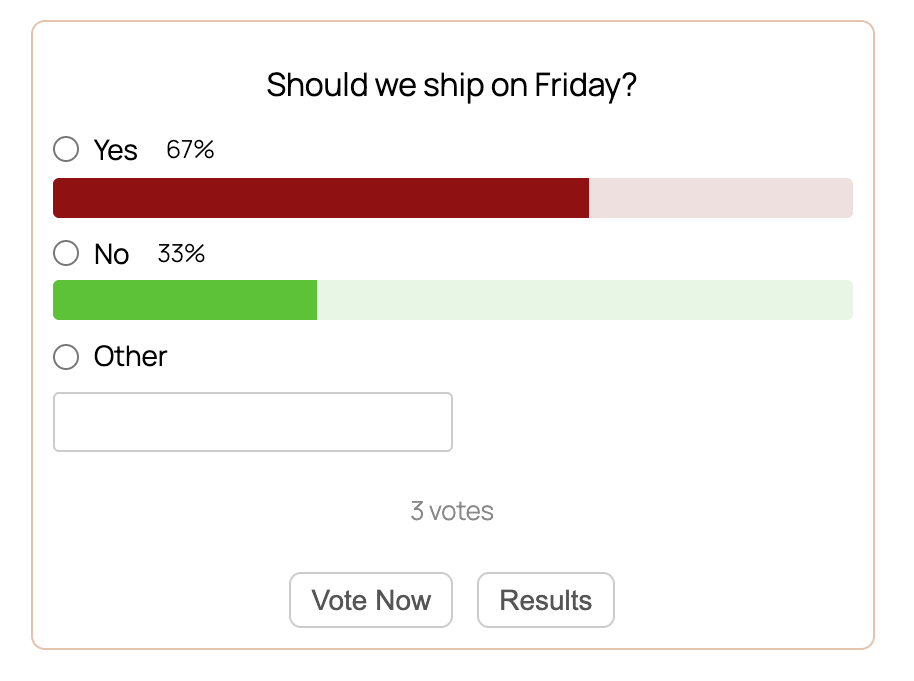
A live YOP Poll on the front end — clean, colorful, and mobile-friendly
-
Choose from multiple poll designs
-
Add your question and answers with a real-time preview as you type
-
Configure poll behavior — scheduling, statistics, and notifications
-
Decide who can vote and how to prevent duplicates
-
Control exactly when and how results are shown
-
Run multiple polls at the same time — track votes, status, and schedules at a glance
About this plugin
YOP Poll is back — completely rebuilt from the ground up.
After more than a decade of powering polls on WordPress sites, YOP Poll has been rewritten from scratch using modern web technologies. The result is a faster, more secure, and dramatically easier-to-use plugin — without losing any of the flexibility that made YOP Poll the go-to polling solution for WordPress.
Faster, end to end. The new admin interface responds instantly to your actions. Creating a poll, editing answers, switching templates, viewing results — everything happens in real time, with no full-page reloads slowing you down.
More secure by design. Internal data handling has been modernized to follow current security best practices.
Easier for everyone. The admin has been redesigned around how people actually build polls. Clear flows, sensible defaults, and fewer clicks to go from idea to published poll — whether you’re running a single quick poll or managing dozens of campaigns at once.
Safe to upgrade. All your existing polls, votes, templates, and settings migrate automatically. Nothing to export, nothing to rebuild — just install the new version and pick up where you left off.
Everything you can do with YOP Poll
- Run unlimited polls at the same time, with no artificial limits
- Schedule polls to start and end automatically — perfect for time-bound campaigns
- Choose between single-choice and multiple-choice questions
- Allow voters to add their own “Other” answers
- Sort answers in any order — exact, alphabetical, by votes, ascending, or descending
- Display results before voting, after voting, on a custom date, after the poll ends, or never
- Show results as numbers, percentages, or both
- Collect extra information from voters with custom fields (name, email, age, anything you need)
- Set who can vote: guests, registered users, or both
- Block voters by cookie, IP, or username
- Display polls anywhere with shortcodes, widgets, or by poll ID
- Show a random active poll, the latest poll, or any specific poll
- Browse a full archive of past polls with statistics
- View detailed logs of every vote, with sorting, search, and export
- Manage bans by email, username, or IP — globally or per poll
- Built-in protection against spam votes, including Cloudflare Turnstile support
Questions
- How do I create a poll?
Go to YOP Poll → Add New in your WordPress admin. Fill in the question and answers, choose your start and end dates, and adjust the settings for results, vote permissions, and display however you like. Click Save and your poll is ready to use.
- How do I add a poll to a page or post?
Every poll has a shortcode you can copy and paste anywhere on your site — pages, posts, widgets, or template files. You’ll find the shortcode for each poll on the All Polls page, in the dedicated shortcode column.
- Are there shortcuts for displaying polls?
Yes. You can use these built-in shortcodes anywhere on your site:
[yop_poll id="-1"]— displays the current active poll[yop_poll id="-2"]— displays the most recent poll[yop_poll id="-3"]— displays a random active poll[yop_poll_archive max=0 sort="date_added|num_votes" sortdir="asc|desc"]— displays a full archive of polls
- Can I run more than one poll at the same time?
Yes. YOP Poll has no limit on the number of polls you can run simultaneously. You can also schedule polls to start and end on specific dates, so you can queue up campaigns to run one after another.
- Can I collect extra information from voters?
Yes. When creating or editing a poll, add Custom Field elements to ask voters for things like name, email, age, or anything else you need. You can export this data from the votes page later.
- How do I see the results of a poll?
On the All Polls page, each poll has a View Results option that shows the full results — vote counts, percentages, and any custom field responses collected from voters.
The Logs option is separate: it records every voting attempt on your site (successful or not), which is useful for auditing, troubleshooting, or investigating suspicious activity. It’s not where you go to see poll results.
- How do I show results only after the poll ends?
Edit the poll, find the View Results setting, choose After Poll End Date, and save. Voters will see only the question until the poll closes.
- Can I have more than one question per poll?
No — each poll has a single question. If you need multiple questions, create a separate poll for each one.
sandywp / also on the shelf
Try another plugin

10+ installs
The Simple Poll is a voting poll system into your post, pages and everywhere in website by just a shortcode. Add poll system to…
Spin up a real WordPress site in seconds.
Test plugins, build a demo, hand a client a link — then squash it and start again. No local setup, no Docker.