sandywp / plugins / yith-woocommerce-order-tracking

YITH WooCommerce Order & Shipment Tracking
Add an easy tool to manage order shipping information of your shop and to notified your customers about the shipping.
Ready in seconds.
v2.50.0 7,000+ installs WP 6.8+ PHP 7.4+
What you get inside
5 screens-
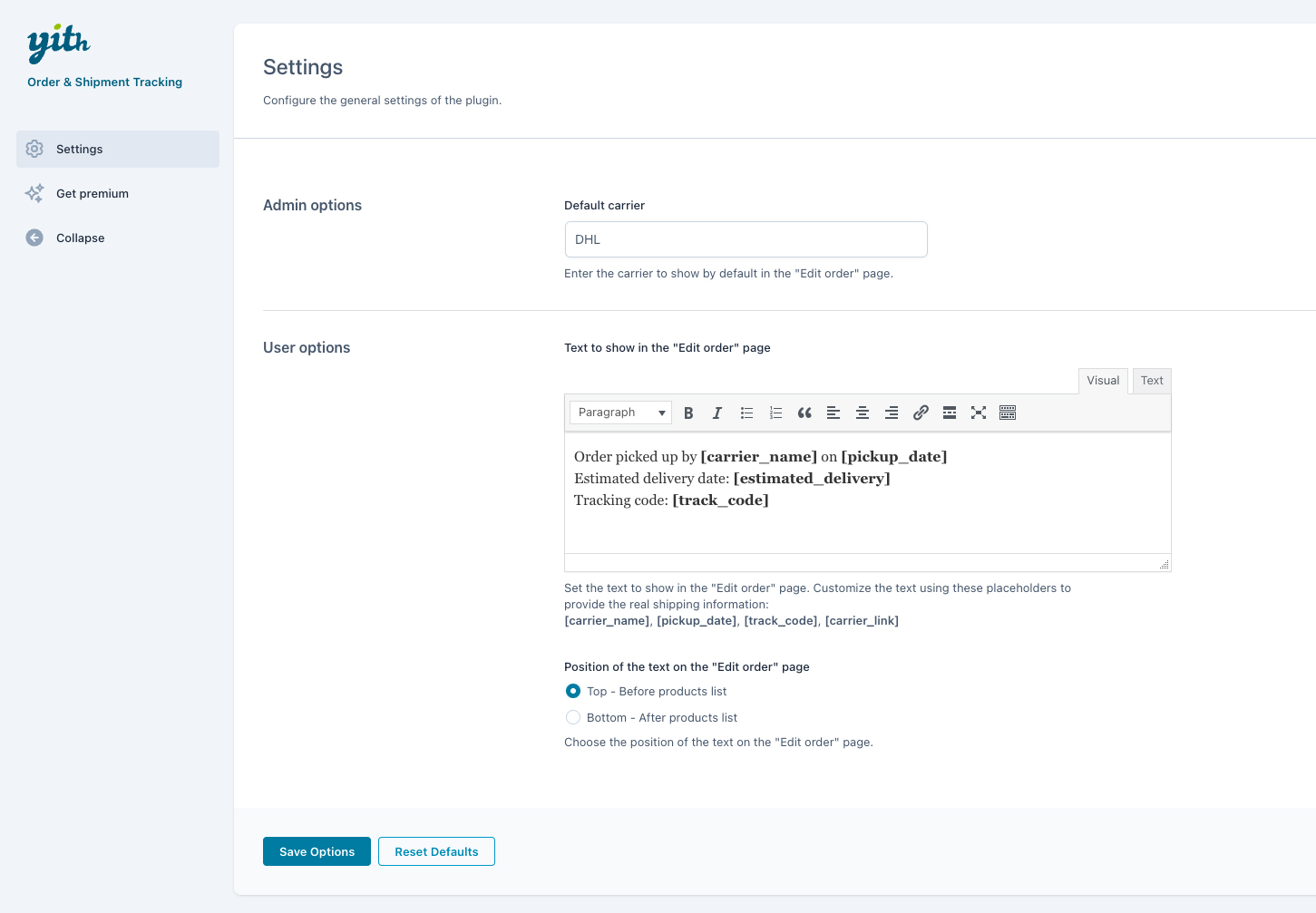
General options: enter the default carrier name and customize the text to show in the user's My Account Page. Placeholders will be automatically replaced with…
-
Order editing: enter the tracking info in the order. You can set the Carrier Name and website URL, the tracking code and the date when the order item(s) have…
-
Admin view in orders table: the admin can view the shipping info of each order directly in WooCommerce's orders list.
-
Customer view in orders list: the customers can view the shipping info of each order directly in the list of orders, inside the My Account page. By clicking on…
-
Customer view in order details: the customers can view the shipping info in the order details page, in the My Account section.
About this plugin
Usability research revealed that 97% of customers expect to be able to monitor every step of the shipping process for the products they have purchased online.
Thanks to the free plugin YITH WooCommerce Order & Shipment Tracking, you can add the shipping information (carrier’s name, delivery date, tracking code, carrier’s site URL to track the order in real time, etc.) to every order and show the same data on your customers’ accounts (both in the orders list and order details).
Giving users a tool to monitor the product shipping will simplify the sale process, will strengthen their trust in your shop, and will reduce the workload (phone calls, emails, etc.) of your customer service.
Free options
- Set a default carrier for your shippings
- Enter the tracking number, carrier’s name, and pickup date in the order detail page
- Show the tracking info on the user’s Orders page
- Show the tracking info on the Order details page
- Choose the position of the tracking info text on the Order details page (above or below the products table)
- Show a button to redirect customers to the carrier’s page containing details of the shipping
Features of the premium version
The free version of our plugin works like a charm, but the premium one is even more interesting.
By upgrading to the premium version, you can:
- Get a list of 480+ supported carriers to automatically share the tracking URL with your customers
- Also enter the estimated date of delivery
- Save time by importing tracking info from a CSV file
- Share the tracking info via email with customers when the order is completed
- Choose the position of the tracking info text in the email (above or below the products table)
- Choose to automatically complete the order when inserting the tracking data
- Use the shortcode to create a custom order tracking page on your shop
- Enable an extra column in the orders list with the orders tracking info
- Insert the tracking data into the packing slips generated with the premium version of YITH WooCommerce PDF Invoices & Packing Slips
- Integration with the premium version of YITH WooCommerce Custom Order Status to show order tracking data in Custom Order Status emails
- Integration with YITH Frontend Manager for WooCommerce
- Use the plugin’s shortcode in the Elementor panel
Questions
- I always use the same carrier to ship my WooCommerce orders, may I set it as default carrier?
Yes, sure, you can set the carrier name in the settings of YITH WooCommerce Order & Shipment Tracking and for each new WooCommerce order you will find the field “carrier name” automatically filled with your default carrier.
- Can I customise the message I want to send to customers?
You can set your own text for your WooCommerce orders using the specific option available in YITH WooCommerce Order & Shipment Tracking. You can also use some optional placeholders to specify carrier’s name, tracking code and shipping date.
- Is it compatible with all WordPress themes?
Compatibility with all themes is impossible, because they are too many, but generally if themes are developed according to WordPress and WooCommerce guidelines, YITH plugins are compatible with them.
Yet, we can grant compatibility with themes developed by YIThemes, because they are constantly updated and tested with our plugins. Sometimes, especially when new versions are released, it might only require some time for them to be all updated, but you can be sure that they will be tested and will be working in a few days.- How can I get support if my WooCommerce plugin is not working?
If you have problems with our plugins or something is not working as it should, first follow this preliminary steps:
- Test the plugin with a WordPress default theme, to be sure that the error is not caused by the theme you are currently using.
- Deactivate all plugins you are using and check if the problem is still occurring.
- Ensure that you plugin version, your theme version and your WordPress and WooCommerce version (if required) are updated and that the problem you are experiencing has not already been solved in a later plugin update.
If none of the previous listed actions helps you solve the problem, then, submit a ticket in the forum and describe your problem accurately, specify WordPress and WooCommerce versions you are using and any other information that might help us solve your problem as quickly as possible. Thanks!
- How can I get more features for my WooCommerce plugin?
You can get more features with the premium version of YITH WooCommerce Order & Shipment Tracking, available on YIThemes page. Here you can read more about the premium features of the plugin and make it give it its best shot!
- How can I try the full-featured plugin?
If you want to see a demonstration version of the premium version of YITH WooCommerce Order & Shipment Tracking, you can see that in this page. Browse it and try all options available so that you can see how your plugin looks like.
- How can I report security bugs?
You can report security bugs through the Patchstack Vulnerability Disclosure Program. The Patchstack team help validate, triage and handle any security vulnerabilities. Report a security vulnerability.
sandywp / also on the shelf
Try another plugin

4.5 · 20K+ installs
Elevate your store with Packlink PRO —the ultimate free shipping solution offering discounted rates from 350+ carriers instantly.

Dewa Kirim – WooCommerce Gojek / Gosend
3.0 · 10+ installs
Dewa Kirim Gojek add shipping on demand services like gojek features to your website. Needs WooCommerce to work. WooCommerce…

10+ installs
Faster, emissionless deliveries - it's magic.
Spin up a real WordPress site in seconds.
Test plugins, build a demo, hand a client a link — then squash it and start again. No local setup, no Docker.