sandywp / plugins / yith-woocommerce-ajax-search

YITH WooCommerce Ajax Search
YITH WooCommerce Ajax Search allows your users to search products in real time.
Ready in seconds.
v2.28.0 30,000+ installs WP 6.8+ PHP 7.4+
What you get inside
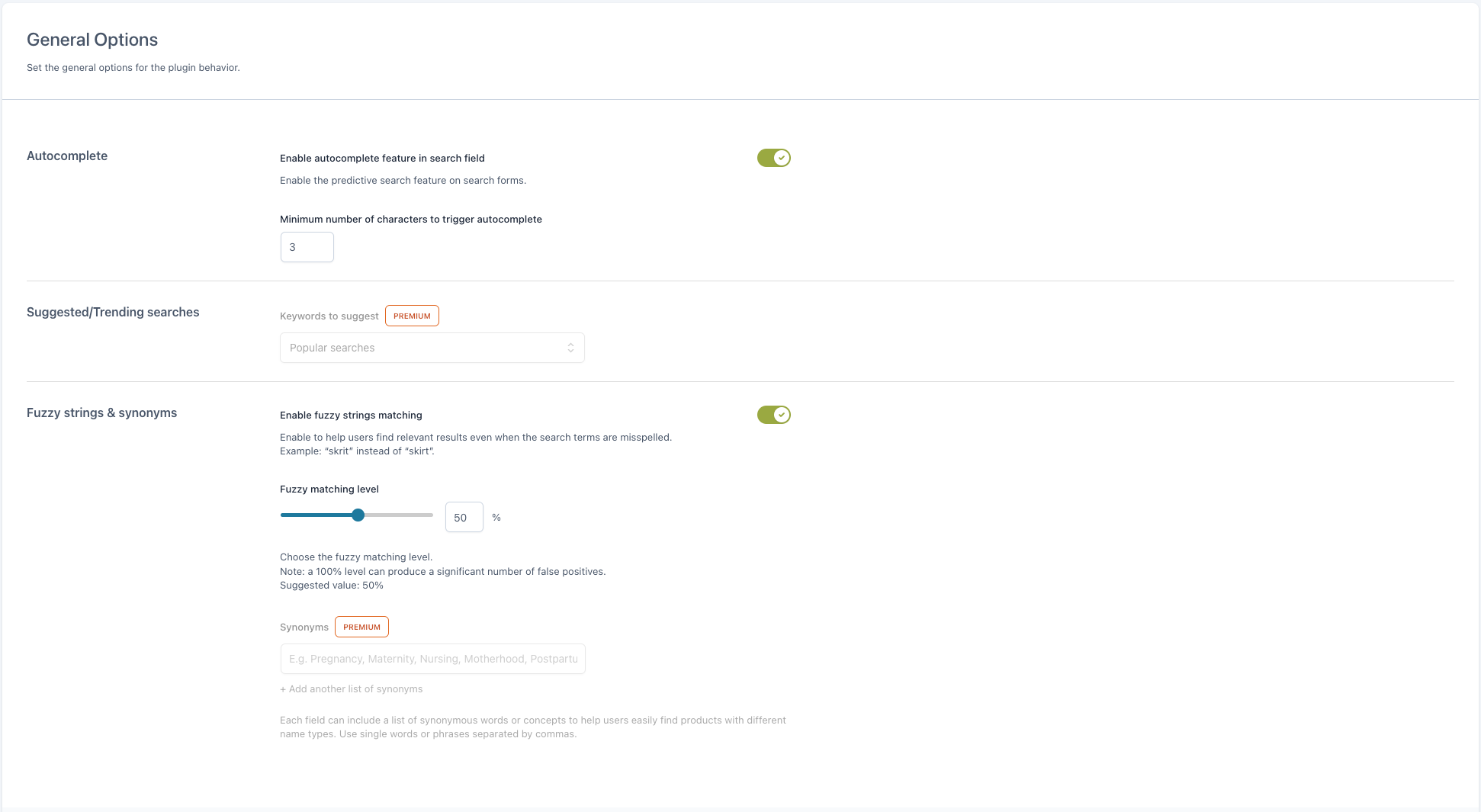
7 screens-
General Settings
-
Search fields and indexing
-
Shortcode configuration - general tab
-
Shortcode configuration - search input tab
-
Shortcode configuration - submit button tab
-
Shortcode configuration - search results tab
-
Search Stats tab
About this plugin
According to several usability studies, 85% of users who access an e-commerce store go straight to the search form. If they cannot find it and search for the products they want to buy, most of them will abandon the site after a few seconds.
If you already have a search form on your website, but it does not work properly or suggests irrelevant products, the same will happen: they will abandon your shop and you will lose those sales.
With the latest version of YITH WooCommerce AJAX Search, in just a few minutes, you can set up a modern and usable search form in WooCommerce that’s designed to deliver effective results consistently, search after search.
The new version of the plugin is powerful, flexible, and easy to configure. You can place your search form anywhere using the built-in block or shortcode, customize its style and colors, and, most importantly, set a tolerance threshold to find results even if there are some typos in the text.
Go ahead, install the plugin and in just a few clicks you’ll have your customers searching and quickly finding the products they are interested in.
Features of the free version:
-
Insert the search form using the Gutenberg block
-
Insert the search form using the shortcode
-
Choose the size of the search form
-
Set the placeholder text to show in the form search input
-
Set the colors of the form and the “Submit” button
-
Enable instant search (autocomplete feature)
-
Set the number of characters after which the instant search is triggered
-
Search for keywords in product names
-
Search for keywords in product (main and short) description
-
Show search results in a list layout, one below the other
-
Show product names and images
-
Configure the maximum number of results to show
-
Choose whether to show a “View all results” link
-
100% mobile-friendly layout
-
(NEW!) Statistics panel to analyze the most popular searches, the most-clicked products, and searches with no results.
Want to see the plugin in action? Check out the live demo of the free version >
Need an extra boost? Upgrade to premium!
In the free version of YITH WooCommerce AJAX Search, you’ll find everything you need to add a modern and powerful search form to your shop. But if you are looking for advanced options and even more flexibility, we invite you to upgrade the plugin to the premium version.
Features of the premium version:
-
Enable searching in product SKUs
-
Extend the search to categories, tags, attributes, and custom fields
-
Extend the search to posts and/or pages to suggest related content to your users
-
Show search suggestions and choose whether to show popular searches or specific keywords
-
Configure synonym sets to show relevant results regardless of the keywords typed by the user
-
Show search results in a grid layout
-
Hide out-of-stock products from search results
-
Optional: show product price, SKU, and stock
-
Optional: show categories, “Add to cart” button, and short description
-
Set a maximum length for product descriptions
-
Choose whether to show badges on discounted, featured, or out-of-stock products and customize the colors of the badges
-
Show links to categories related to the search keys
-
Show the user’s history with the latest searches
-
Advanced boost options to determine which products, categories, or tags to promote in search results
-
New layout to show the search in a full-screen overlay
-
Stats panel to monitor the most popular searches, most clicked products, and searches with no results
Questions
- Is it compatible with all WordPress themes?
Compatibility with all themes is impossible, because they are too many, but generally if themes are developed according to WordPress and WooCommerce guidelines, YITH plugins are compatible with them.
Yet, we can grant compatibility with themes developed by YITH, because they are constantly updated and tested with our plugins. Sometimes, especially when new versions are released, it might only require some time for them to be all updated, but you can be sure that they will be tested and will be working in a few days.- How can I get support if my WooCommerce plugin is not working?
If you have problems with our plugins or something is not working as it should, first follow this preliminary steps:
- Test the plugin with a WordPress default theme, to be sure that the error is not caused by the theme you are currently using.
- Deactivate all plugins you are using and check if the problem is still occurring.
- Ensure that you plugin version, your theme version and your WordPress and WooCommerce version (if required) are updated and that the problem you are experiencing has not already been solved in a later plugin update.
If none of the previous listed actions helps you solve the problem, then, submit a ticket in the forum and describe your problem accurately, specify WordPress and WooCommerce versions you are using and any other information that might help us solve your problem as quickly as possible. Thanks!
- How can I get more features for my WooCommerce plugin?
You can get more features with the premium version of YITH WooCommerce Ajax Search, available on YITH page. Here you can read more about the premium features of the plugin and make it give it its best shot!
- How can I try the full-featured plugin?
If you want to see a demonstration version of the premium plugin, you can see that in this page. Browse it and try all options available so that you can see how your plugin looks like.
- How can I report security bugs?
You can report security bugs through the Patchstack Vulnerability Disclosure Program. The Patchstack team help validate, triage and handle any security vulnerabilities. Report a security vulnerability.
sandywp / also on the shelf
Try another plugin
-
Search Any Post Type Or Taxonomy
-
Add Product Filter on your WooCommerce Website.


Spin up a real WordPress site in seconds.
Test plugins, build a demo, hand a client a link — then squash it and start again. No local setup, no Docker.