sandywp / plugins / yet-another-related-posts-plugin

YARPP – Yet Another Related Posts Plugin
The best WordPress plugin for displaying related posts. Simple and flexible, with a powerful proven algorithm and inbuilt caching.
Ready in seconds.
v5.30.11 100,000+ installs WP 3.7+ PHP 5.3+
What you get inside
6 screens-
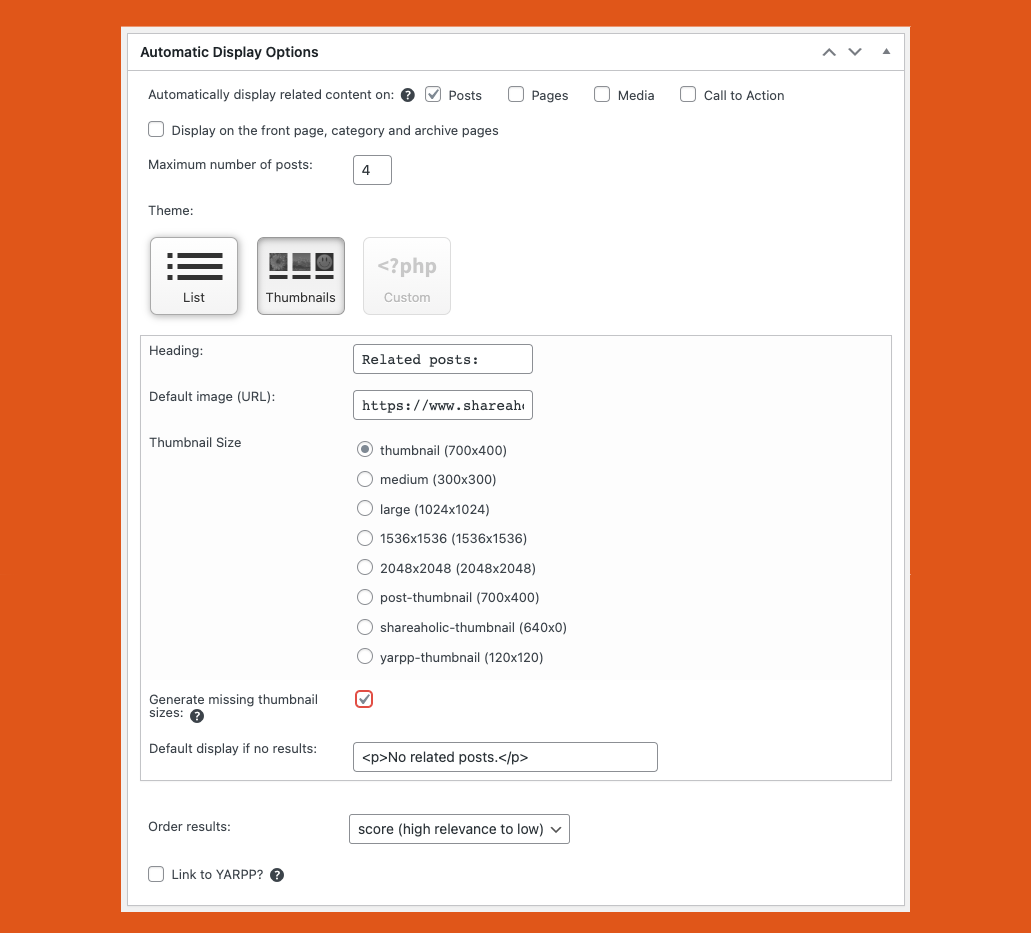
YARPP options in WP-Admin: Automatic Display Options
-
YARPP options in WP-Admin: "The Pool" settings
-
YARPP options in WP-Admin: "The Algorithm" settings
-
Example - YARPP on starwars.com
-
Example - YARPP on CB2.com
-
Example - YARPP on chrisguillebeau.com
About this plugin
Related Posts Plugin for WordPress
Yet Another Related Posts Plugin (YARPP) is a professionally maintained, highly customizable, performant and feature rich plugin that displays pages, posts, and custom post types related to the current entry. YARPP introduces your visitors to other relevant content on your site — boosting visitor engagement, time on site and SEO. Related Posts can increase your pageviews up to 10%. Simply install, activate and watch your sessions and pageviews increase.
Key Features
- An advanced and versatile algorithm: Using a customizable algorithm considering post titles, content, tags, categories, and custom taxonomies, YARPP finds related content from across your site
- Caching: Inbuilt cache makes subsequent queries super efficient and fast
- Custom Templates and Styles: Use a pre-built list or thumbnail template, or use the YARPP custom templating system for 100% control of how results are styles and displayed
- Flexible with a full range of placement options, including:
- Automatic Display Options (pick where to show YARPP from the YARPP settings page)
- RSS/Feed Options
- Block Editor (Gutenberg)
- [yarpp] Shortcode
- Widget
- YARPP functions()
- REST API
- Works with all languages, including those with full-width (double-byte) characters and those that don’t use spaces between words
- Custom post type and taxonomy support
- WordPress Multisite support
- bbPress forums support
- WooCommerce support
- Professionally maintained and supported with regular updates
YARPP Algorithm Explained
Contribute: Translate YARPP
YARPP is available for translation directly on WordPress.org. Please check out the official Translator Handbook.
Wide Support
YARPP is the most popular and the highest rated Related Posts Plugin for WordPress. With your support, this plugin always strives to be the best WordPress plugin for Content Discovery and Related Posts.
✔ Over 10 years of development
✔ Over 6 million downloads
✔ Translated into more than a dozen languages
✔ Professionally maintained and actively supported with regular updates
✔ Works with all languages
YARPP works best with PHP 5.3 or greater, MySQL 5.6 or greater OR MariaDB 10.1 or greater, and WordPress 3.7 or greater. See the FAQ for answers to common questions.
Questions
- Many pages list “no related posts.”
Most likely you have “no related posts” right now because the default “match threshold” is too high. Here’s what we recommend to find an appropriate match threshold: lower your match threshold in the YARPP “Algorithm” options to something very low, like 1. (If you don’t see the match threshold, you may need to display the “Algorithm” options via the “Screen Options” tab at the top.) Most likely the really low threshold will pull up many posts that aren’t actually related (false positives), so look at some of your posts’ related posts and their match scores. This will help you find an appropriate threshold. You want it lower than what you have now, but high enough so it doesn’t have many false positives.
- How can I limit related posts to a certain time frame? For instance, I don’t want to show posts from two years ago.
In WordPress, go to “Settings” and “Related Posts (YARPP)” and make sure “The Pool” is checked in the “Screen Options” section at the top of the page. In “The Pool” section, check the box next to “Show only posts from the past X months.”
- Where do I tell YARPP to display related posts only by tags?
In WordPress, go to “Settings” and “YARPP” and make sure “Algorithm” is checked in the “Screen Options” section at the top of the page. In the “Algorithm” section, configure the dropdown boxes next to “Titles,” “Bodies,” “Categories,” and “Tags.”
- Can I manually specify related posts?
Sorry, but specifying related posts, displaying related posts from external WordPress sites, and pulling content from the Comments section are all outside the scope of YARPP at this time.
- I’m seeing related posts displayed on the home page. How do I prevent that?
Some WordPress themes treat the home page as an archive or a “page.” Go to “Settings” then “Related Posts (YARPP)” and view the “Automatic Display Options” section. Make sure “Pages” and “Also display in archives” are not checked.
- How can I prevent the “related posts” list from displaying on specific posts?
Option 1:
On the edit post page, uncheck “Display Related Posts” in the YARPP box. Be sure to update or publish to save your changes.
Option 2:
Add
<!--noyarpp-->to the HTML code of any post to prevent related posts from displaying.Option 3:
Use the
noyarppfilter. For example:// Disable YARPP Automatic Display in specific categories function yarpp_disable_categories() { // Examples of in_category usage: https://codex.wordpress.org/Function_Reference/in_category if ( in_category( array( 'my_category_1_slug', 'my_category_2_slug' ) ) ) { return true; } } add_filter( 'noyarpp', 'yarpp_disable_categories' );These solutions only work if you are using “Automatic Display” in the “Display Options” section. If you are programatically calling
yarpp_related(), the shortcode[yarpp]from PHP code or the YARPP Block, you will need to do your own conditional checks.- I’m using the Thumbnails display in YARPP 4+. How do I override the style of the text that displays? The title only shows two lines, the font is larger than I’d like, I’d like to center the…
If you’re familiar with CSS, you can override any YARPP styles by editing your theme’s
style.cssfile, or any other CSS file you may have created that loads after the YARPP one. To edit your theme’s CSS file, go to “Appearance” then “Editor” and then clickstyle.cssin the right sidebar. Add changes at the bottom of the file and click “Save.” If you do edit this file, just make sure you add!importantafter each style declaration, to make sure they’ll override the YARPP rules.Some common overrides that YARPP users have added are:
/* Reduces the title font size and displays more than two title lines */
.yarpp-thumbnail {height: 200px !important;}
.yarpp-thumbnail-title {font-size:0.8em !important; max-height: 4em !important}

/* Centers the thumbnail section */
.yarpp-related-widget {text-align:center !important;}
Once you save any CSS changes, empty your browser’s cache and reload your page to see the effect.
- How do I remove sold out WooCommerce products from recommendations (and otherwise filter by postmeta)?
If you use YARPP to show related products and want to exclude products that are sold out, use the following code snippet:
function yarpp_custom_wp_query($query) {
    if(isset($query->yarpp_cache_type)){
        $query->set('post_type', 'product');
        $meta_query = [
            'relation' => 'AND',
            [
                'key' => '_stock_status',
                'value' => ['instock','onbackorder'],
                'compare' => 'IN',
            ]
        ];
        $query->set('meta_query', $meta_query);
    }

    return $query;
}
add_filter('pre_get_posts', 'yarpp_custom_wp_query', 100);
Note: this filter applies after the related items were already calculated, so when it filters out an item you will see fewer related items than you requested.
You can similarly filter WordPress’ meta queries to include/excluded posts from YARPP’s related results.
sandywp / also on the shelf
Try another plugin

4.8 · 50K+ installs
Keep visitors on your site longer with intelligent, fast-loading, contextually related posts. Block, shortcode, custom post type…
-
Related Posts Plugin to improve Traffic & Bounce-Rate with Superior Algorithm. ZERO Server Load & Highly Configurable…

10+ installs
This is a plugin for WordPress for kayo-co, a service operated by CROCO Inc.

Spin up a real WordPress site in seconds.
Test plugins, build a demo, hand a client a link — then squash it and start again. No local setup, no Docker.