sandywp / plugins / wp-store-locator

WP Store Locator
An easy to use location management system that enables users to search for nearby physical stores.
Ready in seconds.
v2.3.23 50,000+ installs WP 3.7+
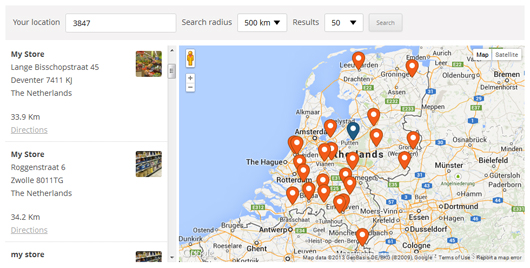
What you get inside
5 screens-
Front-end of the plugin
-
The driving directions from the user location to the selected store
-
The 'Store Details' section
-
The plugin settings
About this plugin
WP Store Locator is a powerful and easy to use location management system.
You can customize the appearance of the map, and provide custom labels for entry fields.
Users can filter the results by radius, and see driving directions to the nearby stores in
the language that is set in the admin panel.
Features include:
- Manage an unlimited numbers of stores.
- Provide extra details for stores like the phone, fax, email, url, description and opening hours. There are filters available that allow you add custom meta data.
- Support for custom map styles.
- Choose from nine retina ready marker icons.
- Show the driving distances in either km or miles.
- Shortcodes that enable you to add individual opening hours, addresses or just a map with a single marker to any page.
- Compatible with multilingual plugins like WPML and qTranslate X.
- You can drag the marker in the editor to the exact location on the map.
- Show the search results either underneath the map, or next to it.
- Show Google Maps in different languages, this also influences the language for the driving directions.
- Show the driving directions to the stores.
- Customize the max results and search radius values that users can select.
- Users can filter the returned results by radius, max results or category.
- Supports marker clusters.
- Customize map settings like the terrain type, location of the map controls and the default zoom level.
- Use the Geolocation API to find the current location of the user and show nearby stores.
- Developer friendly code. It uses custom post types and includes almost 50 different filters that help you change the look and feel of the store locator.
- GDPR – Load Google Maps only after the user agrees to it ( requires the Borlabs Cookie plugin ).
Documentation
Please take a look at the store locator documentation before making a support request.
Premium Add-ons
CSV Manager
The CSV Manager allows you to bulk import, export and update your locations using a CSV file.
Search Widget
The Search Widget enables users to search from any of the widgetized areas in your theme for nearby store locations, and show the results on the store locator page.
Statistics
The Statistics add-on enables you to keep track of the locations users are searching for and see where there is demand for a new store.
Extenders
The Extenders add-on adds the features needed by power users such as managing location based events, social media information and locations managed by other logged in users.
Questions
- How do I add the store locator to a page?
Add this shortcode [wpsl] to the page where you want to display the store locator.
- Oops! Something went wrong
You can fix this by setting the browser key on the settings page.
- There are weird characters in the search results, how do I remove them?
This is most likely caused by a plugin like W3 Total Cache that tried to minify the HTML output on the store locator page. You can fix this by excluding the store locator from being minified on the settings page of the caching plugin you’re using. In W3 Total Cache this is done by going to Minify -> Advanced -> Never minify the following pages, and fill in the page you don’t want to have minified. So if your store locator is used on mydomain.com/store-locator, then fill in ‘store-locator’.
- Can I use different markers for category or individual store locations?
How to use custom markers is described here, you can also only use different markers for a few locations, or just for the categories.
- The map doesn’t display properly. It’s either broken in half or doesn’t load at all.
Make sure you have defined a start point for the map under settings -> Map Settings.
- The map doesn’t work anymore after installing the latest update
If you use a caching plugin, or a service like Cloudflare, then make sure to flush the cache.
- I can’t dismiss the pop up asking me to join the mailing list, how do I fix this?
There is probably a JS error in the WP Admin area that prevents the pop up from being dismissed. Try for a second to switch back to a default WP theme, disable all other plugins, and then try to dismiss the newsletter pop up again.
- Why does it show the location I searched for in the wrong country?
Some location names exist in more then one country, and Google will guess which one you mean. This can be fixed by setting the correct ‘Map Region’ on the settings page -> API Settings.
sandywp / also on the shelf
Try another plugin

Mobile Call Now & Map Buttons
4.9 · 4K+ installs
Adds customizable Call Now and Google Maps Directions buttons for mobile visitors.

5.0 · 100+ installs
Allows admins to easily set instructional context for metaboxes and more on pages, posts or custom post types.

100+ installs
Provides an input where your customers can enter any location and get real-time directions on Google Maps to your…
Spin up a real WordPress site in seconds.
Test plugins, build a demo, hand a client a link — then squash it and start again. No local setup, no Docker.