sandywp / plugins / wp-rss-aggregator

WP RSS Aggregator
RSS Import, Feed to Post, Autoblogging, AI Content
The #1 WordPress RSS aggregator to quickly import RSS feeds, build a news aggregator, and for easy autoblogging.
Ready in seconds.
v5.5.0 40,000+ installs WP 6.2.2+ PHP 7.4.0+
What you get inside
8 screens-
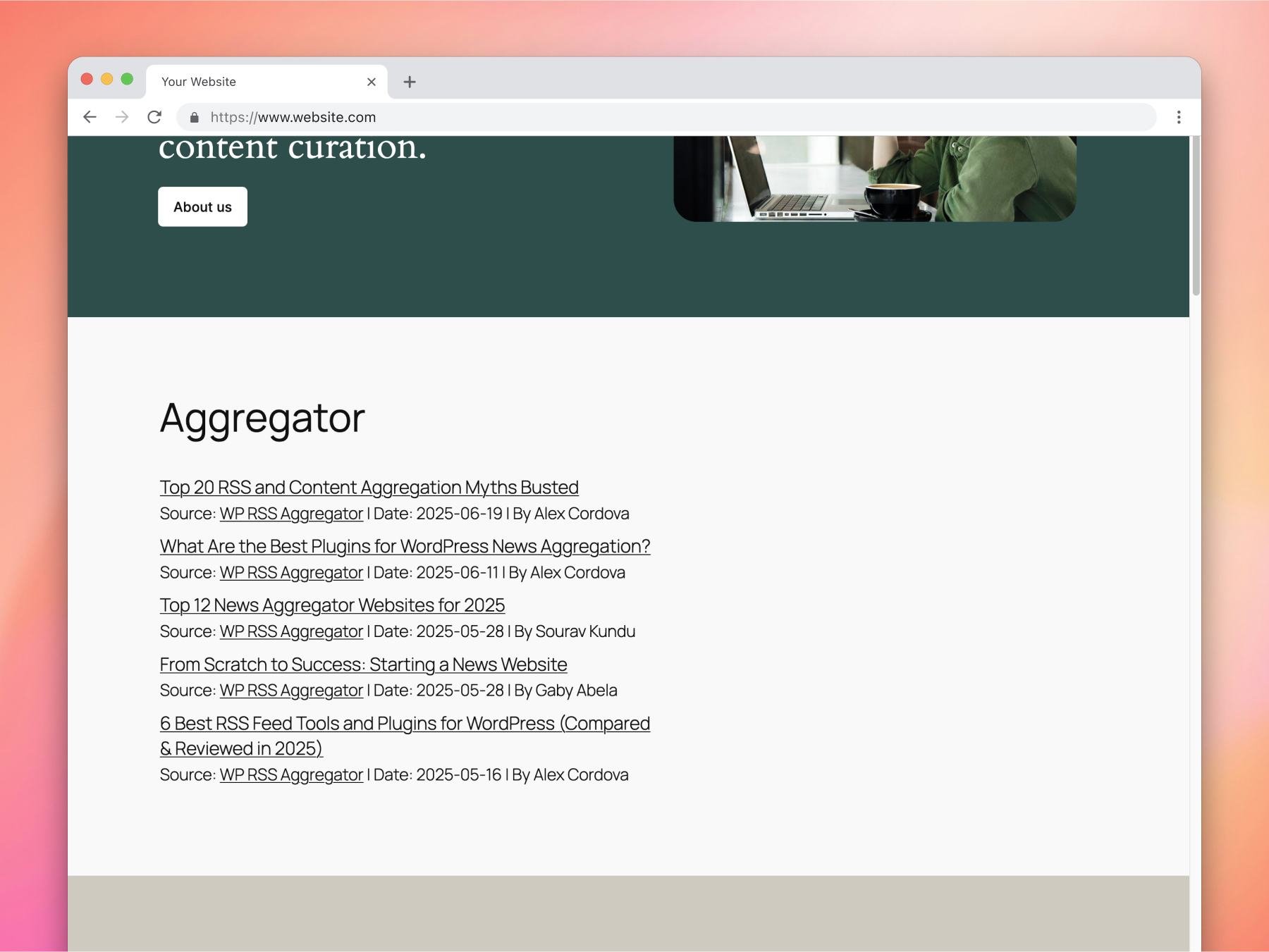
Feed items displayed using WP RSS Aggregator's list layout.
-
Adding the RSS Aggregator Display Gutenberg block.
-
Adding/Editing a feed source in WP RSS Aggregator.
-
A list of sources in WP RSS Aggregator.
-
A list of imported feed items in WP RSS Aggregator.
-
Setting up a display in WP RSS Aggregator.
-
The Hub, showing recently imported content.
-
Using the Feed to Post premium feature to import items as posts.
About this plugin
WP RSS Aggregator is the perfect plugin to quickly import RSS feeds, build a news aggregator, and for easy autoblogging.
This is why it is used on 50,000+ websites to aggregate and curate content from all over the web.
WP RSS Aggregator: The original and still the most popular RSS import plugin for WordPress
Import and display RSS feeds anywhere on your site.
Set up any RSS feed once and let Aggregator do the rest automatically. Create a constant flow of fresh content to keep your audience engaged.
Whether you’re creating a news aggregator, sharing related posts, curating videos, or displaying a collection of articles, RSS is still the best way to do it.
All Features | Video Guides | Get Aggregator Pro
Discover the power of Aggregator and RSS feeds
With more than a decade of experience in the aggregator and RSS space, we’ve built WP RSS Aggregator to be your ideal partner for autoblogging, content hubs, and news aggregators of all kinds. Here are our main features:
🚀 Quick Setup: Add RSS feeds from unlimited sources in seconds, whether for news feeds, blog posts, or anything else. Learn more
🔎 RSS Feed Auto-Discovery: Enter a website’s URL and let WP RSS Aggregator find the RSS feed. Learn more
🧭 The Hub: Get a full view of your imported feed items, filter by source or folder, and quickly reject unwanted content. A clearer way to manage what gets shown on your site.
🚦 Manage Your Sources: Keep track of your RSS feed sources in one place. Monitor, pause, and track their automation. Learn more
🔄 Auto-Updating Content: Keep your website fresh with new content, both as an autoblog & to supplement existing content.
🛠 Customizable Displays: Showcase your RSS feeds in stylish layouts that highlight the content you want to share. Learn more
🙋 Built-In Attribution: Automatically credit the original authors and content creators.
📊 Optimize Performance: Control the number of RSS feed items imported and stored on your site to keep it running smoothly.
🏗️ Build It Your Way: Use the WP RSS Aggregator block or shortcode to display RSS feeds anywhere, using any site builder.
WP RSS Aggregator is built with you in mind
There is a lot more to an RSS aggregator than meets the eye. Here are a few additional perks that make working with RSS feeds worth your while.
📈 SEO Benefits: Become an instant source of quality content, generate backlinks, and gain more trust in the eyes of search engines (like Google) and AI systems that rely on structured, regularly updated content.
💡 Generate Original Content: Publish unique content in your name by automatically rewriting imported articles into new content.
🔗 Custom RSS Feeds: Create a custom RSS feed from imported RSS feed items to use anywhere you want.
🌍 Multilingual Support: Integrate with translation plugins to translate imported content into any language.
💵 Monetize Your Content: Learn how to make money with WordPress by leveraging your content.
🔑 Unlock Premium Upgrades
Your website deserves the best, so we’ve been building premium upgrades for WP RSS Aggregator since 2013 with the goal of helping you deliver the best experience possible to your visitors while improving your website’s performance.
-
AI Content Suite: Automatically summarize or rewrite imported articles right inside your import workflow,
-
Feed to Post (❤️ Most Popular): Automatically convert RSS feeds into WordPress posts, pages, or any custom post type.
-
Full Text RSS Feeds: Import the full content from sources that only provide RSS feed excerpts or are missing images.
-
Manual Curation: Automatically or manually curate your content to only share the most relevant items on your site.
-
Custom Displays: Attract more attention with stylish feed designs, including titles, excerpts, images, audio, video, and attribution.
-
Video Feeds: Import and share YouTube videos from any channel or user.
-
Organization Folders: Use Folders as a powerful way to group, manage, and display your sources more effectively.
-
Automatic Filtering: Precisely control what content is imported and displayed using keywords, phrases, and tags.
-
Custom Mapping: Map custom fields from RSS feed sources to any custom field in your posts or pages.
Get access to all of these amazing features with our Premium WP RSS Aggregator Plans.
Why use WP RSS Aggregator?
From bloggers and content creators to developers and digital teams, people have built some wonderful projects using RSS feeds. Here’s are a few we’ve highlighted over the years.
Content Curation: Personal Finance Blogs
“It has been approximately four and a half months since the launch. We’ve seen some strong traffic growth month over month. We’re up to over 10,000 page views a month, which is great for a new blog but also just any blog in general. In terms of the traffic, we’re sending about 150 clicks to various posts and blogs on a daily basis.” – Erik Tozier ⭐️⭐️⭐️⭐️⭐️
Industry News Aggregator: World of WordPress
“I was searching for a good plugin to aggregate all the feeds. WP RSS Aggregator has the functionality I was looking for. I’ve tried other plugins, but this was the one I knew could do everything. I get 150 visitors a day, so that’s probably 4,500 visitors per month, and I think maybe 99% of visitors land on one of the articles aggregated by the plugin.” – Ronald Heijnes ⭐️⭐️⭐️⭐️⭐️
Content Syndication: The Broker List
“WP RSS Aggregator is time-saving. Our members love it because it doesn’t cause them any extra work. We can just pull their content in. Don’t hesitate! I would definitely work with Mark and his team. They will give you 110% and solve any issues you may have.” – Linda Day Harrison ⭐️⭐️⭐️⭐️⭐️
Local News Aggregator: Bristol Today
“After identifying the news sources I wanted to link out to, I searched for the best possible way to create a reliable feed (and without ruffling any feathers!). Thankfully, RSS is still going strong and each of the sites had active feeds. After a bit of research, WP RSS Aggregator stood out as the leading WordPress plugin in the space and I was impressed with their product pages. – Ross Merritt ⭐️⭐️⭐️⭐️⭐️
Browse through our Showcase to see how WP RSS Aggregator is being put to great use on a large variety of WordPress sites, from CrossFit to celebrity news, and gaming to government updates.
A word of advice: Don’t steal other people’s work; give credit where it’s due. WP RSS Aggregator makes it extremely easy to automatically credit the original source for full attribution.
5-star customer support
Our comprehensive Help Center provides you with everything you need to install, set up and customize WP RSS Aggregator to your needs. You can also browse through a number of FAQs to get started.
If that doesn’t do the trick, we provide support for the free version of WP RSS Aggregator via the WordPress support forums, while for premium support and pre-sales questions you can contact us via our premium support channel.
Questions
- What websites can I import content from?
You can import content from any website that offers a valid RSS or XML feed. Just enter the website URL into WP RSS Aggregator, and it will automatically detect and list the available feeds for you. Most websites provide RSS feeds – here’s how to find them.
- How do I display the imported feed items?
Create a display with the layout of your choice to showcase imported items anywhere across your site. To show the items, you can use either one (or a combination) of the options below.
- Is there a limit on the number of feed sources I can set up?
No, there is no limit for the number of feed sources to import items from. Having many (50+) feed sources should not present any problems in itself. However, pulling in posts from many sites is bound to put your server under some stress, so you might want to consider using a hosting solution that goes beyond your typical shared host and staggering the feed imports.
Check out our dedicated page on WordPress hosting recommendations.
- Can I import the full text from any source site?
In the majority of cases, this is possible using our Feed to Post and Full Text features, both of which are part of our most popular bundle, the Pro Plan. When importing the full text from a source, please make sure to check and abide by the source site’s terms and conditions on the sharing of their content.
- Can I add Twitter (now known as X) RSS feeds to my WordPress site?
Creating Twitter RSS feeds for your WordPress site involves a few simple steps using third-party services since Twitter no longer offers native RSS feed support. Here’s a quick overview:
-
Select a Third-Party Service: Use an RSS feed generator such as RSS.app or Nitter to create your Twitter RSS feed. These platforms allow you to convert Twitter content into RSS feeds.
-
Generate Your Twitter RSS Feed: Follow the specific instructions on your chosen platform to generate the RSS feed URL for the Twitter content you wish to display.
-
Integrate with WP RSS Aggregator: Once you have your RSS feed URL, use WP RSS Aggregator on your WordPress site to add and configure your new feed source.
For detailed instructions, including step-by-step guidance, please visit our full article on creating Twitter RSS feeds.
-
- How can I display the latest posts from a Facebook page on my WordPress site?
To showcase the latest posts from a Facebook page on your WordPress site, you can create an RSS feed for that Facebook page using a third-party service like FetchRSS. Once you have the RSS feed URL, you can easily integrate this feed into your site using WP RSS Aggregator. For a detailed guide on generating the RSS feed and integrating it with WP RSS Aggregator, including step-by-step instructions, visit our full article on how to create a Facebook RSS feed.
- Does WP RSS Aggregator work using JSON as the source?
No, our plugin does not currently import from JSON, it only imports from RSS and Atom structured XML.
- Why do I get “No feed items found” when I insert the shortcode on a page or post?
-
Try adding a few more feed sources and make sure they are valid by using the RSS Feed Validator.
-
Make sure that feed items have been imported by visiting the Feed Items page.
-
Try out the solutions listed in our Feed Items Not Importing help center section.
-
It’s important to make sure your WordPress cron system is working well. If not, the feeds cannot be imported. If in doubt, you can install the WP Crontrol plugin to check for bad cron or check out these helpful tips.
If the problems persist, please contact our support team. If you’re using a premium plan, please use the premium support channel.
-
sandywp / also on the shelf
Try another plugin

RSS Aggregator by Feedzy – Feed to Post, Autoblogging, News & YouTube Video…
4.6 · 40K+ installs
The most powerful WordPress RSS aggregator, helping you curate content, autoblog, import RSS & display unlimited RSS feeds…

2.3 · 1K+ installs
Generate, optimize, and auto-publish SEO content to your WordPress site — with images, internal links, videos, and more.

5.0 · 200+ installs
Lightweight feed importer for WordPress with support for RSS, Atom, Google Product Feed, Yandex feeds, YouTube and more.
Spin up a real WordPress site in seconds.
Test plugins, build a demo, hand a client a link — then squash it and start again. No local setup, no Docker.