sandywp / plugins / wp-revisions-control

WP Revisions Control
Control how many revisions are stored for each post type.
Ready in seconds.
v1.4.4 40,000+ installs WP 3.6+ PHP 5.6+
What you get inside
3 screens-
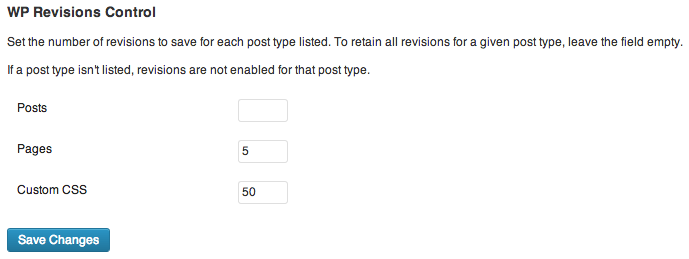
The plugin's settings section, found under Settings > Writing.
-
The post-level controls for the Classic Editor provided in version 1.2.
-
The post-level controls for the Block Editor provided in version 1.4.
About this plugin
WordPress 3.6 allows users to control how many revisions are stored for each supported post type. No longer must you rely on the WP_POST_REVISIONS constant, which applied universally. This plugin provides an interface for this new functionality.
With this plugin enabled, simply visit Settings > Writing to specify the number of revisions retained for each post type.
Why is this helpful? Revisions are stored in the database, and if many are stored, can cause bloat. This bloat may lead to slower queries, which can have a noticeable performance impact. The value of these revisions also depends on what is being tracked. For example, I may want to store every revision of the posts I write, but only desire to keep the latest five versions of each page on my site. Starting in WordPress 3.6, this control is available. WordPress doesn’t provide a native interface to specify revisions quantities, so I wrote this quick plugin to do so.
Thanks to Maria Ramos at WebHostingHub, the plugin is also available in Spanish. Many thanks to her for her efforts!
Development is at https://git.ethitter.com/wp-plugins/wp-revisions-control.
Questions
- Where do I change the plugin’s settings?
Navigate to Settings > Writing in your WordPress Dashboard, and look for the WP Revisions Control section.
sandywp / also on the shelf
Try another plugin

4.8 · 1M+ installs
Loginizer is a WordPress security plugin which helps you fight against bruteforce attacks.

4.4 · 900K+ installs
Redux is a simple, truly extensible, and fully responsive options framework for WordPress themes and plugins. It ships with an…

4.6 · 300K+ installs
Lets you edit the WordPress admin menu. You can re-order, hide or rename menus, add custom menus and more.
Spin up a real WordPress site in seconds.
Test plugins, build a demo, hand a client a link — then squash it and start again. No local setup, no Docker.