sandywp / plugins / wp-job-portal

WP Job Portal
AI-Powered Recruitment System for Company or Job Board website
A smart, AI-powered job board plugin for WordPress. Build a company careers page or a full job board with resumes, applications and smart matching.
Ready in seconds.
v2.9.1 8,000+ installs WP 6.2+ PHP 7.4+
What you get inside
8 screens-
Admin dashboard
-
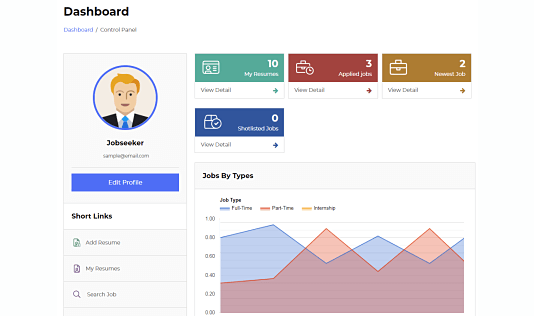
Job seeker dashboard
-
Newest jobs
-
An applied resume
-
Resume
-
Credit packs (Marketplace Suite)
-
Pay to view details (Marketplace Suite)
-
Login
About this plugin
WP Job Portal is a complete recruitment system for WordPress: a careers page for your own company, or a job board for many employers. Post jobs, receive applications, review resumes and hire from your WordPress dashboard. No coding needed.
- Hiring for your company? Publish your openings on a branded careers page, take applications and keep every candidate in one place.
- Running a job board? Employers register, post jobs and manage their applicants; job seekers build resumes and apply in a few clicks. Charge for listings when you are ready.
You are live in minutes: the setup wizard prepares the site for a company or a job board, creates the pages and can add sample jobs to show it working.
View demo | Documentation | Videos | Support
Smarter hiring with AI
- AI writing: draft job and company descriptions, resume skills and cover letters in seconds.
- AI tools: job title ideas, a job post check, screening and interview questions and e-mail drafts for employers; resume wording and “how well do I match” for job seekers.
- Your choice of AI: create a free Zywrap account from your dashboard (paid plans add monthly credits), or use your own Anthropic (Claude) or OpenAI key. Limits, usage figures and a privacy setting are included.
- Smart Search & Matching (premium): relevance-ranked job and resume search, suggested jobs for candidates, suggested resumes for employers and a match score for every application, run on your own server.
Jobs that get found
- Google for Jobs: every job carries JobPosting structured data, so it can appear in Google’s job search.
- Search-engine-friendly job addresses and a jobs XML sitemap
- Share buttons, RSS feeds and a “tell a friend” email for every job
- Weekly job alert emails that bring candidates back
For job seekers
- Search by keyword, category, job type, location and salary, and save searches to run again
- Build a resume once and apply in a few clicks, or use Quick Apply with a resume file
- Shortlist jobs and follow every application from a personal dashboard
For employers
- Post, copy and manage jobs and company profiles from the front end
- Review applicants, read and print resumes
- A dashboard with their jobs, applications and statistics
Easy to run and fit to your site
- Approve jobs, companies and resumes before they go live
- Custom fields for jobs, resumes, companies and registration, with conditional logic
- Gutenberg blocks, an Elementor widget, 30+ shortcodes and seven sidebar widgets
- Works with any theme, with color presets to match your design, and supports right-to-left languages
- Registration and login for employers and job seekers, protected by Google reCAPTCHA or Cloudflare Turnstile
- An email template for every notification, and control over who receives which
- Location data for 186 countries, in English or the local language
- Import companies, jobs, resumes and applications from WP Job Manager
- Activity log and a system status page
Premium products
Add what your site needs. Each product works with the free plugin on its own and installs from your WordPress dashboard. Compare plans.
- Pro: advanced resume builder, multiple resumes and cover letters, resume search, visitor applications, messaging, PDF and export, reports, instant job alerts and maps with radius search.
- Marketplace Suite: sell job packages, credits and subscriptions through Stripe, PayPal or WooCommerce, with paid featured jobs, companies and resumes.
- Recruit Suite: a hiring pipeline for teams, with stages, scorecards, shared notes, offers with approvals and e-signatures, and recruiting reports.
- Smart Search & Matching: AI job and resume search, suggestions and match scores.
Translations
WP Job Portal is available in Arabic, Chinese (China), Czech, Dutch, French, German, Greek, Hebrew, Indonesian, Italian, Japanese, Polish, Portuguese (Brazil), Romanian, Russian, Spanish and Turkish, and installs the one your site uses. Help translate on translate.wordpress.org.
External services
WP Job Portal runs on your own server. It connects to the services below only in the cases described.
WP Job Portal translations (d2cx1dgksy1tik.cloudfront.net, WP Job Portal’s download server): when the site language is not English, the plugin downloads that language’s translation files and checks daily for updates. It sends nothing but the request for the files. To turn this off, add define( 'WPJOBPORTAL_TRANSLATIONS_AUTO', false ); to wp-config.php. Terms, Privacy policy.
Translations screen (www.joomsky.com, the developer’s translation service): only when an administrator opens the plugin’s Translations screen to list or download a language. It sends the site address, the plugin and WordPress versions, and the language chosen. Before that, the screen checks the internet connection by requesting www.google.com. Terms, Privacy policy.
Theme demo import (wpjobportal.com): only with the WP Job Portal theme, when an administrator imports one of its demos. It requests the demo’s content and sends nothing else. Terms, Privacy policy.
WP Job Portal licences and updates (wpjobportal.com): only when you enter a licence key or have a premium product installed. It sends the licence key, your site address and the installed product versions, to activate the licence and offer updates. When you claim the monthly AI credits a paid plan includes, it also sends the ID of your connected Zywrap account. Terms, Privacy policy.
Zywrap (api.zywrap.com, zywrap.com): when Zywrap is the AI engine. Creating or connecting an account from the AI screen sends the e-mail address and name you enter and your site address. Each time someone uses an AI button, the text it is asked to write about is sent. Resume name and contact fields are never sent, and e-mail addresses and phone numbers are removed from the text by default (a setting on the AI screen). Terms, Privacy policy.
Anthropic (api.anthropic.com): only when you add your own Anthropic key and choose it as the AI engine. The same text as for Zywrap is sent. Terms, Privacy policy.
OpenAI (api.openai.com): only when you add your own OpenAI key and choose it as the AI engine. The same text as for Zywrap is sent. Terms, Privacy policy.
Google Maps (maps.googleapis.com): only when you add a Google Maps API key. Map pages load Google’s map script in the visitor’s browser. Terms, Privacy policy.
Google reCAPTCHA (google.com) or Cloudflare Turnstile (challenges.cloudflare.com): only when you turn one on for forms. The form page loads its script in the visitor’s browser. Google privacy policy, Cloudflare privacy policy.
Questions
- Is WP Job Portal free?
Yes. Job posting, resumes, applications, employer and job seeker dashboards, search, job alerts and everything above not marked premium are free. The premium products add paid listings, team hiring tools, advanced resumes and smart matching.
- Can I use it only for my company’s careers page?
Yes. Choose the careers site option in the setup wizard: only your company posts jobs, and candidates apply to you.
- Can employers pay to post or feature jobs?
Yes, with Marketplace Suite: job packages, credits and subscriptions, paid through Stripe, PayPal or WooCommerce.
- Will my jobs show in Google for Jobs?
Each job page includes JobPosting structured data, which is what Google reads for its job search. Google decides what it shows; you can check a job page with Google’s Rich Results Test.
- Will WP Job Portal work with my theme?
Yes, it works with any theme. Color presets, blocks and the Elementor widget help it match your design.
- Can I move from WP Job Manager?
Yes. The built-in import brings over companies, jobs, resumes and applications.
- I bought separate add-ons before 2.7.0. What happens to them?
Twelve of them are now free and part of the plugin. The rest are included in Pro, Marketplace Suite, Recruit Suite and Smart Search & Matching. See Upgrading to 2.7 for what your purchase includes now.
- What are the main shortcodes?
[wpjobportal_jobseeker_controlpanel], [wpjobportal_employer_controlpanel], [wpjobportal_job_search], [wpjobportal_job], [wpjobportal_job_categories], [wpjobportal_employer_registration], [wpjobportal_jobseeker_registration], [wpjobportal_login_page] and [wpjobportal_searchjob]. The full list, with options, is under WP Job Portal > Shortcodes.
sandywp / also on the shelf
Try another plugin

4.4 · 70K+ installs
Create a careers page for your company website, or build a public job board for your community.

4.7 · 10K+ installs
job board plugin for job listings, managing applicants, applications, categories, job types, taxonomies, career page, job…

4.2 · 100+ installs
Plugin to pull a job board from greenhouse.io via their API.
Spin up a real WordPress site in seconds.
Test plugins, build a demo, hand a client a link — then squash it and start again. No local setup, no Docker.