sandywp / plugins / wp-job-openings

HireZoot
WordPress Recruitment, Job Listings & Careers Plugin
Create a professional careers page, publish job listings, collect applications, and manage candidates directly from your WordPress dashboard.
Ready in seconds.
v4.3.0 30,000+ installs WP 6.0+ PHP 5.6+
What you get inside
8 screens-
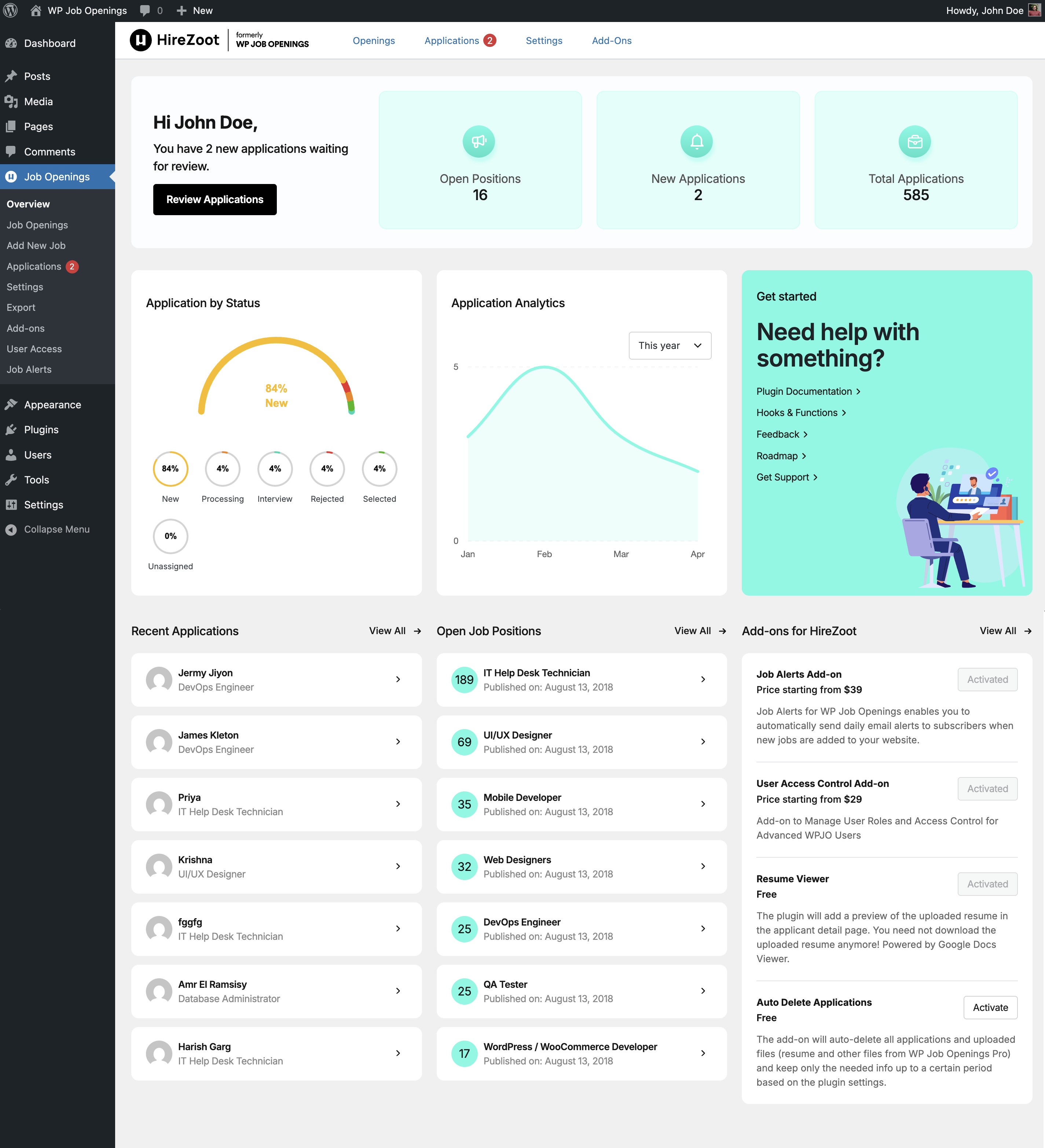
Job Openings and Applications Dashboard
-
Job listing - Grid View
-
Job listing - List View
-
Job listing - Stack View
-
Job Block
-
Job Detail View
-
Plugin Welcome Page
-
Add A Job Opening
About this plugin
HireZoot (formerly WP Job Openings) is a WordPress recruitment and hiring plugin for creating professional careers pages, publishing job listings, collecting applications, and managing candidates directly from your WordPress dashboard.
HireZoot is designed for businesses, HR teams, recruitment teams, and agencies that want a complete hiring workflow inside WordPress. Create job openings, publish job listings, accept applications, manage candidates, and handle the recruitment process without needing a separate job board or recruitment platform.
- View Demo ↗︎
- Visit website – HireZoot.com ↗︎
- Documentation ↗︎
- Pro & Pricing ↗︎
- Add-ons ↗︎
- View Changelog ↗︎
🆕 Recent Updates
HireZoot continues to evolve with improvements to job listings, applications, notifications, and the overall recruitment workflow.
- Job Schema settings with an option to enable or disable JobPosting structured data
- Test Email option for notification templates
- Redesigned notification email template and daily email digest
- Reduced database queries used by application analytics on admin pages
- New Job Specification field types including Tag Input, Single Select, and Multi Select
- Improved job listing blocks with multi-select filters, sidebar filters, sorting, Stack layout, and styling controls
- Resume preview and improved application management
- New Elementor widget for displaying job listings
- Security, performance, and usability improvements
💼 Key Features for WordPress Recruitment & Hiring
✔ Simple setup – get started in minutes
✔ Create a professional careers page directly in WordPress
✔ Publish and manage unlimited job listings
✔ Multiple layouts: Grid, List, and Stack
✔ Sidebar and inline filtering options
✔ AJAX-powered job search and filtering
✔ Multi-select filters and sorting options
✔ Unlimited job specifications
✔ Flexible Job Specification field types
✔ Built-in application form
✔ Manage applications inside WordPress
✔ Resume preview
✔ Customizable email notifications
✔ Daily email digest
✔ Job expiry options with date and time
✔ JobPosting structured data for SEO
✔ Gutenberg block with advanced customization options
✔ Elementor widget support
✔ Shortcodes for displaying job listings
✔ WPML support
✔ Developer-friendly hooks and customization options
👥 Applications, Candidates & Recruitment Management
Collect applications directly through your website and manage candidates from the WordPress dashboard.
✔ View and manage applications
✔ Filter applications by status and date
✔ Track application status
✔ View unread application counts
✔ Preview resumes
✔ Configure application notification emails
✔ Customize notification templates
✔ Send notifications to multiple recipients
✔ Restore applications from trash
✔ Extend candidate management with HireZoot Pro
HireZoot keeps your job listings and applications connected, giving your team a central place to manage candidates without switching between multiple systems.
✨ Premium Features
HireZoot Pro adds advanced tools for customizing application forms and managing candidates.
✔ Custom application form builder
✔ Shortlist, reject, and rate candidates
✔ Notes and activity logs
✔ Advanced email notifications
✔ Export and filter applications
✔ Attach files with email notifications
✔ Shortcode generator for custom job listings
✔ External application links
✔ Third-party application forms
🔌 Add-ons
Extend HireZoot with additional tools for different recruitment requirements.
- Auto-Delete Applications (FREE)
- PRO Pack (PREMIUM)
- User Access Control (PREMIUM)
- Job Alerts (PREMIUM)
- Interviews & Assessments (PREMIUM)
🎯 Interviews & Assessments
The Interviews & Assessments add-on extends HireZoot beyond application management and helps teams manage structured candidate evaluation.
✔ Schedule interviews and assessments
✔ Support video and in-person interviews
✔ Use reusable evaluation forms and scorecards
✔ Assign hiring panelists and evaluators
✔ Create custom evaluation criteria
✔ Collect structured panel feedback
✔ Record evaluations and recommendations
✔ Reschedule or cancel interviews and assessments
✔ Review candidate evaluation results
This gives hiring teams a more structured workflow from application review through interview and candidate evaluation.
🔔 Job Alerts
The Job Alerts add-on allows candidates to receive notifications about new job opportunities.
Job alerts can help keep candidates engaged with your careers page and bring them back when relevant positions become available.
🔐 User Access Control
The User Access Control add-on provides additional control over access to HireZoot recruitment features.
This is useful for organizations where multiple team members, HR users, or hiring managers need to work with recruitment data while access needs to be controlled.
🔎 SEO & Job Search Visibility
HireZoot supports JobPosting structured data to help search engines understand your job listings.
The free plugin includes Job Schema settings that allow administrators to enable or disable JobPosting structured data. HireZoot Pro provides additional schema controls for advanced configurations.
🛠 Built for WordPress
HireZoot is designed to work with the WordPress tools and workflows you already use.
✔ Gutenberg block support
✔ Elementor widget support
✔ Shortcodes
✔ WPML compatibility
✔ Developer hooks and filters
✔ Template customization
✔ REST API support
✔ WordPress-native administration
Developers can extend HireZoot using available hooks, filters, and APIs without modifying the plugin’s core files.
HireZoot can also be integrated with other systems and custom workflows using its developer hooks and APIs.
🔄 A Complete WordPress Hiring Workflow
HireZoot can support the recruitment journey from publishing a vacancy through candidate evaluation:
Publish jobs → Attract candidates → Collect applications → Review candidates → Shortlist candidates → Schedule interviews → Evaluate candidates → Hire
Start with the core job listings and application features, then extend the workflow with Pro and add-ons as your recruitment requirements grow.
🤝 Built for Businesses, Teams & Agencies
HireZoot can be used for:
✔ Company careers pages
✔ Internal recruitment teams
✔ HR departments
✔ Recruitment agencies
✔ Client websites
✔ Multi-user hiring teams
✔ Custom WordPress recruitment portals
Whether you need a simple WordPress job board or a more structured recruitment workflow, HireZoot provides a WordPress-native foundation that can grow with your hiring process.
📚 Documentation & Support
Detailed documentation covering job listings, applications, Pro features, add-ons, developer resources, and integrations is available at:
🤝 Contribute
Translate the plugin: https://translate.wordpress.org/projects/wp-plugins/wp-job-openings/
Questions
- Is HireZoot easy to set up?
Yes. You can publish a job listing page and start receiving applications within minutes.
- Can I customize the application form?
Yes. The default form works out of the box, and PRO features allow full customization.
- Will it work with my theme?
HireZoot works with most well-coded WordPress themes.
- Can I manage applications inside WordPress?
Yes. You can view, filter, and manage applications from your dashboard.
sandywp / also on the shelf
Try another plugin

Auto Delete Applications – Add-on for HireZoot
5.0 · 1K+ installs
This is an add-on for HireZoot Plugin, which will let you delete the received applications periodically. The plugin will let you…

50+ installs
Easily display published jobs from Recruitee anywhere with shortcode.
-
Binary Job Listing is the most powerful and incredibly feature-packed, advanced recruitment plugin that comes with gorgeous…

Spin up a real WordPress site in seconds.
Test plugins, build a demo, hand a client a link — then squash it and start again. No local setup, no Docker.