sandywp / plugins / wp-hooks-finder

WP Hooks Finder
Everything on WordPress depends on the action and filter hooks. And they are the backbone of WordPress. You can enhance or customize any WordPress fun …
Ready in seconds.
v1.3.3 1,000+ installs WP 4.0+
What you get inside
2 screens-
Menu Options
-
Display Actions & Filters
About this plugin
Everything on WordPress depends on the action and filter hooks. And they are the backbone of WordPress. You can enhance or customize any WordPress functionality by using these hooks. If you look at any WordPress page or post, they appear through the combination of action & filter hooks.
If you want to customize any functionality, whether it comes from a theme or plugin, you can customize it using their action and filter hooks without touching the core files. But sometimes, it is really hard to find what action or filter hooks you have to use to customize the functionality according to the need.
This plugin will solve your problem and display all the action and filter hooks of any page, post, widget header, footer, or anything appearing on your screen. So you can easily find what action and filter you have to use to add or customize the functionality.
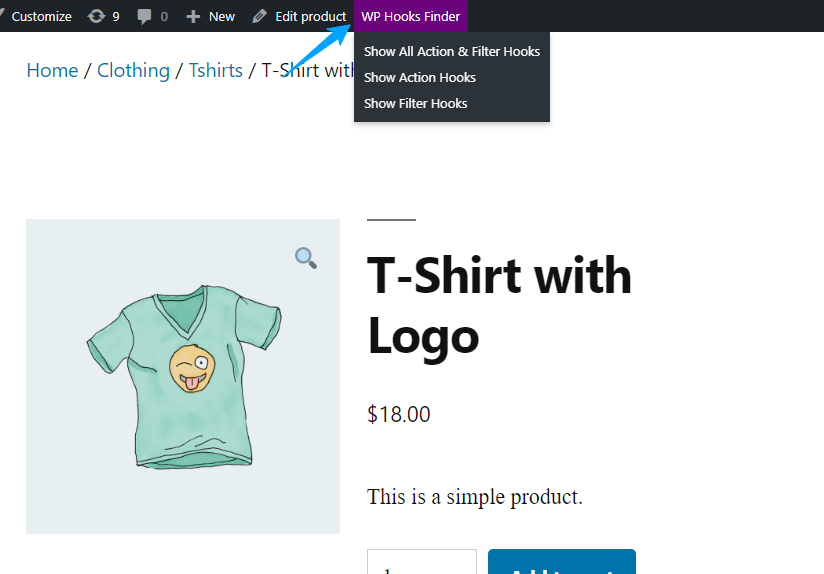
Once you have installed the plugin, a menu “Hooks Finder” will appear on top of the admin bar. You can view all the action and filter hooks that are running on your WordPress page, including header, footer, widgets, etc.
Questions
- How to use this plugin?
Just after installing WP Hooks Finder, A new menu “WP Hooks Finder” will be added in your wordpress admin bar where you can display all the hooks and filters
sandywp / also on the shelf
Try another plugin

Call To Action Customizable Block
5.0 · 1K+ installs
Easily add customizable call to action blocks in your posts and pages with the Call To Action Customizable Block for Gutenberg.

5.0 · 1K+ installs
Simply Show Hooks helps theme and plugin developers to quickly see where all the action and filter hooks are on any WordPress…

3.2 · 1K+ installs
Delete Action Scheduler Events to avoid having large database tables.
Spin up a real WordPress site in seconds.
Test plugins, build a demo, hand a client a link — then squash it and start again. No local setup, no Docker.