sandywp / plugins / wp-external-links

External Links
nofollow, noopener & new window
Internal links & external links manager: open in new window or tab, control nofollow, ugc, sponsored & noopener. SEO friendly.
Ready in seconds.
v2.66 90,000+ installs WP 4.2+ PHP 7.2+
What you get inside
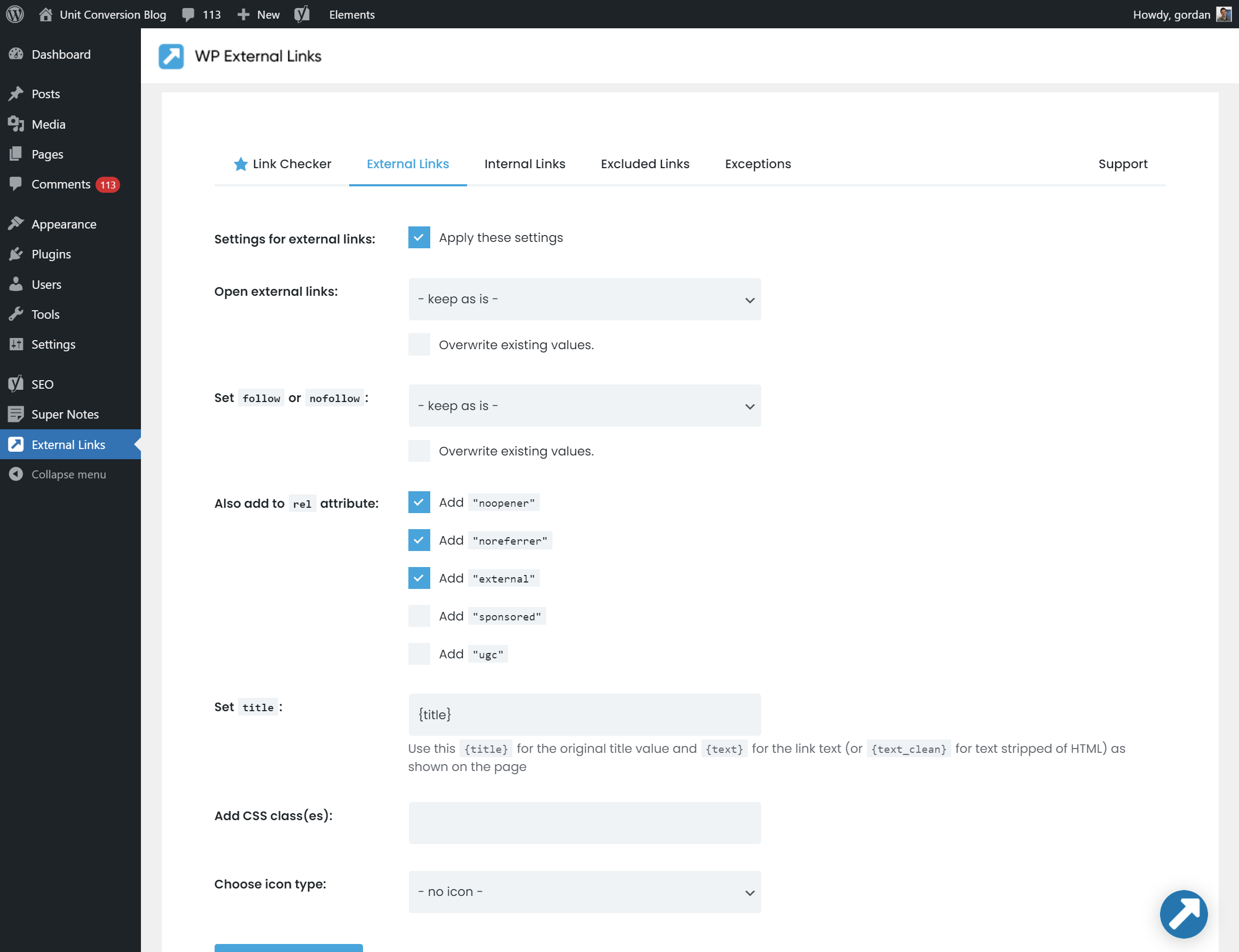
3 screens-
Admin Settings Page
-
Link Checker / Link Tester
-
Link Icons
About this plugin
Manage all external & internal links on your site. Control icons, nofollow, noopener, ugc (User Generated Content), sponsored and if links open in new window or new tab.
WP Links plugin was completely rebuilt in v2 and has lots of new features, like noopener, ugc and sponsored values for rel; font icons, internal links options and full WPMU support.
Link Scanner – PRO feature
Check every single link on your site! See if it’s broken or not, if it’s redirected, what’s the target and rel attribute and what page exactly it’s linking to. This feature is a part of the WP Links PRO plugin.
Having problems with spam, bots, or AI scrapers? Have a look at our free Captcha plugin used on over 200,000 sites.
Features
- Manage external and internal links
- Open links in new window or tab
- Add follow or nofollow (for SEO)
- Add noopener and noreferrer (for security)
- Add ugc (User Generated Content) and sponsored values to rel (Google announcement)
- Add link icons (FontAwesome and Dashicons)
- Set other attributes like title and CSS classes
- Scan complete page (or just posts, comments, widgets)
- SEO friendly
- Link Scanner – check all links on your site – PRO feature
- Exit Confirmation – protect visitors and traffic when external links are clicked – PRO feature
- Link Rules – create advanced link rules for chosen link groups – PRO feature
And more…
- Network Settings (WPMU support)
- Use template tag to apply plugin settings on specific contents
- Set data-attribute to change how individual links will be treated
- Use built-in actions and filters to implement your specific needs
Easy to use
After activating you can set all options for external and internal links on the plugins admin page.
On the fly
The plugin filters the output and changes the links on the fly. The real contents (posts, pages, widget etcetera) will not be changed in the database.
When deactivating the plugin, all contents will be the same as it was before.
GDPR compatibility
We are not lawyers. Please do not take any of the following as legal advice.
WP External Links does not track, collect or process any user data. Nothing is logged or pushed to any 3rd parties. We also don’t use any 3rd party services or CDNs. Based on that, we feel it’s GDPR compatible, but again, please, don’t take this as legal advice.
Like the plugin? Rate it to support the development.
If you’re having problems with SSL or HTTPS try our free WP Force SSL plugin. It’s a great way to enable SSL and fix SSL problems.
Documentation
After activating you can set all options for external and internal links.
Data attribute “data-wpel-link”
Links being processed by this plugin will also contain the data-attribute data-wpel-link.
The plugin could set the value to external, internal or exclude, meaning how the
link was processed.
You can also set the data-attribute yourself. This way you can force how the plugin will process
certain links.
When you add the value ignore, the link will be completely ignored by the plugin:
<a href="http://somedomain.com" data-wpel-link="ignore">Go to somedomain</a>
Action “wpel_link”
Use this action to change the link object after all plugin settings have been applied.
add_action( 'wpel_link', ( $link_object ) {
    if ( $link_object->is_external() ) {
        // get current url
        $url = $link_object->getAttribute( 'href' );

        // set redirect url
        $redirect_url = '//somedom.com?url='. urlencode( $url );
        $link_object->setAttribute( 'href', $redirect_url );
    }
}, 10, 1 );
The link object is an instance of WPEL_Link class.
Action hook “wpel_before_apply_link”
Use this action to change the link object before the plugin settings will be applied on the link.
You can use this filter f.e. to ignore individual links from being processed. Or change dynamically how
they will be treated by this plugin.
add_action( 'wpel_before_apply_link', function ( $link ) {
    // ignore links with class "some-cls"
    if ( $link->has_attr_value( 'class', 'some-cls' ) ) {
        $link->set_ignore();
    }

    // mark and treat links with class "ext-cls" as external link
    if ( $link->has_attr_value( 'class', 'ext-cls' ) ) {
        $link->set_external();
    }
}, 10 );
Filter hook “wpel_apply_settings”
When filter returns false the plugin settings will not be applied. Can be used when f.e. certain posts or pages should be ignored by this plugin.
add_filter( 'wpel_apply_settings', '__return_false' );
See FAQ for more info.
Questions
- I want certain posts or pages to be ignored by the plugin. How?
Just use the option “Skip pages or posts” under the tab “Exceptions”.
For a more custom approach use the action
wpel_apply_settings:
add_action( ‘wpel_apply_settings’, function () {
global $post;
$ignored_post_ids = array( 1, 2, 4 );if ( in_array( $post->ID, $ignored_post_ids ) ) { return false; } return true; }, 10 );Using this filter you can ignore any request, like certain category, archive etcetera.
- I want specific links to be ignored by the plugin. How?
There’s an option for ignoring links containing a certain class (under tab “Exceptions”).
For a more flexible check on ignoring links you could use the filter
wpel_before_apply_link:
add_action( ‘wpel_before_apply_link’, function ( $link ) {
// ignore links with class “some-cls”
if ( $link->has_attr_value( ‘class’, ‘some-cls’ ) ) {
$link->set_ignore();
}
}, 10 );- How to create a redirect for external links? (f.e. affiliate links)
Create redirect by using the
wpel_linkaction. Add some code to functions.php of your theme, like:add_action( 'wpel_link', function ( $link ) { // check if link is an external links if ( $link->is_external() ) { // get current url $url = $link->get_attr( 'href' ); // set redirect url $redirect_url = '//somedom.com?url='. urlencode( $url ); $link->set_attr( 'href', $redirect_url ); } }, 10, 1 );- How to open external links in a new popup window?
By adding this JavaScript code to your site:
jQuery(function ($) {
    $('a[data-wpel-link="external"]').click(function (e) {
        // open link in popup window
        window.open($(this).attr('href'), '_blank', 'width=800, height=600');

        // stop default and other behaviour
        e.preventDefault();
        e.stopImmediatePropagation();
    });
});
See more information on the window.open() method.
- How to add an confirm (or alert) when opening external links?
Add this JavaScript code to your site:
jQuery(function ($) { $('a[data-wpel-link="external"]').click(function (e) { if (!confirm('Are you sure you want to open this link?')) { // cancelled e.preventDefault(); e.stopImmediatePropagation(); } }); });- How to open PDF files in a new window?
Use some JavaScript code for opening PDF files in a new window:
jQuery(function ($) { $('a[href$=".pdf"]').prop('target', '_blank'); });- How to set another icon for secure sites (using https)?
Use some CSS style to change the icon for secure sites using https:
a[href^="https"] .wpel-icon:before {
  content: "\f023" !important;
}
The code
\f023refers to a dashicon or font awesome icon.- I am a plugin developer and my plugin conflicts with WPEL. How can I solve the problem?
If your plugin contains links it might be filtered by the WPEL plugin as well, causing a conflict.
Here are some suggestions on solving the problem:- Add
data-wpel-link="ignore"to links that need to be ignored by WPEL plugin - Use
wpel_before_apply_link-action to ignore your links (f.e. containing certain class or data-attribute) - Use
wpel_apply_settings-filter to ignore complete post, pages, categories etc
- Add
sandywp / also on the shelf
Try another plugin

External Links in New Window / New Tab
4.5 · 30K+ installs
Open external links in a new window or new tab. SEO optimized and XHTML Strict compliant.

4.8 · 9K+ installs
The external links plugin for WordPress lets you process outgoing links differently from internal links.

5.0 · 1K+ installs
Analyze, manage, and monitor all external links on your WordPress site. ---
Spin up a real WordPress site in seconds.
Test plugins, build a demo, hand a client a link — then squash it and start again. No local setup, no Docker.