sandywp / plugins / wp-bulk-delete

WP Bulk Delete
Delete posts, pages, comments, users, taxonomy terms and meta fields in bulk with different powerful filters and conditions.
Ready in seconds.
v1.4.4 100,000+ installs WP 4.9+ PHP 5.3+
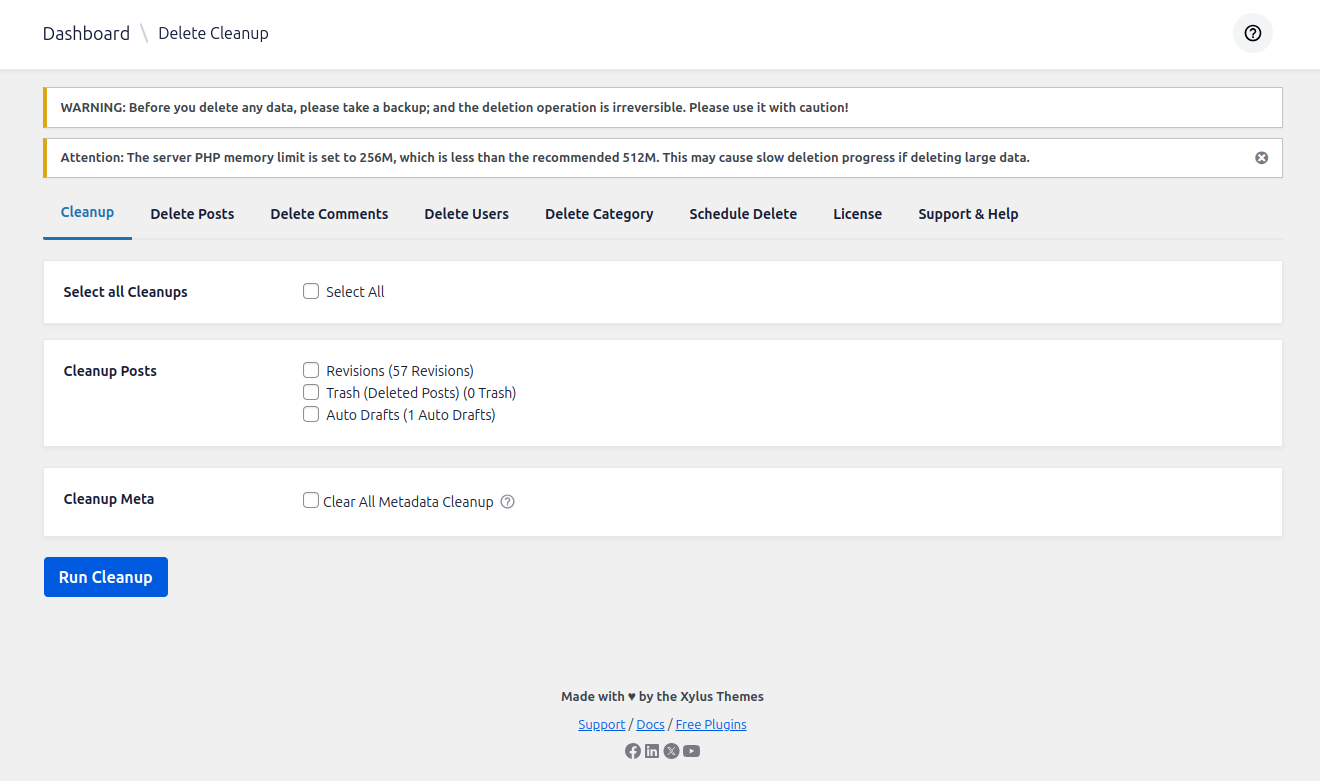
What you get inside
8 screens-
🧹 Cleanup
-
🗂️ Delete Posts
-
💬 Delete Comments
-
👤 Delete Users
-
🔖 Delete Taxonomies & Tags
-
⏱️ Scheduled Delete
-
📜 Scheduled Delete History
-
🛒 Delete WooCommerce Orders
About this plugin
WP Bulk Delete is a powerful WordPress plugin designed to help you delete posts, pages, comments, users, taxonomy terms, and meta fields in bulk with flexible filters and conditions. It helps in managing unnecessary data, improving website performance, and reducing database load.
posts delete, delete all, mass delete, delete posts, delete comments, delete users, delete meta, delete taxonomy, delete revision, wp clean, clean trash, bulk user delete, clean spam, delete with condition, delete with filter, remove
🔒 Powerful Features
💻 Database Cleanup
- ✅ Delete Auto Drafts, Trash Posts, and Revisions
- ✅ Advanced Cleanup: Clean up revisions, auto-drafts, and trash for specific separate post types (e.g., custom post types) PRO Version.
- ✅ Delete Orphaned and Duplicate Meta:
- 🗃️ Post Meta:
- Orphan Post Meta
- Duplicate Post Meta
- 💬 Comment Meta:
- Orphan Comment Meta
- Duplicate Comment Meta
- 👥 User Meta:
- Orphan User Meta
- Duplicate User Meta
- 🔖 Term Meta:
- Orphan Term Meta
- Duplicate Term Meta
- 🗃️ Post Meta:
📂 Deleting Posts
- ✅ Delete Posts by Post Type.
- ✅ Delete Posts by Status.
- ✅ Delete Posts by Category.
- ✅ Delete Posts by Tag.
- ✅ Delete Posts by Authors.
- ✅ Delete Posts by Post Registered Date.
- ✅ Delete Posts by Post Modified Date.
- ✅ Delete Images Along with Posts PRO Version.
- ✅ Delete Posts by Meta Fields PRO Version.
- ✅ Delete Posts by Ids. PRO Version.
- ✅ Delete Posts by Duplicate Post. PRO Version.
- ✅ Delete Posts by Title Contains PRO Version.
- ✅ Delete Posts by Content Contains PRO Version.
- ✅ Delete Posts by Post Link. PRO Version.
- ✅ Delete Posts by Content Character Count PRO Version.
- ✅ Delete Posts by Content Word Count PRO Version.
- ✅ Delete Posts by Custom Query.
- ✅ Schedule Post Deletion PRO Version.
📝 Deleting Comments
- ✅ Delete Comments by Status.
- ✅ Delete Comments by Types. PRO Version.
- ✅ Delete Comments by Authors. PRO Version.
- ✅ Delete Comments by Authors Email. PRO Version.
- ✅ Delete Comments by Meta Fields PRO Version.
- ✅ Delete Comments by Post. PRO Version.
- ✅ Delete Comments by Registration Date.
- ✅ Schedule automatic comment deletion PRO Version.
👤 Deleting Users
- ✅ Delete Users by Roles.
- ✅ Delete Users by Registration Date.
- ✅ Assign deleted user data to another user PRO Version.
- ✅ Delete Users by User Meta. PRO Version.
- ✅ Delete Users by Email. PRO Version.
- ✅ Delete Users by Display Name. PRO Version.
- ✅ Delete Users by Nicename. PRO Version.
- ✅ Delete Users by Login. PRO Version.
- ✅ Schedule automatic user deletion PRO Version.
🗃️ Deleting Categories and Tags
- ✅ Delete Entire Categories or Tags for Any Post Type
- ✅ Select the post type (Posts, Pages, or Custom Post Types)
- Choose the taxonomy:
- ➡️ Categories
- ➡️ Tags
- Delete all terms in bulk with a single click
- Choose the taxonomy:
🛒 WooCommerce (PRO Version)
📦 Delete WooCommerce Orders
- ✅ Delete Order by Status.
- ✅ Delete Order by Order Date
- ✅ Delete Order by Total( min, max, equal ).
- ✅ Delete Order by Payment Method Filter
👥 WooCommerce Users
- ✅ Delete User by Roles
- ✅ Delete User by Registered Date.
- ✅ Delete User by User Meta.
- ✅ Delete User by Emails.
- ✅ Delete Users Who Have No Orders.
⚙️ WooCommerce General
- ✅ Delete Inactive Users.
- ✅ Delete User Who is Not Listed in WordPress but Exist in WooCommerce( who has no order )
Support
- 🔧 Found a bug or have a feature request? Open a Support Ticket.
- ⭐ Like the plugin? Leave a review on our WordPress plugin page.
- 💼 Explore more WordPress Plugins by XylusThemes.
Upgrade to the PRO Version for advanced features like:
- 🔄 Scheduled deletion of posts, comments, and users.
- 📂 Delete posts by Meta Fields.
- 🔗 Delete posts by IDs.
- 🔁 Delete duplicate posts/pages/CPTs.
- 🔍 Delete posts by Title Contains.
- ✍️ Delete posts by Content Contains.
- 🔗 Delete posts by Post Link.
- 🔢 Delete posts by Content Character Count.
- 🔠 Delete posts by Content Word Count.
- 📅 Schedule automatic comment deletion.
- 👥 Advanced user deletion filters.
- 👤 Delete users by Meta Fields.
- 📧 Delete users by Emails.
- 🔀 Assign deleted user data to another user.
- 🛒 Delete WooCommerce orders by:
- Status.
- Order Date.
- Order Total (min, max, equal).
- Payment Method.
- 👥 Delete WooCommerce users by:
- Roles.
- Registered Date.
- User Meta.
- Emails.
- Users with no orders.
- ⚙️ Delete inactive users.
- 🔍 Delete users not listed in WordPress but existing in WooCommerce.
- 🗃️ Delete images along with posts.
- 🚀 And much more!
Questions
- Can this plugin delete custom post types?
✅ Yes, the plugin supports deleting any custom post type (CPTs).
- Does this plugin support scheduled deletions?
✅ Yes, with the PRO version, you can schedule post, comment, and user deletions.
- Can I delete posts by custom fields or meta values?
✅ Yes, the PRO version allows you to delete posts based on custom field values and meta conditions.
- Does this plugin support bulk deletion of posts, comments and users?
✅ Yes, you can delete posts, comments and users in bulk using multiple filters.
- Can I delete categories and tags in bulk?
✅ Yes, you can delete entire categories and tags for any post type in bulk with a single click.
- Can I undo the deletion process?
❌ No, the deletion process is permanent. Once the posts, comments, or users are deleted, they cannot be restored. It is recommended to take a backup before performing bulk deletions.
- Can I delete images and media along with posts?
✅ Yes, with the PRO version, you can choose to delete attached media files when deleting posts, freeing up server space.
- Can I delete WooCommerce customers without orders?
✅ Yes, with the PRO version, you can delete WooCommerce customers who have no orders or only have failed/canceled orders, helping you keep your customer list clean.
sandywp / also on the shelf
Try another plugin

Manage – Centralized site maintenance and monitoring
2.0 · 90K+ installs
Manage provides a centralized dashboard to monitor, optimize, and maintain your WordPress sites without switching between…

BEAR – Bulk Editor and Products Manager Professional for WooCommerce by…
4.7 · 40K+ installs
BEAR - WooCommerce Bulk Editor Professional (former WOOBE) is plugin for bulk edit/manage woocommerce products their data in the…

4.3 · 30K+ installs
Bulk delete posts, pages, users, attachments, and meta fields based on complex bulk conditions & filters.
Spin up a real WordPress site in seconds.
Test plugins, build a demo, hand a client a link — then squash it and start again. No local setup, no Docker.