sandywp / plugins / wp-auto-featured-image

SNY Auto Featured Image
SNY Auto Featured Image automatically sets featured images from content, external URLs, or defaults. Bulk preview & apply for existing posts.
Ready in seconds.
v2.1.1 1,000+ installs WP 5.0+ PHP 7.4+
What you get inside
4 screens-
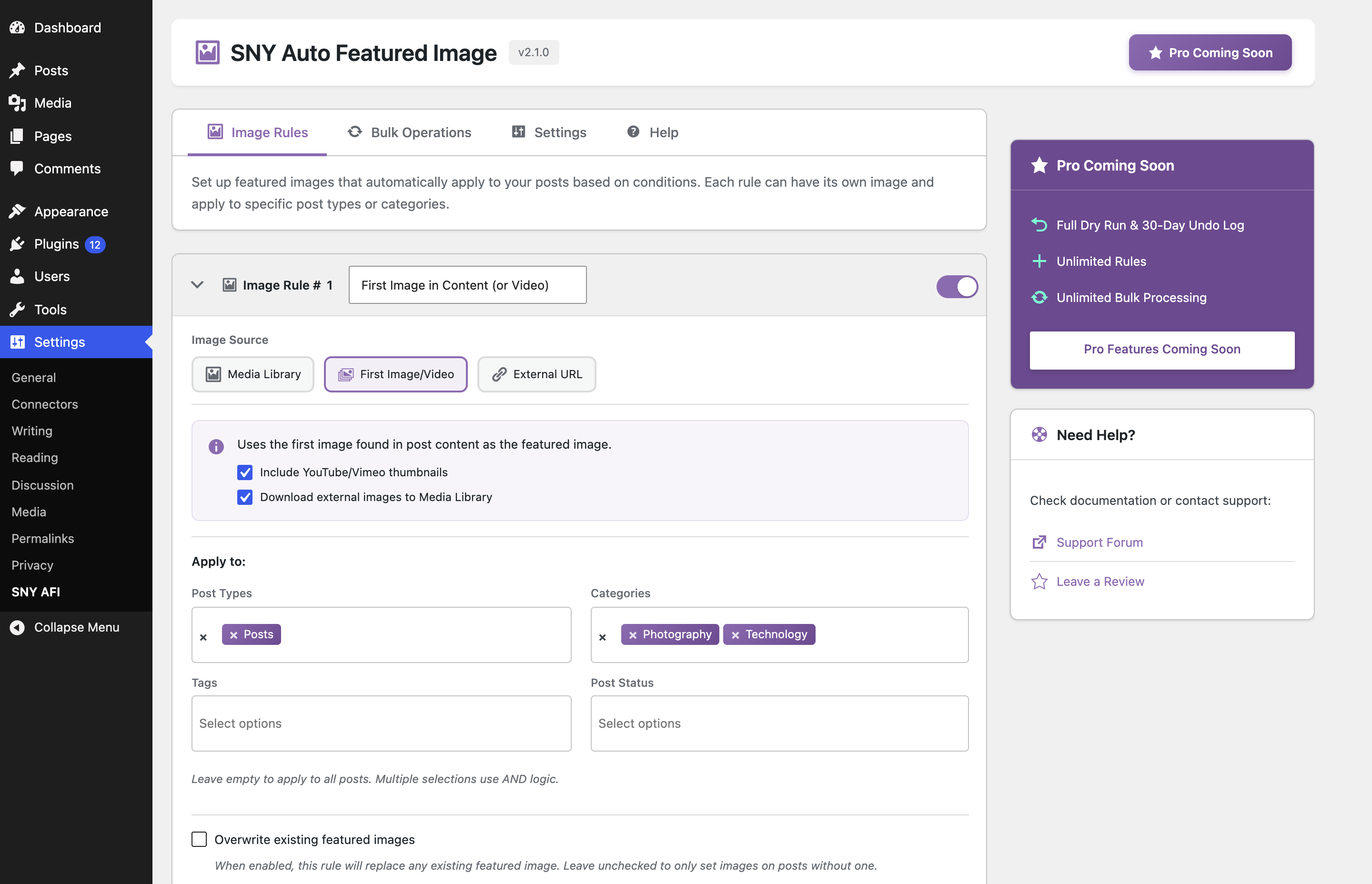
Image Rules: Configure conditional rules with Media Library, first image extraction, and taxonomy filters.
-
Bulk Preview: Interactive dry-run preview showing current vs proposed thumbnails and match reasons.
-
Settings: Configure post list thumbnail preview column and customize thumbnail sizes.
-
Post Listing: Featured image thumbnail column displaying visual previews directly on the Posts screen.
About this plugin
SNY Auto Featured Image automatically sets featured images for your WordPress posts, pages, and custom post types. Extract from content, use external URLs, set category defaults, or bulk-preview and apply to existing posts.
Why Choose SNY Auto Featured Image?
Never publish a post without a featured image again. This lightweight plugin automatically assigns featured images based on your custom rules whenever you publish or update content.
Key Features
- Conditional Image Rules – Set specific images based on post type, category, tag, or post status.
- Multiple Image Sources – Choose from Media Library, extract the first image from post content, or use an external image URL.
- Video Thumbnail Extraction – Automatically detects embedded YouTube and Vimeo videos and extracts their thumbnails.
- Safe Sideloading – Optionally download and save external images directly to your WordPress Media Library.
- Bulk Preview & Apply – Dry-run preview of thumbnail assignments with detailed reasons before applying up to 50 posts at a time.
- Admin Post List Column – View featured image thumbnails directly from your post and page listing tables with configurable sizes.
- Non-Destructive & Smart Overwrite – Preserve existing hand-set thumbnails or selectively overwrite when needed.
- Lightweight & Fast – Built with native WordPress APIs, no bloat, and minimal database queries.
Quick Setup
- Go to Settings > SNY AFI
- In the Image Rules tab, add a rule selecting your image source (Media Library, First Image in Content, or External URL).
- Choose your target post types, categories, or tags.
- Visit Bulk Operations to preview and apply to existing posts, or simply publish new content!
Perfect For
- Bloggers – Ensure consistent thumbnails across all posts
- News Sites – Never have a missing image in article feeds
- WooCommerce Stores – Default product images for quick imports
- Developers – Clean solution for client sites
Documentation & Support
For detailed guides and support, visit sanny.dev.
Found a bug or have a feature request? Open an issue on GitHub.
More WordPress Plugins
Check out our other WordPress plugins at sanny.dev/plugins.
Questions
- How does first image and video extraction work?
When a rule is configured with “First Image/Video”, the plugin automatically scans your post content upon publish or update. It detects the first embedded image or video (YouTube and Vimeo) and sets its thumbnail as the post’s featured image. You can also enable safe sideloading to download and store the media directly in your WordPress Media Library.
- Will this plugin overwrite existing featured images?
By default, no. The plugin is strictly non-destructive and preserves existing hand-picked thumbnails. If you want a specific rule to replace existing featured images, simply check the “Overwrite existing images” option on that rule card.
- How do conditional image rules work?
Conditional rules let you assign different images based on post type, category, tag, or post status. When saving or previewing posts, rules are evaluated from top to bottom (the first matching rule wins). Free includes up to 2 active rules.
- How does the bulk operations preview work?
The Bulk Operations tab provides a safe dry-run preview. Before making any changes, you can click “Preview Changes” to view a table of up to 50 matching posts, comparing their current thumbnail with the proposed thumbnail, along with the matched rule or skip reason.
- Can I see featured images in the WordPress admin post list?
Yes! In the Settings tab, enable the “Show featured image column in posts list” option. You can customize the thumbnail size (30–150px) and choose which post types display the thumbnail column.
sandywp / also on the shelf
Try another plugin

Auto Featured Image (Auto Post Thumbnail)
3.9 · 40K+ installs
Automatically generate, assign, and manage featured images in bulk so every post on your site has a featured image.

4.7 · 20K+ installs
Automatically generate the featured image from the image of the post.

5.0 · 100+ installs
AI featured images in one click, in bulk, or by asking Claude (MCP). Free with OpenAI, Stability AI and Grok. Pro adds…
Spin up a real WordPress site in seconds.
Test plugins, build a demo, hand a client a link — then squash it and start again. No local setup, no Docker.