sandywp / plugins / wp-add-custom-css

WP Add Custom CSS
Add custom css to the whole website and to specific posts and pages.
Ready in seconds.
v1.2.1 60,000+ installs WP 4.0+
What you get inside
4 screens-
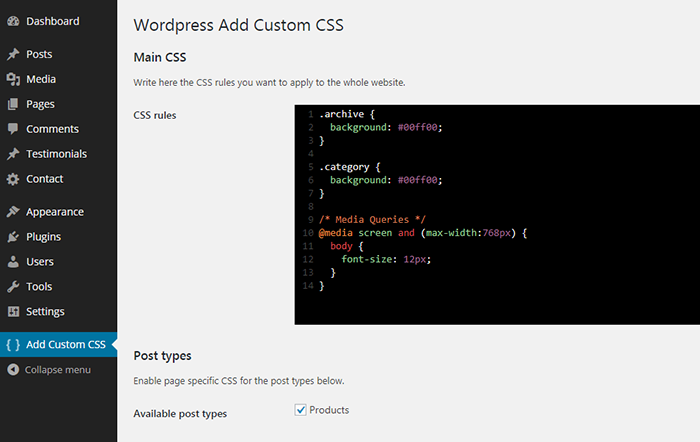
Add custom CSS to the whole website.
-
Add custom CSS to specific posts.
-
Add custom CSS to specific pages.
-
Add custom CSS to specific custom post types (such as Woocommerce products).
About this plugin
WP Add Custom CSS allows you to add custom CSS to the whole website and to individual posts, pages and custom post types (such as Woocommerce products).
The CSS rules applied to the whole website will override the default stylesheets of your theme and plugins, while the CSS rules applied to specific pages, posts or custom post types will override the main stylesheet too.
The plugin works with the most popular builders, such as Elementor, Gutenberg and the Classic Editor.
You can edit the main stylesheet from the the “Add custom CSS” settings page.
The plugin also creates a new “Custom CSS” box in the editing area to add custom CSS to specific posts, pages and custom post types.
Select the preferred CSS output method from the plugin’s settings page to ensure seamless integration with caching and minification plugins or to improve above-the-fold rendering performance.
Questions
- How do I apply custom CSS to the whole website?
Once the plugin is installed and activated, from your dashboard navigate to “Add custom CSS”, and write the CSS rules in the textarea.
- How do I apply custom CSS to a specific post or page?
Once the plugin is installed and activated, you will find a new box called “Custom CSS” in your post/page editing area.
- How do I apply custom CSS to a specific custom post type?
Once the plugin is installed and activated, from your dashboard navigate to “Add custom CSS”, check the desired custom post types and save. You will find a new box called “Custom CSS” in your custom post type editing area.
- Which CSS output method should I choose?
To improve your website’s speed, it’s generally recommended to select “Use a CSS file”, which allows optimization plugins to cache and minify the output.
Choosing “Use a style tag in the HTML head” outputs the CSS directly in the of the page, which can improve above-the-fold rendering performance.
By default, the “Use WordPress hook” option is selected to maintain backward compatibility.- The “Custom CSS” box is not displaying, why?
Click on the “Screen option” link from your post/page editing area and be sure the “Custom CSS” option is checked.
sandywp / also on the shelf
Try another plugin

WPCode – Insert Headers and Footers + Custom Code Snippets – WordPress Code…
4.9 · 3M+ installs
Easily add code snippets in WordPress. Insert header & footer scripts, add PHP code snippets with conditional logic, insert…

4.7 · 1M+ installs
An easy, clean, and simple way to enhance your site with code snippets.

4.7 · 100K+ installs
Add Custom CSS to your WordPress site without any hassles.
Spin up a real WordPress site in seconds.
Test plugins, build a demo, hand a client a link — then squash it and start again. No local setup, no Docker.