sandywp / plugins / woocommerce-breadcrumbs

Breadcrumbs for WooCommerce
A simple plugin to style the WooCommerce Breadcrumbs or disable them altogether
Ready in seconds.
v1.3.0 6,000+ installs WP 4.6+
What you get inside
3 screens-
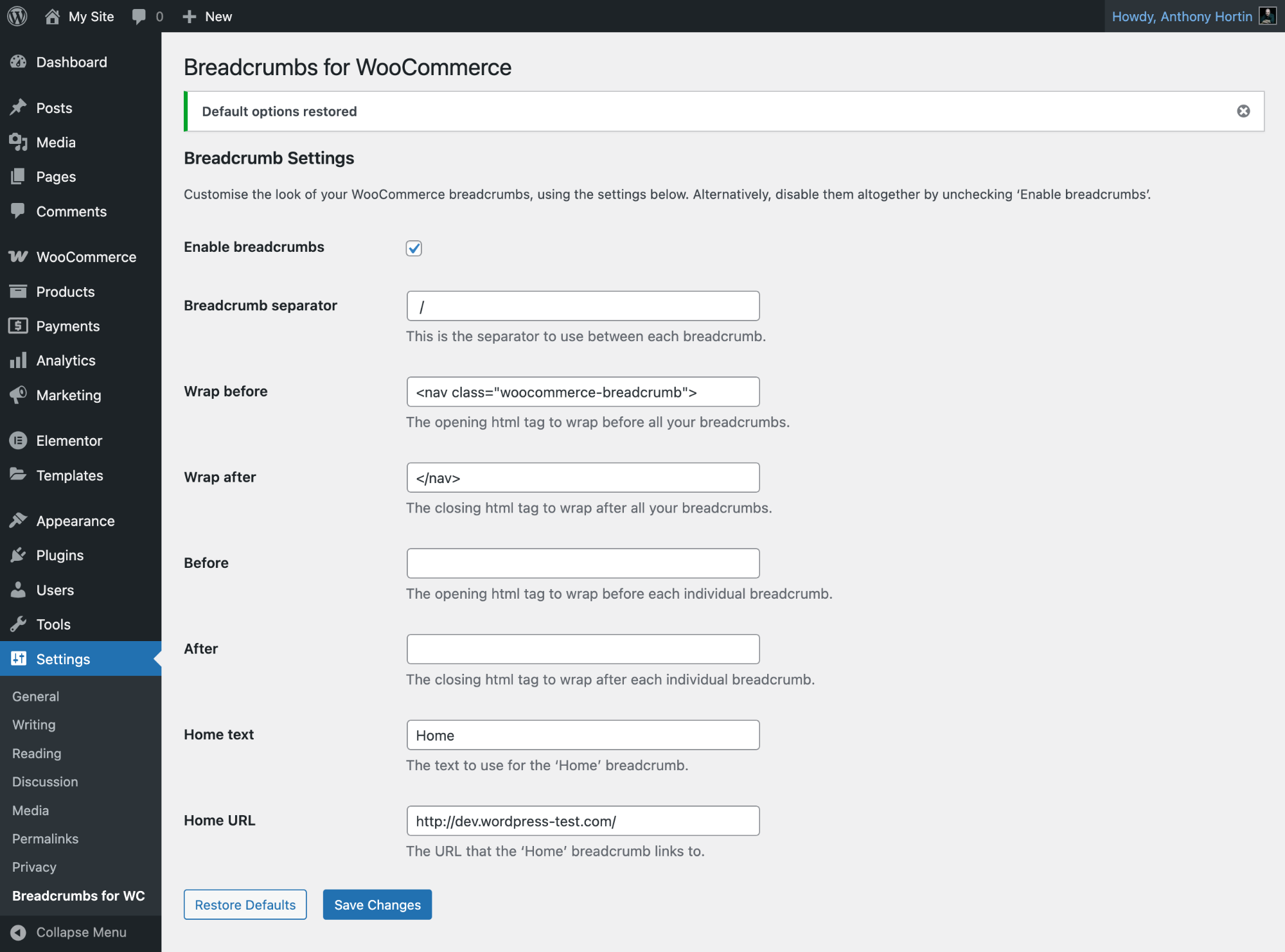
Breadcrumbs for WooCommerce default settings
-
Breadcrumbs for WooCommerce settings
-
Breadcrumbs for WooCommerce settings for WooTheme Themes
About this plugin
Breadcrumbs for WooCommerce is a simple WordPress plugin that helps you restyle the WooCommerce breadcrumbs. It also gives you the ability to disable them completely so they no longer display.
By changing the HTML surrounding your breadcrumbs, you’re able to provide better options for styling your breadcrumbs in different ways. For example, the default breadcrumbs simply display links with a separator character. Using Breadcrumbs for WooCommerce, you can change them to display as an unsorted list of links instead.
NOTE: This plugin wont actually style your breadcrumbs for you. It simply gives you the tools to change the HTML that wraps around your breadcrumbs.
Breadcrumbs for WooCommerce gives you the following settings
- Breadcrumb separator: This is the separator to use between each breadcrumb
- Wrap before: The opening HTML tag to wrap before all your breadcrumbs
- Wrap after: The closing HTML tag to wrap after all your breadcrumbs
- Before: The opening HTML tag to wrap before each individual breadcrumb
- After: The closing HTML tag to wrap after each individual breadcrumb
- Home text: The text to use for the ‘Home’ breadcrumb
- Home URL: The URL that the ‘Home’ breadcrumb links to
If need be, you can also disable the breadcrumbs completely by unticking the ‘Enable breadcrumbs’ checkbox. This will stop the breadcrumbs from displaying on your site.
If you notice there are a few less breadcrumb options on the settings page than you expected, then you’re mostly likely using a WooThemes Theme. WooTheme themes disable the WooCommerce breadcrumbs in favour of the WooFramework Breadcrumbs. The downside to this is that there aren’t quite as many options that can be changed with the WooFramework Breadcrumbs.
To see some examples of how you can style your WooCommerce Breadcrumbs, check out the plugin homepage.
Questions
- I’m not seeing as many options on my settings page as your screenshot
You’re most likely using a WooThemes theme. WooTheme themes disable the WooCommerce breadcrumbs in favour of the WooFramework Breadcrumbs and unfortunately there aren’t as many options that can be configured.
- Can I disable the WooCommerce breadcrumbs?
Certainly! On the settings page, simply untick the ‘Enable breadcrumbs’ checkbox and save your settings.
- How do I get my breadcrumbs back after disabling them?
The easiest method is just to deactivate the plugin. Alternatively, simply tick the ‘Enable breadcrumbs’ checkbox and save your settings.
- Why don’t my breadcrumbs display properly when using the Storefront theme?
Storefront wraps their breadcrumbs with some custom HTML. This means you need to tweak your ‘Breadcrumb separator’, ‘Wrap before’ and ‘Wrap after’ settings. See this support post for more details.
sandywp / also on the shelf
Try another plugin

4.6 · 800K+ installs
Adds breadcrumb navigation showing the visitor's path to their current location.

4.7 · 10K+ installs
Flexy Breadcrumb is a super light weight plugin that is easy to navigate through current page hierarchy.

Breadcrumb – Breadcrumb for WooCommerce and Custom Post Types
4.6 · 10K+ installs
Super light weight & easy breadcrumb navigation for wordpress site.
Spin up a real WordPress site in seconds.
Test plugins, build a demo, hand a client a link — then squash it and start again. No local setup, no Docker.