sandywp / plugins / woocommerce-advanced-free-shipping

Advanced Free Shipping for WooCommerce
Advanced Free Shipping for WooCommerce is an plugin which allows you to set up advanced free shipping conditions.
Ready in seconds.
v1.1.7.1 40,000+ installs WP 5.0+ PHP 7.0+
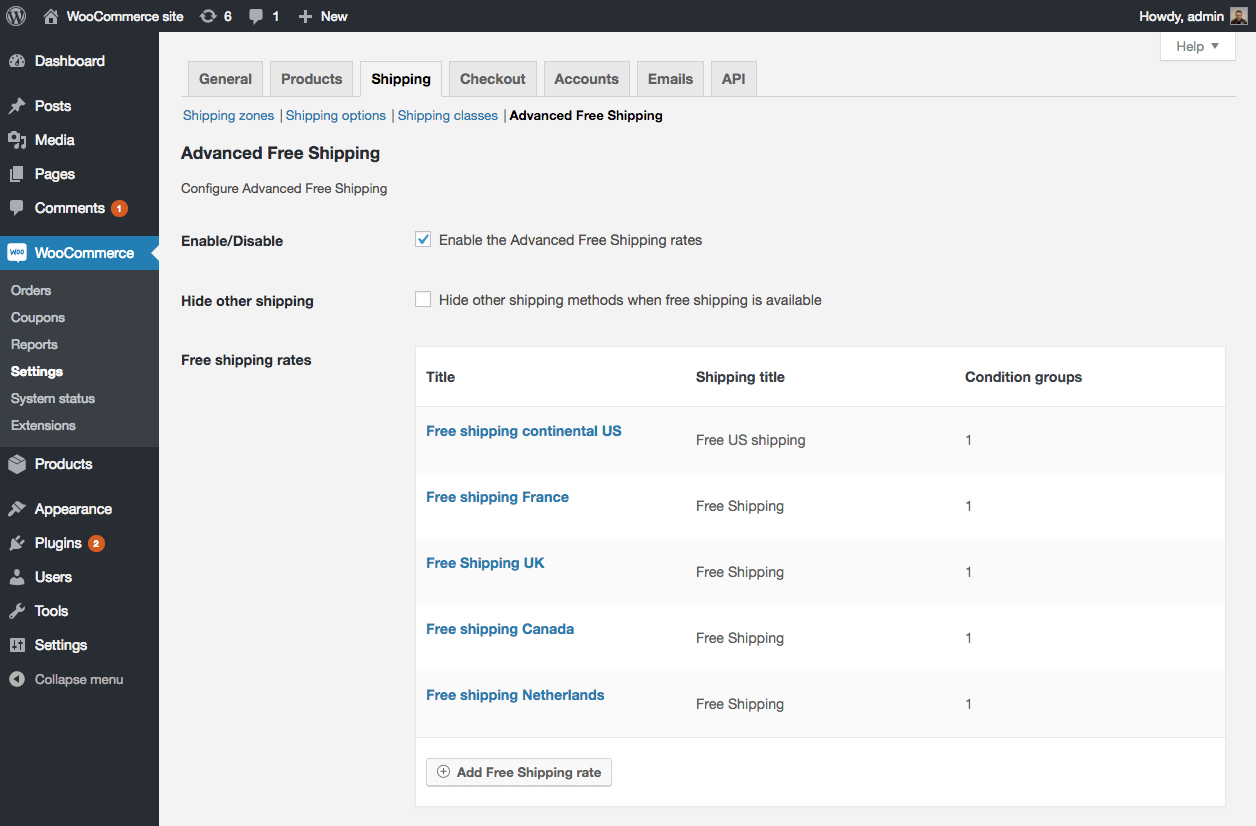
What you get inside
4 screens-
WooCommerce Shipping options overview
-
WooCommerce Shipping rate example
-
WooCommerce Shipping rate all available conditions
-
WooCommerce Shipping condition available operators
About this plugin
With the Advanced Free Shipping for WooCommerce plugin you can setup your own advanced rules to determine when a free shipping rate should be available for the customer.
This plugin will give you full control over your free WooCommerce shipping rates.
Within each shipping rate you can create multiple ‘OR’ condition groups with multiple ‘AND’ conditions inside each group. This means that it is very easy to setup a
free shipping rate for multiple user roles in one shipping rate for example.
There are many default shipping conditions available.
Conditions like:
- Subtotal
- Quantity
- User role
- Country
- Zipcode
- Shipping class
- Category
- Weight
- Volume (Width / Length / Height)
- many, many more…
Not there what you’re looking for? The plugin has been made to be easily extensible, meaning you can also add your own custom conditions through code snippets!
Look at the screenshots!
Applying shipping cost
Have you given this plugin a shot and like how you can set things up?
I’ve build another plugin that allows you to setup shipping cost with the same conditional logic power as this plugin!Features:
– Add shipping cost to the shipping rates
– Per weight
– Per item
– Extra handling fee
– Setup a percentage based fee
– Add Advanced shipping cost via the WAS Advanced Pricing extension
– Cost per shipping class
– Cost per category
– Cost per product
– Cost per weight (table rate)
– Create shipping zones
– Set tax status
Showing a free shipping threshold message
There are a few plugins out there that add a message when someone hasn’t reached the free shipping threshold yet. These plugin work on the ‘Free shipping’ option that is provided in WooCommerce by default.
It is unlikely that these plugins will work out of the box with Advanced Free Shipping due to the complexity of the conditional logic.
In case you do want to show this kind of message, The Advanced Messages for WooCommerce plugin allows you to setup a message with the same type of conditions, allowing you to setup the messages according to the same needs as the free shipping options.
Translations, feature requests and ratings are welcome and appreciated!
Translations
- Spanish
- Italian
- Portuguese (Brazil / Portugal)
- Greek
Questions
- Can I setup partial free shipping?
The short answer to this is ‘no’, the long answer comes down to ‘possibly’. I wrote a full length blog post about this here:
Apply free shipping for specific products in WooCommerce- Can multiple free shipping options show simultaneously?
The current version of the plugin – 1.1.0 – doesn’t have the ability to show multiple Advanced Free Shipping rates at the same time.
During first development I made the – in hindsight – wrong decision thinking “Why would anyone need multiple WooCommerce free shipping options at the same time”.
In the future this will likely be changed, for now I recommend taking a look at the Advanced Shipping for WooCommerce plugin which does have the ability to show all rates that match the conditions.- The shipping rates I configured are not showing at the cart/check, why?
There are two common reasons why a rate may not be appearing when expected.
1) Shipping cache. It could be you’re looking at cached shipping rates. I’d recommend enabling the shipping debug mode when testing.
2) A conflict in the conditions prevents the rate from appearing. For example, having two ‘Country’ conditions in one condition group is not possible.
Try and set a single condition such as ‘Subtotal – greater – 0’ and see if that will appear.If after the above still no rate is showing it is most commonly a third party element that is interfering. Try disabling all other plugins / switch to a default theme and see if the rate is appearing then.
Spin up a real WordPress site in seconds.
Test plugins, build a demo, hand a client a link — then squash it and start again. No local setup, no Docker.