sandywp / plugins / wise-chat

Wise Chat
Advanced chat plugin for WordPress with AI ChatGPT bots. Requires no server, supports multiple channels, appearance settings, moderation, bans.
Ready in seconds.
v3.4 5,000+ installs WP 6.2+ PHP 7.4+
What you get inside
8 screens-
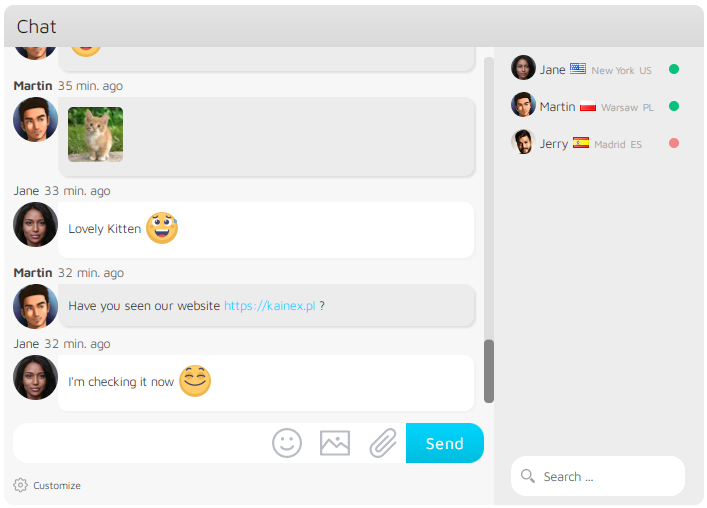
Light Gray theme: pictures, links, customizations, users list
-
Cold Dark theme: pictures, links, customizations, users list
-
Air Flow theme: pictures, links, customizations, users list
-
Default theme: pictures, links, customizations, users list
-
Air Flow theme: simple mode
-
Light Gray theme: admin mode
-
Light Gray theme: responsive design
-
Cold Dark theme: responsive design
About this plugin
Wise Chat is a leading chat plugin that helps to build social networks and this way it increases user’s engagement on your website. The plugin provides a platform to send real-time messages in chat rooms both between real users and AI chatbots. The chat is easy to set up and configure. Its every single feature is extremely adjustable. Our development team is constantly working on new features and supporting the existing ones.
DEMO | Documentation | Features | Wise Chat PRO
- Easy setup and configuration
- AI Chat bots (OpenAI’s ChatGTP integration)
- Themes, appearance adjustments, mobile friendly
- No external server required
- Elementor and Gutenberg (WordPress blocks) integration
- Unlimited number of channels and users, password-protected channels
- WordPress users integration, anonymous users, single sign-on
- Read-only mode, access control, moderation, opening hours
- Banning and muting users
- Replying to messages
- Flood Control, bad words filter, spam reporting
- Posting links, images, camera pictures, files, emoticons, YT videos
- Localization and backups
See below for the full list of features.
Check Wise Chat Pro with AI:
* OpenAI Integration
* GPT Assistants
* AI Chat Bots
* All features of Wise Chat Pro
* Premium support and free updates for 6/12/18 months (depending on the option)
Check Wise Chat PRO:
* Private one-to-one chats
* Facebook/Twitter/G+ login
* Video calls
* Voice messages
* Avatars
* Tenor GIFs
* Reactions (liking chat messages)
* Facebook-like sidebar mode
* Pro themes
* Custom emoticons and 3 use pre-defined sets
* E-mail notifications
* Pending messages (full moderation)
* Multisite support
* BuddyPress/Gutenberg/Elementor integration
* Edit and reply to messages
* Hooks
* Premium support and free updates for 6/12/18 months (depending on the option)
Check Wise Chat LIVE:
* Customizable live chat widget
* Incoming chats management page
* Multiple operators
* All features of Wise Chat Pro
* Premium support and free updates for 6/12/18 months (depending on the option)
Buy once, use forever, no subscription, no recurring payments!
Scroll down to find out more about Wise Chat Pro benefits, for more product details go to Wise Chat Pro site
Wise Chat full features list:
- Easy installation: Install the chat using a shortcode, widget or PHP function.
- Mobile ready: Fully responsive design.
- Themes: Use one of 4 nice themes.
- No external server required: There is no need to set up, maintain or pay for a server. Regular hosting is sufficient.
- Unlimited Chat Channels: Let people post messages in dedicated chat rooms (called channels). Run multiple channels either simultaneously on the same page or on separate pages.
- Private Chat Channels: Make individual chat channels private by protecting them with a password. Only users that know the password could access the channel.
- Channels management: Remove all messages from the single channel or delete the channel completely.
- Anonymous Users: Unregistered or anonymous users can be allowed to participate in the chat. Auto-generated name (configurable) is assigned to such user.
- Anonymous Users with custom name: Let users to choose their name when they visit the chat for the first time.
- Registered Users: Registered and logged-in users are properly recognized by the plugin.
- Single sign-on: No separate login to the chat is required. If an user is logged-in to your website, then the chat automatically logs her / him in.
- Read-only mode: Make the chat read-only for anonymous users. Encourage your users to register in order to post messages.
- Users limit in channels: Limit the amount of users allowed to participate in a channel.
- Channels limit for an user: Limit the amount of channels that an user can participate simultaneously.
- User settings: Chat users have options to change their name, color of their messages or mute sounds generated by the chat.
- Restrict access: Option to permit access for registered and logged-in users only.
- Flood Control: Detect spammers and block them from posting messages in the chat.
- Posting links and images: Option to allow clickable links and images. Posted images are downloaded into Media Library.
- Pictures from camera: On mobile devices users can take a picture directly and post it with a message.
- YouTube movies: Display links to YouTube movies as a video player with adjustable width and height.
- File attachments: Attach files directly to the messages using convenient uploader.
- Multiline messages: Let your users post long messages in multiple lines. Keyboard shortcut Shift+Enter can be used to send such messages.
- Notifications: Signal new messages, new users, absent users or mentioned users. It can be a sound or a counter in browser’s title.
- 24 sounds: Use any of 24 ready-to-use notification sounds.
- Messages auto cleanup: Auto cleanup messages older than defined amount of time.
- Localization: Translate the chat to your language.
- Appearance adjustments: Adjust visual appearance on the settings page.
- Chat Moderation: Protect your chat by enabling abusive words control using built-in bad words filter. It supports English, Polish and German languages.
- Messages filtering: Create rules that detect and replace specific words / patterns in posted messages.
- Chat Opening Hours / Days: Define days and range of hours when the chat is open for users.
- Spam Reporting: Chat participants can report spam messages.
- Bans: Administrator can ban (IP based) users who do not follow rules of the chat.
- Muting: Administrator can mute (IP based) users who do not follow rules of the chat.
- Automatic bans: An option that automatically blocks an user if he / she exceeds the defined number of bad words.
- Moderation: Administrators (or other specified user roles) can delete single messages or ban users that violate chat rules.
- Emoticons: See nice smiles in messages by enabling emoticons support. Emoticons can be inserted either using shortcuts or the list.
- Custom CSS: Custom CSS styles can be applied for each element of the chat.
- Channels statistics: Observe various statistics of channels, including amount of posted messages or users online.
- Detailed configuration page: All features can be configured on the settings page (see the screenshots). You can control messages posting, appearance, channels statistics, filters, bans and localization.
- Twitter hash tags: Detecting Twitter hash tags and converting them into links.
- List of current users: Show the list of online users and their national flag / country / city of origin in the sidebar of the chat. Display amount of online users.
- Backups: Backup all messages from given channel by downloading them as a single CSV file.
All settings are available on Settings -> Wise Chat Settings page.
List of PRO features:
- Private one-to-one messages: Let your users talk to each other in private conversations. Each user has also an option to ignore messages from unwanted users.
- Private messages to offline users: Send private messages to offline users.
- Video calls: Video one-to-one calls.
- Voice chats: Publish voice messages.
- Messages reactions: Liking messages.
- Facebook-like mode: Display the chat attached to the right side of the browser.
- Avatars: Display avatars both in the chat window and in the users list.
- BuddyPress integration: Integrate Wise Chat Pro with BuddyPress friends and groups. Give moderator rights to delete messages or ban users.
- Custom emoticons: Compose your own set of emoticons.
- Facebook / Twitter / Google+ authentication: Increase range of potential users by allowing them to log in using their accounts on social networking sites like Facebook, Twitter or Google+
- Multisite support: Wise Chat Pro supports WordPress multisite environment.
- E-mail notifications: Configure notifications sent to admin or chat participants.
- Pro themes: Use one of 3 extra modern looking Pro themes.
- Hooks: Add your own code to the main points of the chat’s logic.
- Pending messages: Set up full moderation which allows to publish approved messages only.
- Users list search option: Search users list.
- Reply or edit posted messages: Modify or reply to posted messages.
- One-time payment: Pay once and use it forever.
- 6 / 12 / 18 – month upgrade: Update your Wise Chat Pro to the new version for free during 6 / 12 / 18 – month period after the purchase.
Check Wise Chat Pro ! Move customer engagement to the higher level!
See screenshots for detailed features.
Questions
- How to create a channel and open it?
Place the following short code in your page or post:
[wise-chat channel=”My Chat Room”]
or add this PHP snippet in a template file:or put “Wise Chat Window” widget on the desired sidebar and set the desired channel name in Channel field.
The channel will be created during the first usage and it will be added to the list of channels on Wise Chat Settings page in the Channels tab.
- I see “Loading the chat …” and the chat does not show up. What is wrong?
It means that the chat cannot start due to some errors. First, please try to check JS Console (in Chrome of Firefox) in search for any error message. Then please try to fix them. If an error comes from Wise Chat then please let us know it. We will do our best to help you.
Otherwise please contact the support of other plugins / themes that you suspect are causing issues. After fixing all errors in the JS Console the chat should start properly.If you do not see any errors in the console then please try to disable any security plugin you use. They may be blocking the connection between the chat and your server.
After finding a plugin that is blocking the chat try to add an exception to it. Basically, security plugins should avoid this particular URL:https://yourdomain/wp-content/plugins/wise-chat/src/endpoints
You may also read this doc.
- I have iThemes Security plugin and Wise Chat does not work. How to fix it?
Short answer: WP Dashboard > Security > Settings > Advanced > System Tweaks and uncheck “Disable PHP in Plugins”. Then click Save button.
Advanced answer: Edit .htaccess file and locate “#Disable PHP in Plugins – Security > Settings > System Tweaks > PHP in Plugins” line. Then add a line of code:
RewriteCond %{REQUEST_URI} !/wp-content/plugins/wise-chat/.*$ [NC]
RewriteRule ^wp-content/plugins/.*.(?:php[1-7]?|pht|phtml?|phps).?$ – [NC,F,L]Less recommended approach: WP Dashboard -> Settings -> Wise Chat Settings -> AJAX Engine and set to Default. This solution is less efficient.
Explanation: Wise Chat executes PHP files directly in /wp-content/plugins/wise-chat/src/endpoints/ultra directory. It is done strictly for performance because the standard admin-ajax.php endpoint is too slow.
- How to give access to Wise Chat Settings page to other user roles?
Please add ‘manage_wise_chat_option’ capability to any user role you wish to grant access to Wise Chat Settings page to.
By default only administrators have access to this page.- My messages are not visible until I refresh the page. What is going on?
In order to get new messages the chat is requesting the following URL:
https://yourdomain/wp-content/plugins/wise-chat/src/endpoints
It is very likely the URL is is forbidden in your setup (403 error). It may be caused by a security plugin or theme. A specific configuration of HTTP server (.htaccess file or server settings) may be the reason too. Please ask your server administrator to make the URL accessible.
You may also read this doc.
- How to create a password-protected private channel?
First, create a regular channel (see the previous question) and then go to Settings -> Wise Chat Settings page, select Channels tab. In the right to the chosen channel click “Password” link and a form will appear below. Specify the password and confirm it by clicking “Set Password” button. From now the channel is secured and only users that enter valid password are allowed to join.
- How to convert a password-protected channel into an open channel?
Go to Settings -> Wise Chat Settings page, select Channels tab. In the right to the chosen channel click “Password” link and a form will appear below. Click “Delete Password” button.
- How to install the chat using a widget?
Go to Appearance -> Widgets page, drag and drop “Wise Chat Window” widget on the desired sidebar. The name of the channel can be specified as well.
sandywp / also on the shelf
Try another plugin

4.6 · 100K+ installs
(OFFICIAL tawk.to plugin) Instantly chat with visitors on your website with the free tawk.to chat widget. Website: http://tawk.to

5.0 · 3K+ installs
Collect 4x more responses with conversational apps using Typebot.

SendPulse – Live Chat and Chatbot
100+ installs
Free live chat and chatbot plugin by SendPulse. Add live chats to your website to engage your site visitors and help solve their…
Spin up a real WordPress site in seconds.
Test plugins, build a demo, hand a client a link — then squash it and start again. No local setup, no Docker.