sandywp / plugins / widget-google-reviews
Rich Showcase for Google Reviews
Google Reviews plugin for WordPress. Set up in a minute. No API keys or sign-in. Free, GDPR, review updates, multiple places, widgets and shortcodes.
Ready in seconds.
v7.3 100,000+ installs WP 6.0+ PHP 7.2+

What you get inside
8 screens-
Step 1: find your Google place and choose one of 80 ready-made designs
-
Step 2: set up the widget with a live preview
-
Style settings: stars shape and colors
-
Step 3: publish with the shortcode, the block or a draft page
-
Design with AI: your AI chat writes the look and you apply its code
-
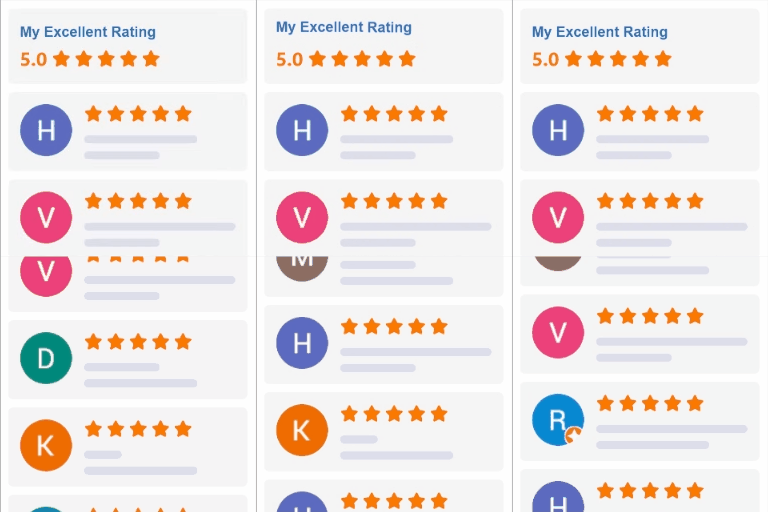
Google reviews slider: Classic design with the rating header
-
Slider: speech bubble design with filled circle stars
-
Slider: Centered design
About this plugin
Build instant trust with visitors by showing your real Google reviews and star rating right on your WordPress site. Setup takes less than a minute — no coding, no API key required for the first 10 reviews.
There are no limits on how many Google business locations you can connect, and you can create as many widgets or shortcodes as needed to place reviews across your site. The plugin is easy to use and helps build trust with your visitors by displaying real Google reviews and your overall rating.
Active on 100,000+ WordPress sites.
Want to see how it works? Watch the short demo below to see how quickly you can get started – or simply try it in the Live Preview.
Google reviews slider, grid, list and rating
- Responsive layouts: Slider, Grid, List and Rating
- Rating layout can open the reviews in a popup on click
- Floating Google rating badge with review count and a live line from your reviews, shown on every page of the site or only where you add it
- Pagination for List and Grid layouts
- Trim long reviews with a “read more” link
- UI options to customize star, text, rating and review colors
- Design with AI: describe the look or show a screenshot to your AI chat (ChatGPT, Gemini, Claude or DeepSeek) and apply the design it writes
- Stars as outline stars, filled tiles or filled circles
- Additional styling with your own CSS
- Works with dark themes
- Upload a custom business photo
Embed Google reviews with Elementor, Gutenberg, WPBakery or a shortcode
- Display reviews using shortcode, widget, block, or page builders (Elementor, WPBakery, Divi, Beaver Builder, SiteOrigin)
- No limits on created widgets or shortcodes
- Optimized for performance: one CSS and one JS file, about 24 KB compressed in total, lazy-loaded images
Google reviews, updates and privacy
- Show up to 10 Google reviews on initial setup – NO API KEY REQUIRED
- Connect multiple Google business places
- Places page: every connected place with its rating and last update; update reviews, create a widget or delete the place from there
- Badges: pick a preset, set position, tone and size, then publish the badge on the whole site in one click
- Automatically updates reviews and ratings when using your own API key
- Fully ADA compliant: built for Accessibility
- Fully GDPR-compliant: no external requests, all data loads from your own website
- Choose which reviews to display or hide, option to hide reviews without text
- “review us on Google” button to collect new reviews
- Supports multiple languages
Support
If you have any questions or need help using the plugin, we recommend the following steps:
- Check the plugin’s support page in your WordPress admin under “Google Reviews / Support”.
- Visit the Support Forum to browse existing topics or ask a new question.
Email support in English is also available on weekdays: [email protected]
External services
The widget on your site loads its scripts, styles and images from your own site. The plugin itself connects to these services, in the WordPress admin and in the background:
RichPlugins connect service
Used when you connect a Google place without your own Google API key: the search form on the Create Widget page and the first 10 reviews of the place come from app.richplugins.com. It receives the place you search for or its Place ID, the language of the reviews, your site URL and the plugin’s connection code. The same server is asked once when you open the debug information on the Support page. Terms of Service, Privacy Policy.
Google Places API
Used when you add your own Google API key: to find a place, to connect it and to update its reviews every day. Google receives the Place ID or the search text, the language and your API key. When a place is connected or updated, the reviewers’ photos and the business photo are downloaded from Google to your site. Terms of Service, Privacy Policy.
ip6.me
Used on the Settings page when a Google API key is set: ip6.me answers the public IP address of your server, which you can use to restrict the key. Nothing but the request is sent.
YouTube, Facebook and X on the Support page
The Support page in the WordPress admin shows a video and follow buttons that your browser loads from YouTube, Facebook and X when you open that page. YouTube Terms, Google Privacy Policy, Meta Privacy Policy, X Privacy Policy.
AI chats (Design with AI)
The Design with AI window in the widget editor has buttons that open the AI chat you choose in a new browser tab: ChatGPT, Gemini, Claude or DeepSeek. The plugin does not connect to these services and sends them nothing by itself. Your browser opens the chat’s site; for ChatGPT and Claude the address carries a short prompt: a link to the description of the theme format on cdn.reviewsplugin.com, which the chat reads, and whether the widget is a slider or a grid on a light or dark page. In the other chats you paste that description yourself, and you always paste the chat’s answer into the plugin yourself. Nothing about your site is sent. OpenAI: Terms, Privacy. Google: Terms, Privacy. Anthropic: Terms, Privacy. DeepSeek: Terms, Privacy.
RichPlugins CDN
Only when Debug mode is switched on in the Settings: the plugin’s scripts and design files are loaded from cdn.reviewsplugin.com instead of the plugin’s folder. Nothing about your site is sent. Terms of Service, Privacy Policy.
Roadmap
- Under discussion.
Questions
- Do I need a Google API key?
No, you can connect and display up to 10 Google reviews without any API key – just paste your Google Maps URL or Place ID and you’re done. An API key is only needed if you want reviews to update automatically. We provide a step-by-step guide in the plugin’s Support section showing how to create a free Google API key.
- Is the plugin GDPR-compliant?
Yes. All review data, business photos, and reviewer avatars are stored locally on your WordPress site after the initial connection. No external requests are made when visitors load your pages, so no personal data is shared with Google or any third party on page view. There’s also an option to display only the first name and initial of the reviewer’s last name.
- Can I connect multiple Google Business locations?
Yes, there are no limits on the number of Google Business places you can connect. Reviews from multiple locations can be combined in a single widget and sorted by date, or you can create separate widgets for each location.
- Will reviews update automatically?
Yes, when you add your own free Google API key, the plugin will refresh reviews on a daily schedule. Without an API key, the initial 10 reviews are loaded once; you can fetch the latest reviews at any time from the Places page.
- Does it work with Elementor, Gutenberg, and WPBakery?
Yes. The plugin provides a native Gutenberg block, a shortcode that works in any page builder (Elementor, WPBakery, Beaver Builder, Divi, SiteOrigin), and a classic sidebar widget. You can mix all three on the same site.
- How do I embed Google reviews on a WordPress page?
Open Google Reviews in the admin menu, find your business in the connection wizard and save the widget. Paste its shortcode into any page, add the Google Reviews block in the editor, or place the classic widget in a sidebar.
- Why do I get only 5 reviews with my own API key?
The Google Places API returns 5 reviews per request. The plugin checks daily and keeps every new review it sees, so the list grows over time.
- Can I hide some reviews?
Yes. Every review has a hide button in the widget builder, and there is an option to hide reviews without text.
sandywp / also on the shelf
Try another plugin

4.9 · 1M+ installs
Google Reviews Widget for WordPress. Display Google reviews in 1 minute with 45 professional layouts. Build trust, boost SEO, and…

Reviews Feed – Google Reviews, Yelp, Trustpilot & Tripadvisor Reviews Widget
4.3 · 100K+ installs
Turn your Google and Yelp reviews into trust on any page, free and with no API key, or show all 11 review platforms with Pro.

WP Social Ninja – Embed Social Feeds, User Reviews & Chat Widgets
4.8 · 30K+ installs
Add Facebook feeds, Instagram feeds, TikTok feeds, Facebook reviews, WhatsApp Chat, Messenger chat, Testimonial, and others using…
Spin up a real WordPress site in seconds.
Test plugins, build a demo, hand a client a link — then squash it and start again. No local setup, no Docker.