sandywp / plugins / widget-css-classes
Widget CSS Classes
Add custom classes and ids plus first, last, even, odd, and numbered classes to your widgets.
Ready in seconds.
v1.5.4.1 80,000+ installs WP 3.3+ PHP 5.2.4+

What you get inside
4 screens-
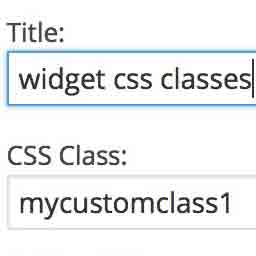
Basic Widget
-
Widget with ID field and Predefined Choices
-
Settings Page
-
Generated HTML
About this plugin
Widget CSS Classes gives you the ability to add custom classes and ids to your WordPress widgets
Please note that this plugin doesn’t enable you to enter custom CSS. You’ll need to edit your theme’s style.css or add another
plugin that allows you to input custom CSS.
This plugin also adds additional classes to widgets to help you style them easier:
- widget-first: added to the first widget in a sidebar
- widget-last: added to the last widget in a sidebar
- widget-odd: added to odd numbered widgets in a sidebar
- widget-even: added to even numbered widgets in a sidebar
- widget-#: added to every widget, such as widget-1, widget-2
Features
- Adds a text field to a widget for defining a class
- You can specify multiple classes by putting a space between them
- Optionally adds checkboxes with predefined classes
- Optionally adds a text field to add an id to a widget
- Adds first and last classes to the first and last widget instances in a sidebar
- Adds even/odd classes to widgets
- Adds number classes to widgets
- Fully translatable
- Multi-site compatible
- Compatible with Widget Logic, Widget Context, and WP Page Widget plugins
- Has filters and hooks for customizing output including class names
Credits
- Adding Custom CSS Classes to WordPress Widgets
- Add .first & .last CSS Class Automatically To WordPress Widgets
- Widget Context compatibility fix provided by Joan Piedra
- Slovak translation by Branco WebHostingGeeks.com
- Polish translation added, Slovak translation files renamed by Tomasz Wesołowski
- Spanish translation by Maria Ramos at WebHostingHub
- Serbo-Croatian translation by Borisa Djuraskovic at WebHostingHub
- Dutch translation and predefined classes fix by Jory Hogeveen at Keraweb
- Russian translation by Наталия Завьялова
- Swedish translation by Olle Gustafsson
- Fix ids notice by Ricardo Lüders
- Brazilian Portuguese translation by Jonathan Xavier at Mealfan
Questions
- Why aren’t the classes showing up in my widget?
You need to make sure you have an HTML element defined for
before_widgetandafter_widgetin your active theme’sregister_sidebarfunctions,
usually located in your theme’s functions.php (/wp-content/themes/yourtheme/functions.php).This HTML element must have class and id attributes. This plugin will not work if
before_widgetandafter_widgetare blank.Example:
register_sidebar( array(

    'name'          => 'Sidebar',

    'before_widget' => '<div id="%1$s" class="widget %2$s">',

    'after_widget'  => '</div>',

    'before_title'  => '<h2 class="widget-title">',

    'after_title'   => '</h2>'

) );- How do I add the CSS for my custom class?
There are two ways:
- Edit your theme’s style.css file (usually located in /wp-content/themes/yourtheme/).
- Use a plugin such as Simple Custom CSS.
- How I export the Settings?
You can export the Settings from Settings > Widget CSS Classes > Import/Export.
- What should I do if I find a bug?
Please file a bug report on GitHub.
sandywp / also on the shelf
Try another plugin

5.0 · 2K+ installs
Allows users to create custom classes on a per-post/term basis.

5.0 · 1K+ installs
Widget Classes allows you to add classes to your individual widgets to be used by your theme. This is done by appending an…

5.0 · 200+ installs
Enhances the body_class template tag, adding some extra classes to the body (post/page slugs, post categories, and archive parent…
Spin up a real WordPress site in seconds.
Test plugins, build a demo, hand a client a link — then squash it and start again. No local setup, no Docker.