sandywp / plugins / when-last-login

When Last Login
Show a users last login date by creating a sortable column in your WordPress users list.
Ready in seconds.
v1.2.3 50,000+ installs WP 5.0+ PHP 7.4+
What you get inside
2 screens-
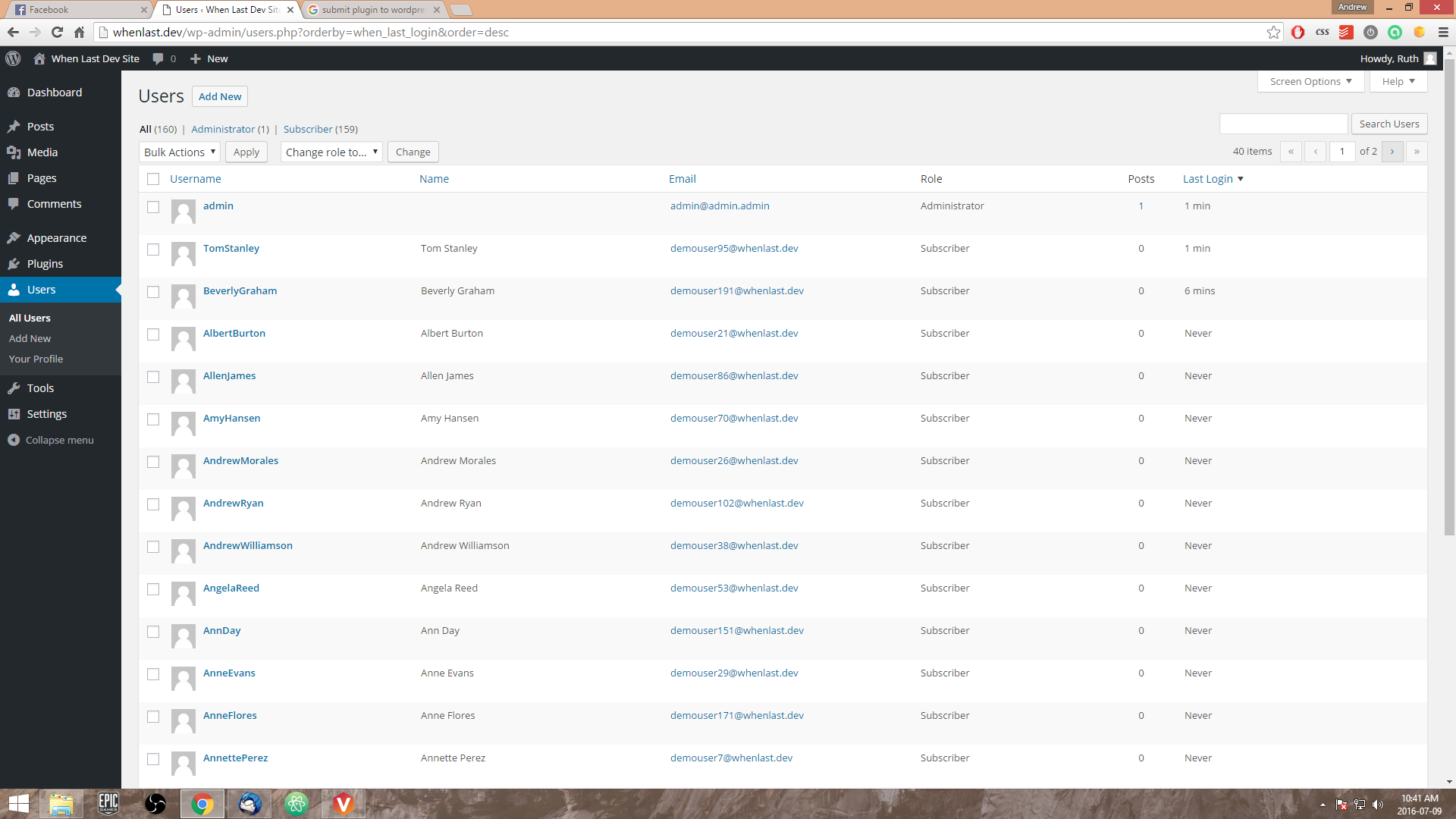
When Last Login - User's list custom last login field with sorting according to "Last Login" time.
-
When Last Login - Show top 3 user login (includes 'administrators' in free version)
About this plugin
A lightweight plugin that allows you to see active users according to their last login time/date. No need to configure, simply activate When Last and you’re ready to go! This adds a custom column to your WordPress users list of “Last Login” and a timestamp linked to that user.
Features
- Show when last a user has logged into your site.
- Sorts users according to last login time stamp (Ascending/Descending) in the WordPress user list.
- Administrator widget for top 3 users according to login count.
- Integrates with Paid Memberships Pro 1.8+ – Add’s a ‘Last Logged In’ column to the ‘Members List’.
- Generates a login history table under ‘When Last Login’ > ‘All Login Records’.
- Hooks and filters for developers.
- Record the user’s last IP address when logging into your WordPress website (Optional Setting).
- A variety of Premium and Free add-ons available.
Free Add-ons
Premium Add-ons
- When Last Login – Slack Notifications
- When Last Login – User Statistics
- When Last Login – Zapier Integration
When Last Login in your Language
We need your help to translate When Last Login into your locale. To translate When Last Login, simply visit https://translate.wordpress.org/projects/wp-plugins/when-last-login
Track Your Members Better
You are able to track which members login to your site by simply sorting your default user’s list according to when last the user was seen in easily readable text such as “X Min/Hours/Days/Weeks/Months/Years”.
Plugins that When Last Login integrates with
Here is a list of plugins we currently support:
If you have a plugin and would like to integrate with When Last Login, please open a support thread.
Need Help
Something not working as intended or have a question about functionality of When Last Login. Open a support thread
Questions
- What does When Last Login do exactly?
When Last Login allows you to see when last users have logged into your WordPress website. This is great for big sites that require user management.
- Is When Last Login GDPR ready?
Since version 1.0, we have made it easier to be GDPR compliant. With this being said, you need to take the necessary steps in order to become GDPR compliant – we are not a law firm!
- Does this work with 2FA?
Yes, this integrates with the Two Factor Authentication plugin.
- Is this plugin free?
Yes, When Last Login is a free plugin for WordPress. We are looking into possibilities of creating a Pro version with a lot more features around the user data of WordPress users. We rely heavily on donations to keep all of our plugins free. If you wish to donate, please click on the donation link on the WordPress repository.
- Where is the When Last Login settings page?
The settings page is found under the menu item ‘When Last Login’ within the WordPress dashboard.
- How can I remove data I no longer need?
Inside your WordPress dashboard, navigate to ‘When Last Login’ -> ‘Settings’. Under the ‘Tools’ heading, you will have a couple of actions that you can run, such as clear old login records, clear all login records and clear IP Addresses.
- I have installed When Last but users are showing “Never” under “Last Login”?
This is because users have not logged in since you have activated “When Last Login”. By default we set the “Last Login” to “Never” but this can be easily changed. Once a user logs into your site, their profile will be updated from “Never” to a timestamp.
- I have updated and lost my ‘Login Records’ link in the WordPress dashboard
As of version 0.6 the ‘Login Records’ has been moved under the ‘Users’ link in the admin dashboard.
Version 0.7 introduced a settings page menu item. The ‘Login Records’ can now be found under the ‘When Last Login’ menu item.
sandywp / also on the shelf
Try another plugin
-
Show a users last login date by creating a sortable column in your WordPress users list.
-
A lightweight plugin that allows you to see active users according to their last login time/date.


Spin up a real WordPress site in seconds.
Test plugins, build a demo, hand a client a link — then squash it and start again. No local setup, no Docker.