sandywp / plugins / whatshelp-chat-button

Chat Button & Custom ChatGPT-Powered Bot by GetButton.io
Floating button for chatting with your visitors via WhatsApp, Messenger, Contact form, and more.
Ready in seconds.
v1.9.2 20,000+ installs WP 2.7+
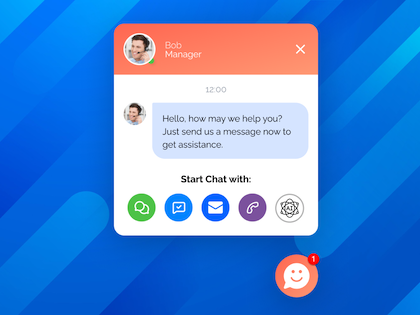
What you get inside
4 screens-
GetButton Chat Button.
-
Facebook and WhatsApp chat for website.
-
Greeting message.
-
GetButton ChatGPT bot.
About this plugin
The Chat Button by GetButton instantly connects website visitors to your preferred messaging apps like Facebook Messenger or WhatsApp, allowing them to initiate conversations with you directly. You can continue these conversations anytime, anywhere, ensuring seamless communication with your customers.
Now, with the Custom ChatGPT-Powered Sales & Support Bot—included FREE with the basic GetButton subscription—you can supercharge your customer interactions. Why hire more sales or support staff when the ChatGPT bot, trained on your website’s content, can handle inquiries, guide visitors, and even close sales for you? It’s a cost-effective, smart solution that works around the clock.
Why should I use Chat button?
Key Benefits
- Uninterrupted Conversations: Keep the dialogue going even after visitors leave your website.
- 24/7 AI-Powered Support: Provide intelligent, round-the-clock support with the ChatGPT 4 bot trained on your website content.
- Cost Efficiency: Save on hiring additional staff by leveraging the power of AI.
Amazing Features
- Quick Installation: Get started in under 60 seconds with full customization options.
- Cross-Device Compatibility: Works perfectly on desktops, tablets, and mobile devices.
- Multi-Messaging App Support: Connect with customers on Facebook Messenger, WhatsApp, Viber, Snapchat, Line, WeChat, Telegram or even a custom contact form!
- ChatGPT Livechat Support: The ChatGPT bot handles visitor inquiries, offers support, and assists in making sales based on your website’s content.
- Lead Generation: Add a floating contact form to capture more leads and drive sales.
- Multi-Channel Setup: Use one messaging app or several, depending on your needs.
- Proactive Engagement: A greeting message can increase chats by up to 10X.
- Multilingual Support: Compatible with multilingual sites and multisite networks.
- Lightweight & Fast: The SVG icons are super-lightweight and pixel-perfect on any display resolution.
Get More Chats and Sales with EXCLUSIVE Features:
- AI-Powered Bot Assistance: Automate customer engagement and support with the ChatGPT bot trained on your business knowledge.
- Activate Greeting Message to better engage website visitors.
- Add Up to Ten Buttons: Customize your widget with multiple buttons.
- Customizable Button Appearance: Color, Size, Animation, Shadow, Custom Icon and much more.
- Branding: Add your company logo to the Greeting Message.
- Flexible Widget Placement: Position the widget anywhere on your site.
- Where to show feature: Choose All website pages or selected ones.
- Google Analytics Tracking: Monitor click-through rates with ease.
Support
GetButton offers 24×7 support. Send us an email at [email protected] for assistance.
You can also connect with us on LinkedIn.
Visit https://getbutton.io/ and https://help.getbutton.io/ for more information.
Arbitrary section
Questions
- For additional information check https://help.getbutton.io
sandywp / also on the shelf
Try another plugin

Floating Chat Widget: Contact Chat Icons, Telegram Chat, Line Messenger,…
5.0 · 300K+ installs
WhatsApp chat, Facebook Messenger, Telegram, TikTok, Instagram, Email, Line, WeChat Phone call, SMS, 20+ live chat icons &…

Lead Generation Contact Widget & AI Chatbot: Chat Button, Phone Call,…
5.0 · 10K+ installs
💬 Turns visitors into leads. Contact Widget, Free AI Chatbot, WhatsApp, Instagram, Facebook Messenger, Telegram, phone call,…

Sticky Chat Widget – Floating Chat Icons, Contact Form, Call, Click to Chat,…
5.0 · 10K+ installs
Social chat buttons with WhatsApp, Messenger, WeChat, Telegram, Instagram, TikTok, Zalo & more — plus SMS, Call button,…
Spin up a real WordPress site in seconds.
Test plugins, build a demo, hand a client a link — then squash it and start again. No local setup, no Docker.