sandywp / plugins / weglot

Translate WordPress with Weglot
Multilingual AI Translation
Translate WordPress sites with automatic AI translation into 110+ languages. Multilingual SEO, WooCommerce compatible, 110k+ sites.
Ready in seconds.
v6.2 50,000+ installs WP 5.9+ PHP 7.4+
What you get inside
8 screens-
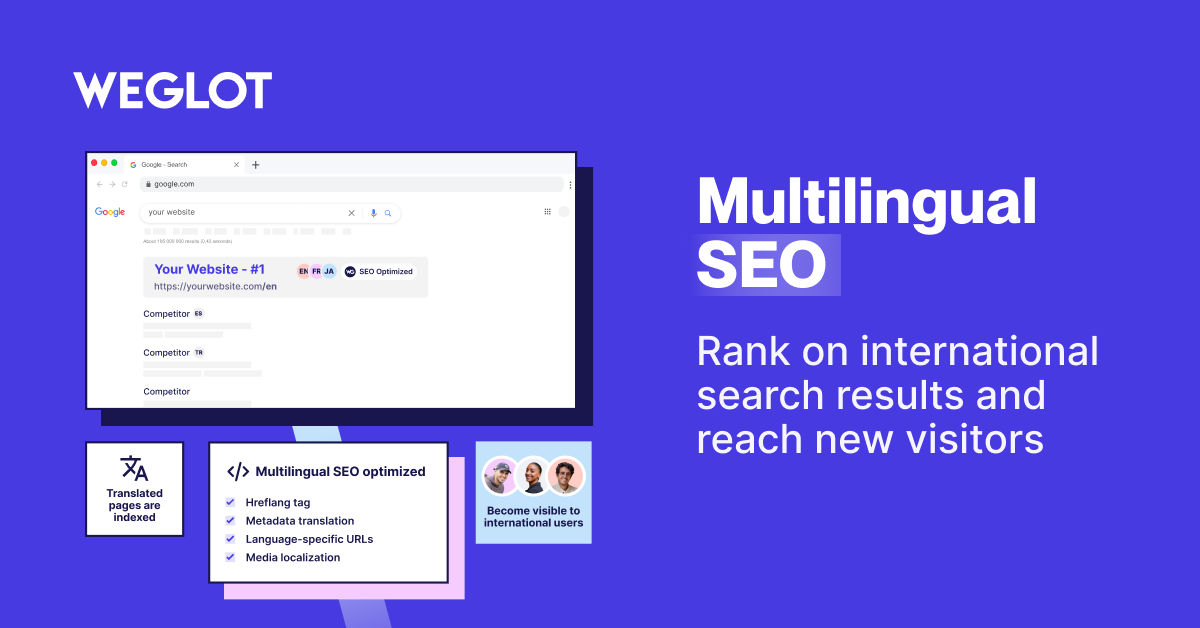
Become visible on search engines with multilingual SEO
-
Train your own AI Language Model for accurate, brand-specific translations tailored to your business.
-
Get full editing control with machine, human and pro translation options
-
Integrate Weglot with your WordPress website and get started instantly
-
Create your translation team and collaborate with members
-
Customize your language switcher for your website and brand
-
Edit your translations directly on a live preview of your website
-
See the impact of your translated pages and leverage new opportunities
About this plugin
Translate and localize your WordPress site into 110+ languages using a custom AI Language Model to generate brand-aware translations on autopilot. Weglot is a WordPress translation plugin trusted by 110,000+ websites worldwide. Translate pages, posts, and WooCommerce stores to go multilingual in 5 minutes with no coding required. Professional translation editing included with frontend editor.
AI-Powered Translation for WordPress
Weglot combines automatic machine translation with human editing control:
- Automatic translation powered by DeepL, Google Translate, and Microsoft Translator.
- Custom AI Language Model powered by OpenAI and Gemini to match your brand voice.
- Multilingual SEO optimization with automatic hreflang tags, metadata, and translated URLs for better localization.
- Visual translation editor for refining and localizing translations directly on your live site.
- WooCommerce translation including products, checkout pages, and customer emails.
- Translation glossary to maintain consistency across your content.
- 110+ languages available including regional variants.
- Pro tiers unlock features designed to scale global businesses:
- Unlimited languages & higher word counts.
- Advanced multilingual SEO.
- Multisite & collaboration features.
- Priority support.
WooCommerce Translation Features
Translate and localize your entire WooCommerce store to boost international sales:
- Product descriptions, categories, and attributes.
- Cart, checkout, and account pages.
- Customer emails in the user’s native language.
- WooCommerce-specific metadata and taxonomies.
The Weglot Advantage
We focus on speed and accuracy. Our AI translation tool detects all your content instantly. You don’t need to manually duplicate pages or manage complex PO files. Everything happens in the cloud, so your site speed remains fast while you scale globally. Unlike traditional translation plugins that create heavy database loads, Weglot is 100% built for performance.
Proven Global Results
- The Bradery: Scaled their fashion ecommerce store to 500+ daily product translations, saving hours of manual work every week.
-
The biggest win for us is the time we’ve saved. It takes us about ten minutes twice a week to double-check everything is running how we want it. Everything else is done by Weglot.*
Adèle Aubry, Ecommerce Manager at The Bradery -
REVIEWS.io: Achieved a 120% increase in German traffic and a 20% conversion boost after localizing with our AI-powered workflow.
-
We needed a product that dramatically increased the speed of website translation. Our clunky manual coding approach was time-consuming, but with Weglot, it’s fast and effortless.*
Rich Ball, Marketing Manager, REVIEWS.io -
Ron Dorff: Now generates 70% of their revenue from international exports by providing a fully-localized customer experience.
Weglot interface is really friendly and easy to use. You can find all your content in a few clicks and then translate it quickly and efficiently.
Jamila Halloum, Digital Marketing Director at Ron Dorff.
Important Links
- https://www.weglot.com/
- https://www.weglot.com/terms
- https://www.weglot.com/security
By using this plugin, you agree to Weglot’s terms and policies. Please review these documents to understand how your data and content are managed and protected.
If you decide to stop using Weglot, your website will no longer be translated. All translations are stored on Weglot’s servers. However, you can export all your translations using our import/export feature before discontinuing the service to save your translations. More details on how to do this can be found here: https://support.weglot.com/article/206-can-i-export-my-translations. If you do not have access to this feature, you can request support from Weglot to assist with the export before you leave.
Questions
- How do I translate WordPress with Weglot?
To translate WordPress with Weglot, install the plugin, add your API key, and select your languages. Your site will be automatically translated. Weglot detects all content including pages, posts, and WooCommerce products. The process uses AI-powered machine translation from DeepL and Google Translate.
- What is a WordPress translation plugin?
A WordPress translation plugin should offer a mix of speed and control. Weglot provides instant AI translation with a visual editor for manual refinements. This ensures your multilingual site is both accurate and fast to launch without technical expertise.
- How to translate WordPress automatically?
To translate WordPress automatically, Weglot uses advanced AI engines to scan and translate your content the moment it’s published. This “set and forget” approach keeps your translations synchronized across all languages without manual work.
- Can I translate WordPress with AI?
Yes, you can translate WordPress with AI using Weglot’s custom AI Language Models. Powered by OpenAI and Gemini, our tool learns from your brand guidelines and past edits to provide context-aware translations that match your brand voice.
- Does Weglot translate WooCommerce?
Yes, Weglot translates WooCommerce stores completely, from the product catalog to the checkout experience. It ensures a localized buyer journey, which is critical for increasing international conversion rates.
- How do I translate WooCommerce products?
To translate WooCommerce products, simply activate Weglot and it will automatically detect your product titles, descriptions, and attributes. Use your translation glossary to keep product names or brand terms in their original language if you prefer, ensuring total brand consistency.
- Can Weglot translate WooCommerce emails?
Yes, you can translate WooCommerce emails with Weglot to ensure your customers receive order confirmations and shipping updates in their own language, providing a professional post-purchase experience.
- How to make WordPress multilingual?
To make WordPress multilingual, Weglot creates dedicated subdirectories (like /es/ or /fr/) for each language. This approach is recommended by Google for SEO and ensures every translated page is indexed separately.
sandywp / also on the shelf
Try another plugin

TranslatePress – Translate Multilingual sites with AI Translation
4.7 · 400K+ installs
Translate your site visually, directly from the front-end. Go multilingual in minutes using automatic AI translation. Works with…

LocoAI – Auto Translate for Loco Translate
4.9 · 70K+ installs
LocoAI - Auto Translate For Loco Translate is a powerful tool for developers looking to quickly translate their WordPress plugins…
Polylang Duplicate Content Addon
4.5 · 10K+ installs
Duplicate your original post/page content into other languages in one click with the Polylang Duplicate Content addon.
Spin up a real WordPress site in seconds.
Test plugins, build a demo, hand a client a link — then squash it and start again. No local setup, no Docker.