sandywp / plugins / wcpas-product-attributes-shortcode

Product Attributes Shortcode
Shortcode to display a linked list of terms from a product attribute, such as all brand links from a brands attribute.
Ready in seconds.
v2.0.3 700+ installs WP 6.3.0+ PHP 7.4.0+
What you get inside
4 screens-
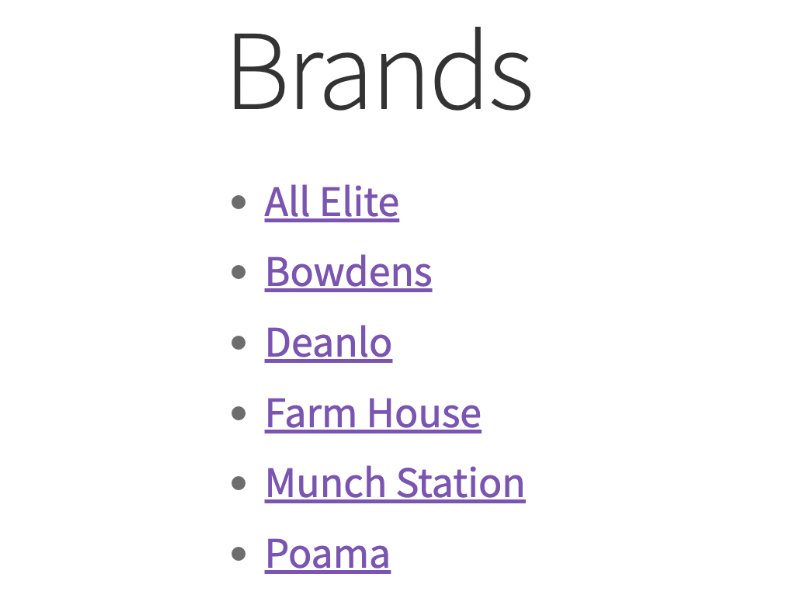
Shortcode display
-
Shortcode display with categorize option used
-
Shortcode display with various additional options used
-
Shortcode added via block
About this plugin
Provides a shortcode to display a linked list of terms from a product attribute, such as all brand links from a brands attribute.
This extension is intended to be used where you want to display all terms from a product attribute, e.g. to display a list of all brands in the footer of your website. It is not intended to be used to display a list of terms associated with a specific product.
Features
- Displays a list of all terms from a specific product attribute
- Choose if these links filter products or go to term archives
- List of terms does not reduce as products are filtered
- Various shortcode attributes to modify the display/functionality
- Elements include classes and IDs for custom CSS styling
Usage
Use the following shortcode replacing the x with your attribute name:
[wcpas_product_attributes attribute="x"]
If your attribute has spaces in the name then replace these with hyphens in the shortcode, if you have other characters in your attribute name see the related FAQ below.
There are various other shortcode attributes which can be used, if these are omitted the defaults are used, the available shortcode attributes are:
archive_links–1to enable archive links e.g./brand/sega/,0to disable e.g./shop/?filter_brand=sega, default is0categorize–first_characterto categorize the terms list by first character, default is emptycurrent_attribute_link–1to still display a link if the current page,0to disable, default is1hide_empty–1to hide empty terms,0to disable, default is1links_target– Use a HTML link target e.g._blankto open links in a new window, default is emptymin_price– Use a minimum price number for links to include a minimum price filter, requiresarchive_links="0", default is emptymax_price– Use a maximum price number for links to include a maximum price filter, requiresarchive_links="0", default is emptyorder–ascordesc, default isascorderby– Any orderby parameter, default is nameshow_counts–1to enable display of term counts,0to disable, default is0show_descriptions–1to enable display of term descriptions,0to disable, default is0
Example shortcode using multiple shortcode attributes:
[wcpas_product_attributes attribute="brand" archive_links="0" categorize="first_character" current_attribute_link="0" hide_empty="0" links_target="_blank" min_price="50.00" max_price="500.00" order="desc" orderby="id" show_counts="1" show_descriptions="1"]
Questions
- Nothing is displaying?
Ensure you have included the shortcode correctly and that the attribute you are using has products assigned. If nothing is still displaying the attribute name you have entered may not be in the correct format, see the related FAQ for more information.
- What attribute name/format do I use?
If your attribute is a single word you just need to enter that. If your attribute has spaces in the name, replace these with hyphens in the shortcode attribute. For more complex attribute names e.g. with special characters you can determine what the attribute name is by editing the attribute in Products > Attributes, in the URL you will see something like
/edit-tags.php?taxonomy=pa_example-attribute&post_type=product, the part after thepa_and before the&is your attribute name, in this example it isexample-attribute.- Why aren’t my list of terms linked?
The list will not include links on the terms if you are using
archive_links="1"and the attribute used does not have archives enabled on the attribute which is set when editing the attribute in Products > Attributes .- My list of terms are linked but the links do not work?
Links are filter based which use your shop page (unless you are using
archive_links="1"), if they are not working you may have not configured a shop page in WooCommerce, this is created during installation of WooCommerce, if it has been removed it will need recreating.- Minimum/maximum price is not working?
These are filter based and therefore require
archive_links="0".- Can I split the list of terms up?
Use the
categorizeshortcode attribute as described in the usage information above.- Can I use it in a page, post, widget, block, etc?
You can use it anywhere you can use a shortcode.
- Can I use it in a PHP template?
Yes, use the
do_shortcodefunction of WordPress to echo the shortcode.
sandywp / also on the shelf
Try another plugin

4.8 · 50K+ installs
WCBoost – Variation Swatches is the ultimate plugin to display WooCommerce product variations in style.
MAS Variation Swatches for WooCommerce
100+ installs
Variation Swatches plugin for WooCommerce by MadrasThemes. Replace dropdown fields on your variable products with Color, Label…

Woocommrece Product Attribute on Cart
10+ installs
Description: This plugin will Add Product Attribute On Cart Page in Woocommrece.
Spin up a real WordPress site in seconds.
Test plugins, build a demo, hand a client a link — then squash it and start again. No local setup, no Docker.