sandywp / plugins / wcboost-products-compare

WCBoost – Products Compare
Enhance your WooCommerce store with WCBoost - Products Compare, enabling customers to easily compare products and make informed decisions.
Ready in seconds.
v1.1.1 30,000+ installs WP 5.7+ PHP 7.0+
What you get inside
4 screens-
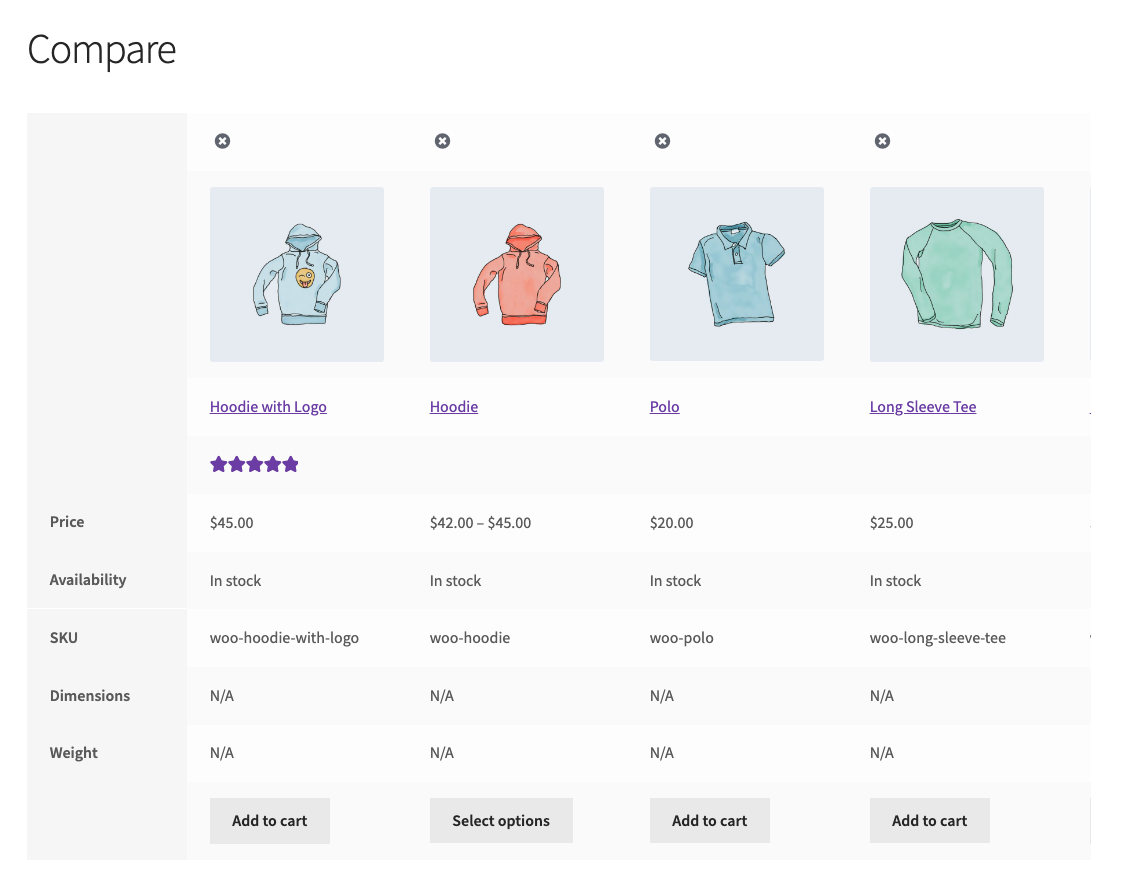
Products comparison page with Storefront theme
-
Comare button on single product
-
Products comparison bottom bar
-
Products comparison popup
About this plugin
When dealing with numerous similar products, customers frequently find it difficult to make a purchase decision. As a result, making it simple for buyers to compare similar products is an important aspect of e-commerce websites. This feature is not included with the basic installation of WooCommerce. Therefore, this plugin was created with the intention of providing a product comparison tool to WooCommerce.
This is a WooCommerce addon created to help websites enhance user experience and conversion rates, hence increasing website revenues.
Users will notice a product comparison option added to the website immediately after installation, which is quick and convenient. Users may quickly add products to their product comparison list. Users can compare similar products by visually displaying product attributes side by side. The product comparison list is also optimized for mobile devices, allowing customers to explore it anytime, anywhere, and quickly decide which items they need to buy.
Add a comparison option anywhere on your website
Customers will now have the opportunity to immediately compare any product on the product page and catalog pages. They may add, remove, and browse the comparison list anywhere on the website with just one click. Because the button is entirely customizable and has a simple appearance, it won’t interfere with your website’s usability.
Quickly browser the comparison list everywhere
You can choose to display the compare table either on its own page or in an AJAX popup. The widget and bottom bar of this plugin also make sure that your customers don’t miss any products.
Main features of the plugin
- Products compare page.
- Products compare popup.
- Compare widget.
- Products compare bottom bar.
- Compare button on single product pages and catalog pages.
- Button is fully customizable.
- Easily integrate to any theme.
- Fully integrated with WooCommerce by using core API.
Questions
- How many products I can compare?
You can compare as many products as you want. This plugin will automatically display them side-by-side that easily to compare.
- Do I have the ability to have a fixed column that wouldn’t scroll if we have many products to compare?
Yes, there the column of features will always be fixed to show in the comparison table.
- Is it possible to customize the Compare button style?
Yes, you can customize the Compare button style in Appearance > Customize > WooCommerce > Products Compare section.
- Does it support variable products?
Yes, you can add variable products to the compare list, but not the variations.
- Can I show the Compare button on the product catalog pages?
Yes, by default the compare buttons will be displayed on both catalog page and singular pages.
- Do I have a sticky compare bar at bottom of the site?
Yes, this is an optional feature of this plugin. You can enable it in the settings.
- Will this plugin work with my theme?
Yes, it will work with any theme, but may requires some styling to make it match nicely.
- Does it work with Multisite?
Yes, it does work with WordPress multisite.
sandywp / also on the shelf
Try another plugin

WPC Smart Compare for WooCommerce
4.5 · 70K+ installs
It helps customers compare products with mighty AJAX, doesn't require opening a new page or iframe, and allows drag-and-drop…

Product Compare for WooCommerce
5.0 · 3K+ installs
Add an easy and powerful product compare feature to your WooCommerce store. Let customers do product comparison by price,…

Products Compare for WooCommerce
4.3 · 1K+ installs
Allow your users to compare products of your shop by attributes and price.
Spin up a real WordPress site in seconds.
Test plugins, build a demo, hand a client a link — then squash it and start again. No local setup, no Docker.