sandywp / plugins / wc-blacklist-manager

Blacklist Manager
WooCommerce Anti-Fraud, Blacklist & Checkout Verification
Block risky WooCommerce orders, spam signups, and form submissions with blacklist rules plus built-in checkout email verification.
Ready in seconds.
v2.3.0 2,000+ installs WP 6.3+ PHP 7.4+
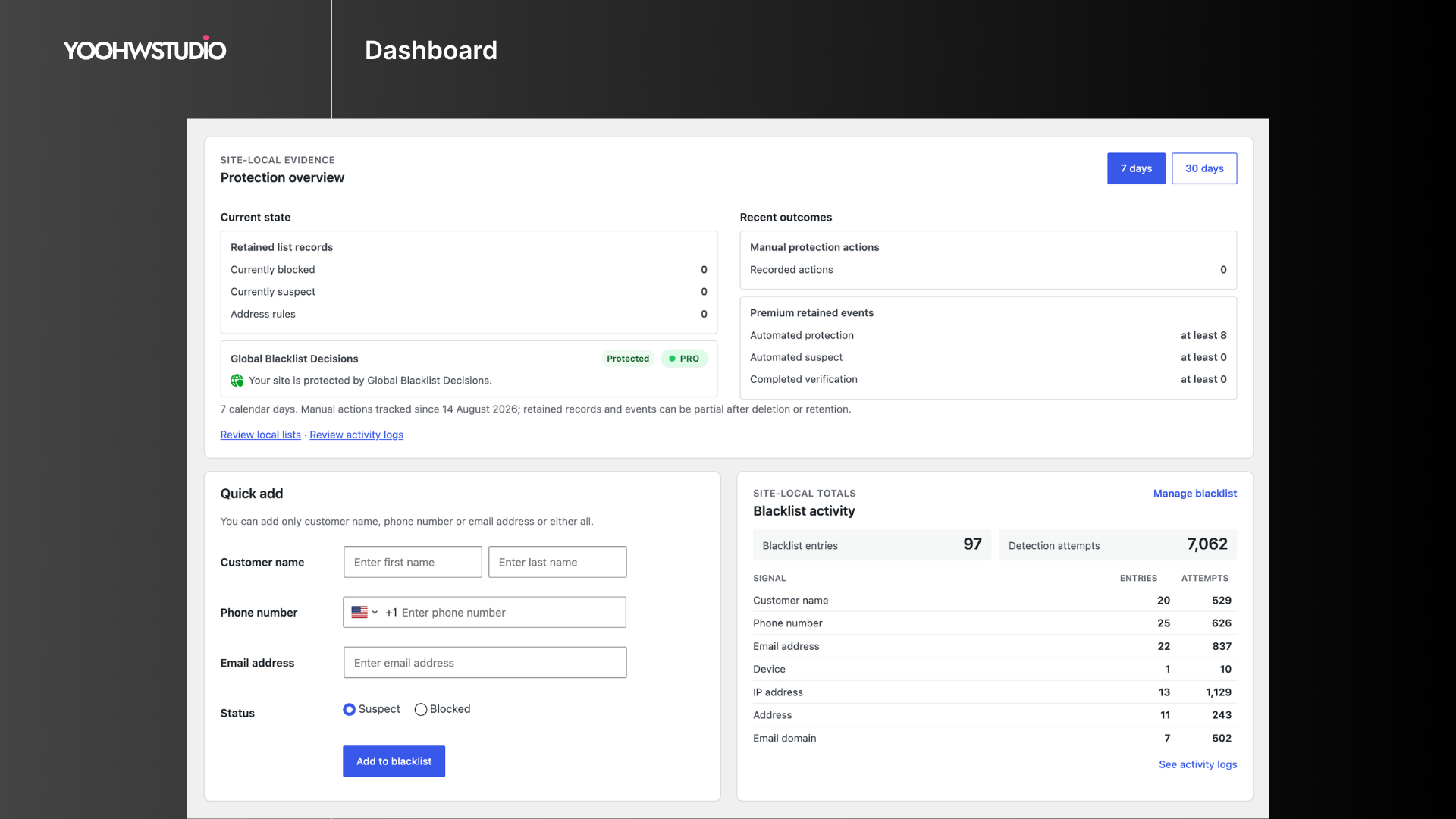
What you get inside
6 screensAbout this plugin
Blacklist Manager is a WooCommerce blacklist, anti-fraud, and spam prevention plugin for stores that need to block fake orders, suspicious customers, spam registrations, and unwanted form submissions.
The free plugin is a complete local protection toolkit, not a Premium trial. Use blacklist rules for phone numbers, email addresses, IP addresses, and email domains at WooCommerce checkout, registration, comments, product reviews, REST API orders, and supported WordPress forms.
The plugin works with WooCommerce Classic Checkout, WooCommerce Checkout Blocks, Contact Form 7, Gravity Forms, and WPForms.
What the free plugin includes
- Manage local email, phone, IP address, and email-domain entries through Suspects and Blocklist workflows.
- Stop matching identities at WooCommerce checkout and protect registration, comments, product reviews, supported forms, and WooCommerce REST API orders.
- Require built-in checkout email verification for the policies you configure. Core owns and runs email verification; phone OTP and Twilio/TextMagic SMS transport belong to Blacklist Manager Premium.
- Configure free customer notices and admin alerts, then review dashboard blacklist and detection statistics.
Documentation | Support | Demo
Key Features
- WooCommerce checkout protection: Block or review orders using phone, email, IP address, and email domain rules.
- Suspect and blocked lists: Review risky identities before moving confirmed abuse to the blocklist.
- Fast blacklist management: Add entries from the dashboard or directly from the WooCommerce order screen.
- Registration protection: Stop signups that match blocked emails, IP addresses, or email domains.
- Comment and review blocking: Prevent comments and product reviews from blacklisted emails.
- Form spam protection: Check Contact Form 7, Gravity Forms, and WPForms submissions against blacklist data.
- Checkout email verification: Require a Core-owned email verification code before allowing checkout to continue.
- WooCommerce REST API protection: Block blacklisted identities from creating orders through external apps or integrations.
- Custom notices and alerts: Customize customer-facing block messages and admin email alerts.
- Dashboard stats: Review blacklist entries and detection attempts from the admin area.
Checkout Compatibility
Blacklist Manager supports WooCommerce Classic Checkout, WooCommerce Checkout Blocks, and many third-party checkout plugins that use standard WooCommerce checkout and order creation flows.
Global Blacklist Decisions
Blacklist Manager can optionally connect your store to Global Blacklist Decisions, a separate broader-risk service that checks order identities such as email, phone, IP address, address, and email domain against network data. It is not required for local Core protection and is not a prerequisite for Premium.
Learn more about Global Blacklist Decisions
Premium Features
Consider Blacklist Manager Premium when recurring abuse makes manual blacklist maintenance too time-consuming, when checkout or payment patterns need automatic action, when repeat attackers change individual identity fields, or when your team needs deeper investigation and audit tools.
Premium is the advanced local/store extension. It adds:
- Risk scoring for blacklist, identity, IP, address, payment, device, and order pattern signals.
- Automation rules to auto-suspect, auto-block, or auto-review orders.
- Payment intelligence for Stripe, PayPal, Mollie, Braintree, WooPayments, AVS, card country, and payer mismatch signals.
- Device identity checks to link repeat abuse across emails, phones, IPs, addresses, and accounts.
- Advanced blocking for customer name, address, device, disposable email, disposable phone, country, VPN, and proxy signals.
- Activity logs, import/export, cleanup tools, permissions, multi-store sync, CAPTCHA, IP intelligence, geocoding, and email validation integrations.
- Phone OTP runtime and Twilio/TextMagic SMS transports; Core continues to own checkout email verification.
Supported Plugins and Integrations
Supported plugins
Premium integrations
- WooCommerce Stripe Gateway, Payment Plugins for Stripe WooCommerce, WooCommerce PayPal Payments, Payment Plugins for PayPal WooCommerce, Braintree for WooCommerce, Mollie Payments for WooCommerce, and WooPayments.
- Cloudflare, reCAPTCHA v3/v2, hCaptcha, IP-api, BigDataCloud, ZeroBounce, NumCheckr, Google Maps, Twilio, and TextMagic.
Use Cases
- Block fake WooCommerce orders before payment review.
- Prevent repeat abuse from known phone numbers, email addresses, IP addresses, and domains.
- Reduce spam registrations, comments, product reviews, and form submissions.
- Require Core email verification during checkout without installing Premium.
- Add Premium phone OTP when a store also needs SMS-based phone ownership checks.
- Review suspicious customers before moving them to the blocklist.
- Use Global Blacklist Decisions as an additional fraud signal.
Questions
- Do I need to configure settings after installation?
Yes. Go to Blacklist Manager > Settings and enable checks for checkout, registration, comments, reviews, forms, or REST API orders.
- What is the Suspects list for?
The Suspects list gives you a review step before fully blocking a customer. Use it when an identity looks risky but should not be rejected immediately.
- Can Blacklist Manager stop checkout through PayPal, Stripe, or another payment gateway?
Yes. Blacklist Manager checks customer details during the WooCommerce checkout and order creation flow before the payment gateway becomes the final decision point. Test custom checkout flows on staging.
- Can this plugin stop contact form spam?
Yes. Blacklist Manager supports Contact Form 7, Gravity Forms, and WPForms submissions.
- Does Blacklist Manager slow down my site?
Blacklist checks run only when needed, such as checkout, registration, comment submission, form submission, or API order creation. The checks are designed to stay lightweight.
- Are Premium features required?
No. Core includes local blacklist management, checkout protection, Suspects and Blocklist workflows, registration/comment/review/form/REST protection, checkout email verification, notices, and dashboard statistics. Premium is appropriate when you need automated risk actions, payment or device intelligence, phone OTP, detailed activity history, multi-store tooling, or advanced integrations.
- What is the difference between Premium and Global Blacklist Decisions?
Blacklist Manager Premium extends protection and administration inside your store. Global Blacklist Decisions is a separate optional connected service for broader-risk checks. You can evaluate either offering for its own use case; neither is a required step before the other, and Core’s local protection works without both.
- Does Global Blacklist Decisions share data?
Global Blacklist Decisions is a connected fraud-prevention service. Data exchange depends on the Global Blacklist connection and checks you enable. Review the Global Blacklist settings, plan details, and privacy terms before using it in production.
sandywp / also on the shelf
Try another plugin

4.3 · 10K+ installs
Add-on for Gravity Forms to create a Blacklisting of specific emails or domains for the Email input field to throw a validation…

4.3 · 4K+ installs
Automatic updating of the comment block list in WordPress with antispam keys from GitHub.
Gravity Forms Block Email Domains
4.1 · 1K+ installs
Easily set a list of email domains to block on email fields in Gravity Forms.
Spin up a real WordPress site in seconds.
Test plugins, build a demo, hand a client a link — then squash it and start again. No local setup, no Docker.