sandywp / plugins / waterwoo-pdf

PDF Ink Lite
Free PDF Watermark & Password Protection
Watermark and password protect PDFs with WooCommerce, Easy Digital Downloads, and Download Monitor Shop. No Ghostscript required, PHP 8+ compatible.
Ready in seconds.
v4.1.7 2,000+ installs WP 7.0+ PHP 7.4+
What you get inside
4 screens-
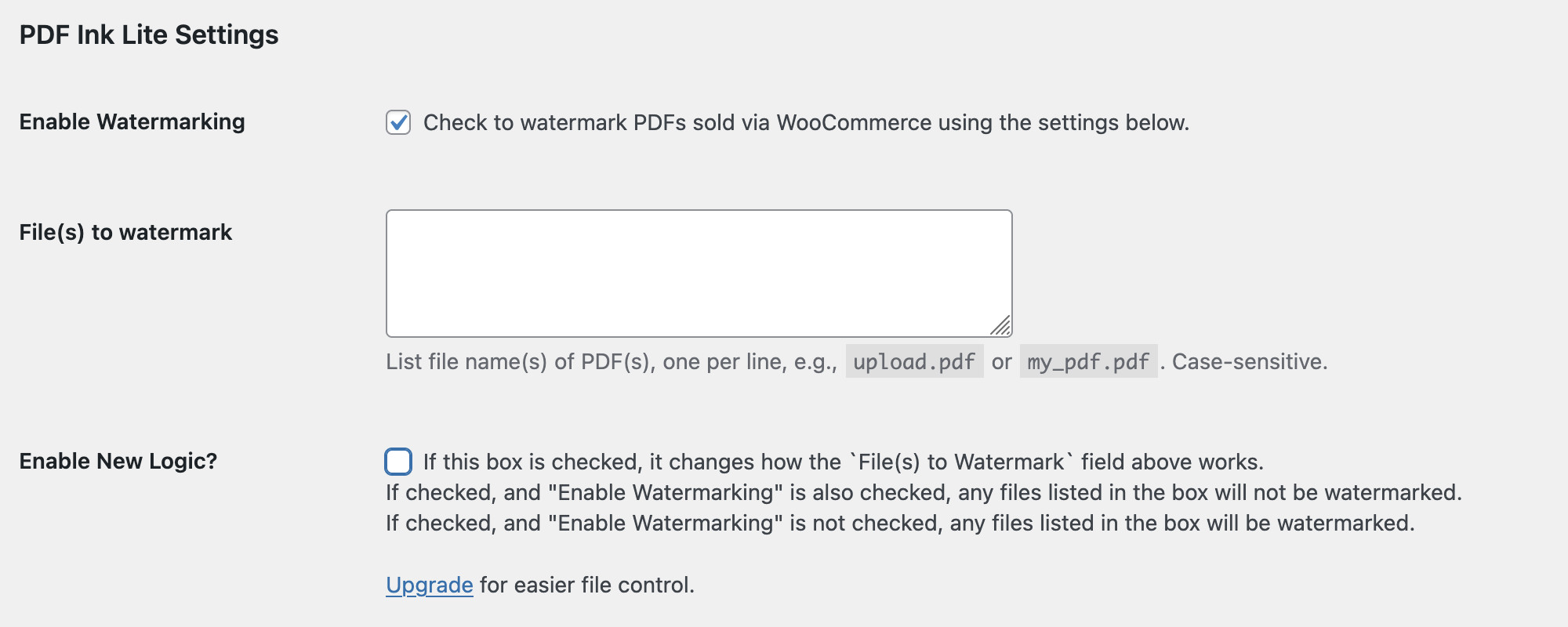
Settings page screenshot, showing where to turn on the plugin and choose files.
-
Settings page screenshot, having to do with font choices and watermark content. Shortcodes are in use and will be converted dynamically to actual customer…
-
Settings page screenshot, showing password and protections settings. RC4 40-bit encryption is set automatically in PDF Ink Lite if protections are selected.…
About this plugin
PDF Ink Lite adds a watermark and optional password protection to PDF files, including PDF ebooks, that customers download from your store.
Add details like a customer’s name, email, or order date to each PDF. Choose the font, color, size, and position of your watermark. PDF Ink Lite works with WooCommerce, Easy Digital Downloads, and Download Monitor.
PDF Ink Lite includes the libraries it needs, so you don’t have to ask your web host to install them. It also works with newer PDF files, not just older versions.
PDF Ink Lite features
PDF Ink Lite works its magic ✨ when a customer clicks a download link. It checks the file and applies your settings. The free version allows you to:
- List which PDF downloads to watermark, or watermark all PDFs
- Choose the font, color, and size of your watermark
- Watermark text centered anywhere on the page, on every page of a PDF
- Add customer details, such as first name, last name, email, order paid date, and phone number
- Add a password and/or limit copying and printing
Get more control with PDF Ink
PDF Ink, the full version of PDF Ink Lite, adds more ways to control, protect, and deliver your files.
- More styling choices: Add your own fonts, change how see-through a watermark is, or style it with HTML
- More placement options: Add multiple watermarks anywhere on the page, with as many positions and angles as you need
- More control over pages: Choose specific pages, page ranges, odd pages, or even pages. Leave out a cover page if you like
- Settings for each product: Use the same settings for every PDF, or set different watermarks and passwords for each product or product variation
- More customer details: Add business name, address, order number, product name, and quantity purchased. Adding other types of customer details requires PHP coding
- More PDF protection: Protect PDFs with stronger AES encryption, and more security options than the free version
- More ways to work with files: Watermark PDFs inside ZIP files and add custom text to EPUB ebooks
- More ways to share files: Create triggered download links with custom shortcodes, embed protected files on a page
- Tools for testing: Preview a watermark or watermark a file from your WordPress admin panel
- Extra file options: Keep a copy of stamped files, optionally recycle them to customers to conserve CPU, and/or set stamped files to be deleted on a schedule.
- More ways to customize: Use right-to-left text, HTML, and QR codes or other barcodes in watermarks
- Keep outside PDF links: Preserve links to websites in a watermarked PDF. Internal table-of-contents links may not always work. SetaPDF-Stamper (add-on) can add support for those links.
- Works beyond WordPress: Use PDF Ink to inline PDF manipulation on any PHP-based website—not just WordPress
Get PDF Ink, the full version of PDF Ink Lite, starting at $45
Questions
- I can’t donate and I cannot upgrade. How can I still support you?
Thanks for thinking of the people who make free plugins!You can add a tiny, hard-to-see link to PDF Ink on page 2 of your PDFs. In PDF Ink Lite settings, open Housekeeping and check the Attribution box.
- Where do I change PDF Ink Lite settings?
On the Plugins page, click the “Settings for XXX” link under PDF Ink Lite.
You can find the PDF Ink settings page by clicking on the “Settings for XXX” link under the PDF Ink Lite plugin title on your WordPress plugins panel.- Something is wrong
Try these steps:
1. Check that WooCommerce, Easy Digital Downloads, or Download Monitor is installed, and that you have a PDF product customers can buy.
2. In PDF Ink Lite settings, make sure “Enable watermarking” is checked.
3. Turn off PDF Ink Lite and check that the original download works.
4. Try a different PDF—ideally one you did not create.
5. Try a different font in the settings.
6. Turn on debugging in PDF Ink Lite settings. Try again, then check the logs.
7. If your server has low PHP memory or time limits, ask your web host whether they can increase them.
8. If possible, ask your webhost if changing PHP version might help.
9. If the watermark is off the page or blank pages appear, see the FAQ below: “Why does the watermark go off the page or create blank pages?”Still stuck? Please post in the WordPress.org support forum before leaving a review. I’m happy to help.
Read these tips before posting in the WordPress.org support forum.
For help with PDF Ink Lite, use the WordPress.org support forum—not email.
For help with the paid version of PDF Ink, use the support channel provided with your purchase. Please don’t ask for paid-version support in the WordPress.org forum.
- My watermark uses non-English text. What should I do?
Try choosing a different font in the settings, such as “Deja Vu.”A font may not include the special characters in your text. If none of the included fonts support your language, you’ll need to add a font with PHP code or use the full version of PDF Ink, which includes more fonts and lets you upload your own.
- How do I test my watermark?
You can test a download by setting a product’s price to $0, or by making a coupon for a free purchase. For WooCommerce, you can also set the product to “Privately Published.”Test the download as a customer would. If you use a coupon, keep it private.
For an easier way to test a watermark without making a purchase, use the full version of PDF Ink
- Why does the watermark go off the page, create blank pages?
The watermark may be too large or too long for the page. Try using a smaller font or shorter text. You can also adjust the Y-axis setting to move the watermark up or down the page.The Y-axis setting is measured in millimeters. For example, an 11-inch-tall page is 279.4 mm tall, so the Y-axis value needs to be lower than that for the watermark to appear on the page. In this exampl, try a font size of 12 and Y of 260.
You can use a negative Y-axis value to measure up from the bottom of the page. This can help when your PDF has pages of different sizes.
- Where do the watermarked files go?
Watermarked files are saved next to the original file, usually in a folder like “wp-content/uploads/year/month/”. Each watermarked file has a unique name that includes the order number and the time it was made.If a customer can’t download their file—for example, because they have reached the download limit—you may be able to find it there.
For WooCommerce “Force” downloads, PDF Ink Lite tries to delete the watermarked file after the download. This may not always work.
The paid version lets you choose how and when stamped files are removed, so you can keep your server clean.
To turn off the cleanup attempt, use the “wwpdf_do_cleanup” filter hook and set it to FALSE.
- What if watermarking fails?
You can choose to send the original file without a watermark if watermarking fails. This code adds that setting:
add_filter( 'wwpdf_serve_unwatermarked_file', '__return_true' );
Add the code to your child theme’s functions.php file. If you’re not comfortable editing PHP files, you can use the Code Snippets plugin to add it.
sandywp / also on the shelf
Try another plugin

FluentCart – Online Store Builder & eCommerce Checkout
4.5 · 10K+ installs
eCommerce plugin for online stores, subscriptions, digital downloads & software licensing. Including checkout, payments, tax,…

4.0 · 8K+ installs
Easy Media Download allows you to embed download buttons on your WordPress site. Add file download functionality with this…

Premium Packages – Sell Digital Products Securely
3.8 · 2K+ installs
Premium Packages is a free, full-featured WordPress eCommerce plugin to sell digital products easily and securely.
Spin up a real WordPress site in seconds.
Test plugins, build a demo, hand a client a link — then squash it and start again. No local setup, no Docker.