sandywp / plugins / vibe-ai

WPVibe – WordPress MCP Server. Connect Claude, ChatGPT & Any AI Agent via MCP
Secure WordPress MCP server. Connect Claude, ChatGPT, Cursor & any AI agent via MCP to manage content, edit themes & automate your site.
Ready in seconds.
v1.16.1 10,000+ installs WP 6.0+ PHP 7.4+
What you get inside
3 screens-
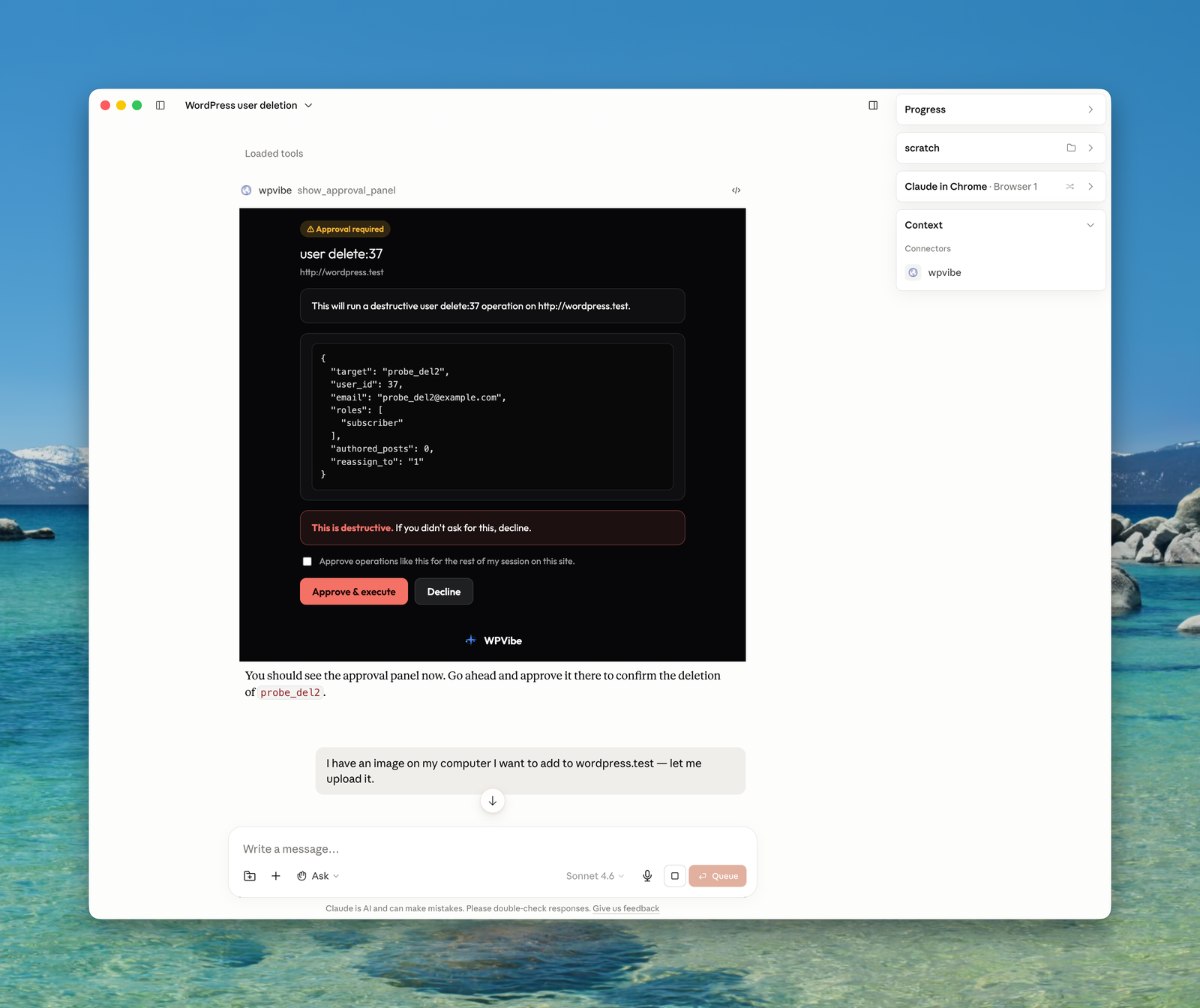
Destructive operations pause for approval right in the chat, with a dry-run preview and Approve or Decline buttons. Nothing irreversible happens without you.
-
The WPVibe admin screen: install the plugin, copy the MCP server URL into your AI client, and your site is connected.
-
Upload images from your computer through a panel in the conversation, and your AI adds them to the WordPress media library.
About this plugin
Your WordPress site just became MCP-ready. WPVibe is the Model Context Protocol server for WordPress, connecting your self-hosted site to any AI assistant or AI agent that speaks MCP: Claude, ChatGPT, Cursor, Windsurf, OpenCode, and more. No copy-pasting between tabs. No switching between your AI chat and wp-admin. Tell your AI what you want, and it happens on your live WordPress site.
What People Are Saying
- “New WordPress Plugin Safely And Easily Connects AI To Your Website” (Search Engine Journal, July 2026)
- “The easiest setup of any AI product for WordPress, period. It’s so click-and-forget, and it absolutely smashes it for what you can do. It’s just mind-blowing.” (Jackson Whelan, WPTuts)
- Thousands of WordPress sites connected and over a million WordPress operations performed since launch.
The Model Context Protocol Server for WordPress
WPVibe is a complete MCP server implementation for WordPress. The Model Context Protocol, introduced by Anthropic and now adopted across the AI industry, lets AI assistants discover and call tools on connected services through a standard interface. WPVibe packages every meaningful WordPress operation (content management, media uploads, theme file browsing, REST API access, and plugin abilities) as MCP tools your AI can call.
You install this free WordPress plugin, connect your site once, and every MCP-compatible AI client becomes a WordPress co-pilot. The WPVibe WordPress MCP server handles authentication, encrypts credentials with AES-256-GCM, and relays your AI’s tool calls to the WordPress REST API. Your WordPress site, your data, your choice of AI.
Connect Claude to WordPress
WPVibe is the easiest way to connect Claude to WordPress. Use it with Claude Desktop, Claude on the web, or Claude Code in your terminal. Once connected, ask Claude to draft a blog post, schedule an article, reorganize categories, update site settings, or run any WordPress task through conversation. Claude sees your WordPress site through the MCP bridge and responds with direct action, not just suggestions.
Connecting Claude to WordPress takes about 30 seconds. Install WPVibe, open the plugin admin, click to authorize, then add the MCP server URL to Claude’s connectors. From that moment, Claude can manage WordPress content, search WordPress files, upload images, and interact with any WordPress plugin that exposes the Abilities API.
Connect ChatGPT to WordPress
WPVibe is the ChatGPT WordPress plugin that actually connects the two systems instead of wrapping an API key. ChatGPT supports MCP servers directly in the web app and the desktop app, so once you add your WPVibe MCP server URL, ChatGPT can read and write to your WordPress site through ordinary conversation.
Ask ChatGPT to turn a Google Doc into a WordPress blog post, find and tag every customer who downloaded a specific resource, update your About page in your own writing voice, or bulk-publish a content calendar. ChatGPT handles the language and strategy, WPVibe handles the WordPress REST API calls behind the scenes. WPVibe is also an official connector in the ChatGPT Apps directory.
Connect Cursor, Windsurf, and Every MCP-Compatible AI Agent
WPVibe is not locked to a single AI vendor. Cursor, Windsurf, OpenCode, Claude Code, ChatGPT, Claude, and any other AI agent that supports the Model Context Protocol can connect through the same MCP server URL. One WordPress MCP server, every AI assistant, no integration rewrite when you switch tools.
For developers, this means Cursor can edit your WordPress theme files with context-aware suggestions, Claude Code can run WordPress tasks as part of an agentic workflow, and Windsurf can scaffold new WordPress templates. For content creators and agencies, this means whichever AI writes best for your brand can publish directly to your WordPress site through the WPVibe MCP bridge.
AI-Powered WordPress Content Management via MCP
Managing WordPress content through MCP has never been easier. Create blog posts, update pages, upload media, manage categories and tags, all through natural conversation with your AI assistant. Tell Claude to write a draft post about your latest product launch, ask ChatGPT to update your about page, or have Cursor reorganize your blog categories. Your AI handles the REST API calls, so you never touch wp-admin.
WPVibe works with every AI client that supports the Model Context Protocol, giving you the freedom to use Claude Desktop, ChatGPT, Cursor, Windsurf, OpenCode, or any future MCP-compatible AI tool for WordPress management.
WordPress Abilities API Support for MCP
WordPress 6.9 introduced the Abilities API, a powerful way for plugins to declare self-describing operations that AI assistants can discover and execute. WPVibe fully supports this WordPress MCP integration. Your AI can discover what abilities your installed plugins expose, inspect their input schemas, and run them directly through natural conversation.
This means AI-powered WordPress plugin management works automatically over MCP. If a plugin registers abilities (WPForms, SeedProd, and others are adopting this standard), your AI assistant can interact with it without any custom integration. The WordPress Abilities API and WPVibe together make every compatible plugin MCP-ready.
WooCommerce, Elementor, Bricks, and Your Other Plugins
WPVibe works with the plugins already running your site. For WooCommerce, your AI can review the store, manage products, and bulk-edit prices, stock, and descriptions through conversation, so updating fifty product pages no longer means fifty trips through wp-admin.
Page builders get dedicated support. Elementor, Bricks, Breakdance, Beaver Builder, and Divi pages are written through each builder’s own save pipeline, so the result opens in the builder like a hand-built page. Built-in skills cover Gutenberg, Kadence, GeneratePress (including GP Premium Elements), and SeedProd. Other plugins work through their own REST APIs or the WordPress Abilities API, and custom fields (including ACF fields, which are post meta under the hood) are read and written correctly, including on custom post types.
Safely Edit WordPress Theme Files
WPVibe lets your MCP client browse and edit your WordPress theme files safely. Your AI can list files, search file contents, analyze code structure, and make edits through a draft theme workflow. The draft clones the active WordPress theme into a sandbox, makes changes there, and exposes a preview URL so you can see the results before going live. Your live WordPress site is never touched until you explicitly approve and publish.
Every file operation runs through WordPress capability checks, a path sandbox scoped to the draft theme, and PHP syntax validation before save. You keep the safety of wp-admin’s file editing guardrails while giving your AI a real place to work.
WordPress WP-CLI Commands over MCP
Run WordPress administration commands through your MCP client. Activate plugins, switch themes, update options, flush caches, query the database, run serialized-data-aware search-replace with a dry run, and more, all via native PHP dispatch with a security-first command allowlist. Everything is emulated through PHP, so it works on shared hosting with no shell and no SSH. Your AI gets a productive WordPress admin surface without the risks of raw command execution.
Approvals You Can See, and an Audit Log
WPVibe does not open your site to the world. Access runs through WordPress’s own encrypted Application Passwords, revocable in one click. When your AI asks for something destructive (deleting a user, mutating the database, uninstalling a plugin), WPVibe pauses and shows an approval panel in the chat with the exact operation, a dry-run preview, and Approve or Decline buttons. Nothing irreversible happens without you.
Every sensitive action is recorded in an append-only Approval Log in wp-admin, with the preview you saw and the result. Posts default to draft, deletes go to trash, and theme publishing keeps a backup so you can roll back.
Smart MCP Notifications on Your WordPress Admin
Every change your AI makes over MCP triggers a smart notification in your browser with a direct link to view or edit the updated content. The notification knows whether you are in the WordPress admin or on the frontend and adapts the link, so your workflow is never disrupted while your AI works in the background.
One-Click WordPress MCP Authorization
Connecting your WordPress site to an MCP server should take seconds. No application passwords typed by hand, no API keys copied between tabs: provide your site URL, click the authorization link that appears in your WordPress admin, and approve the connection. Credentials are encrypted with AES-256-GCM and stored securely on Cloudflare-hosted WPVibe servers. One click, done.
WordPress MCP Server for Every Use Case
Whether you are a blogger, a developer building WordPress themes, or an agency managing client sites, WPVibe works through whichever MCP client you already use.
Bloggers and Content Creators write and publish posts, manage media, organize categories and tags, and update site settings through conversation with Claude, ChatGPT, or any MCP assistant.
WordPress Developers and Designers browse and edit theme files with a safe draft-preview-publish workflow, or build classic themes from scratch, directly from Cursor, Claude Code, or your favorite MCP client.
Agencies and Site Managers connect every client site and run updates across all of them from one panel, use the Abilities API to work with installed plugins, and turn on white label mode (free on every plan) so clients see a clean wp-admin while you manage the site through your AI.
Full WPVibe MCP Server Feature List
- One-click WordPress MCP server connection with AES-256 encrypted credential storage and OAuth magic-link sign-in (no passwords typed into chat)
- AI content management: posts, pages, media, categories, and tags through conversation, with surgical find-and-replace edits in posts, meta, and options
- Fleet updates: update plugins, themes, and WordPress core across every connected site from one panel, with a recheck before and a version verification after each update
- WooCommerce management: review the store and bulk-edit products, prices, stock, and descriptions
- Page builder integrations: Elementor, Bricks, Breakdance, Beaver Builder, and Divi through each builder’s own save pipeline
- Human-in-the-loop approvals with a dry-run preview, plus an append-only Approval Log in wp-admin
- Full WordPress REST API and Abilities API access as MCP tools, including custom post types and plugin routes
- WP-CLI style commands (plugins, themes, users, comments, options, database) through native PHP dispatch, no shell required
- Theme editing with a draft-preview-publish workflow, sandboxed file operations, PHP syntax validation, and a classic theme builder
- Media uploads from URLs and Unsplash stock photo search
- Works with Claude Desktop, Claude on the web, Claude Code, ChatGPT, Cursor, Windsurf, OpenCode, and any MCP-compatible AI agent
- On-demand skills that teach your AI the right approach for each WordPress task, and smart live-reload notifications in wp-admin
Third-Party Service
This plugin connects to the WPVibe service at wpvibe.ai to relay requests between your AI assistant and your WordPress site over the Model Context Protocol. When you connect your site, a WordPress application password is created and encrypted with AES-256-GCM on WPVibe servers hosted on Cloudflare. All communication between the plugin and the WPVibe MCP service occurs over HTTPS.
No data is collected, tracked, or shared with third parties beyond what is necessary to relay your AI assistant’s MCP requests to your WordPress REST API. Your content stays on your WordPress server.
On WPVibe’s own authorization page (the Approve screen an authorize link opens), if your site’s REST API answers the approval request with a firewall page or no response, the plugin reports that outcome to the WPVibe service (the HTTP status, whether the answer was a page or JSON, and the security vendor if recognised; never page content) so support can see what blocked the connection. Nothing is reported on a successful approval.
Third-Party Libraries
WPVibe bundles one third-party JavaScript library for use inside scaffolded classic starter themes:
- Alpine.js v3.15.12, MIT License, https://alpinejs.dev/, included at
starter-themes/classic/assets/js/alpine.min.js. Used as the interactivity layer (modals, dropdowns, tabs, accordions, sliders) for AI-generated classic themes. Not loaded outside scaffolded themes.
Built by SeedProd
WPVibe is built by the team behind SeedProd, the most popular WordPress landing page and theme builder plugin, trusted by over 1 million WordPress websites. We have been building WordPress tools since 2012.
Better Than Custom AI WordPress Integrations
If you have connected AI to WordPress before, you have probably dealt with custom API wrappers, hand-rolled Custom GPTs, or copying content between Claude and your browser. WPVibe replaces all of that with a proper WordPress MCP server on an open standard supported by Claude, ChatGPT, Cursor, Windsurf, and a growing list of AI tools. Connect once, use any MCP client, no custom code to maintain.
Unlike bundled-AI plugins that ship one model and one prompt style, WPVibe lets you bring your own AI and use whichever model reasons best for each task. Your content stays on your WordPress server.
Branding Guidelines
This plugin is a product of SeedProd LLC. The product name is WPVibe, one word, everywhere: the plugin, wpvibe.ai, the documentation, and the in-product UI. When writing about it, please use WPVibe rather than WPvibe, Wp Vibe, WP Vibe, or VibeAI.
WordPress MCP Server Resources
Questions
- My host strips the Authorization header. Does WPVibe need an .htaccess change?
No, not from version 1.13.0 onward. Some servers, commonly Apache running PHP as CGI or FastCGI, do not pass the Authorization header to PHP unless CGIPassAuth is enabled. WordPress then treats every authenticated REST request as logged out. WPVibe sends the same credential under an X-WPVibe-Authorization header, which those servers do pass through, and the plugin restores it before WordPress authenticates. This mirrors what WordPress core already does in wp_populate_basic_auth_from_authorization_header(): it only runs when no credential arrived by any normal route, it validates the header format, and WordPress still checks the credential exactly as it always has, so nothing about who may do what changes.
If you would rather it did not run, add
define( 'WPVIBE_DISABLE_AUTH_FALLBACK', true );to wp-config.php, or return false from thewpvibe_allow_auth_fallbackfilter.- Is WPVibe free? Do I need another AI subscription?
The plugin is free, and the WPVibe service has a free plan that includes every tool and skill with a daily allowance of WordPress actions. You bring the AI you already use: WPVibe works with the free plans of Claude and ChatGPT, and it never charges for AI inference. Optional paid plans raise your daily WordPress action allowance, which is completely separate from your Claude or ChatGPT limits.
- Which AI assistants work with WPVibe?
Any AI assistant that supports the Model Context Protocol (MCP): Claude Desktop, Claude on the web, Claude Code, ChatGPT, Cursor, Windsurf, OpenCode, and any future MCP-compatible client.
- Is WPVibe a WordPress MCP server?
Yes. WPVibe is a full Model Context Protocol server implementation for WordPress. Your AI client connects to the WPVibe MCP server, which relays authenticated requests to your WordPress REST API.
- Does this plugin modify my live WordPress site directly?
For content management (posts, pages, media), changes go live immediately, just like editing in wp-admin. For theme editing, all changes happen in a sandboxed draft theme. The live site is never modified until you explicitly publish.
- What authentication does WPVibe use?
WordPress application passwords (built into WordPress 5.6+). WPVibe uses a one-click authorization flow, so no passwords are typed into the AI chat. Credentials are encrypted with AES-256-GCM at rest.
- Is my WordPress data sent to third-party servers?
No. WPVibe connects your AI assistant directly to your WordPress REST API over MCP. Your content stays on your server. The only external connection is between your AI client and the WPVibe MCP server, which proxies authenticated requests to your WordPress site.
- Can the AI break my WordPress site?
WPVibe has multiple safety layers: draft theme isolation for file editing, file extension allowlists, path sandboxing, PHP syntax validation, WordPress capability checks, and WP-CLI command allowlisting. Destructive operations (mutating database queries, user deletes, plugin uninstalls, permanent deletes) pause for an in-chat approval panel with a dry-run preview before anything runs, and every approved operation is recorded in the append-only Approval Log. DELETE operations move to trash (never permanent delete), new posts default to draft status, and publishing a draft theme keeps a backup of your previous theme files so you can roll back.
sandywp / also on the shelf
Try another plugin

Uncanny Automator – AI + Automation for WordPress | AI Agent, AI Page Builder,…
4.9 · 40K+ installs
The AI + Automation plugin for WordPress. Automate workflows across all your plugins and apps, add an AI agent, and build pages…
-
AI chatbot that engages visitors 24/7 and automates customer support from your content. Use free monthly AI credits or scale with…

ZIP AI (Beta) – AI Website Builder, AI Agent & Assistant for WordPress
5.0 · 1K+ installs
Beta: An AI agent that builds & edits WordPress sites by chat. Requires a block (FSE) theme - does NOT work with classic…

Spin up a real WordPress site in seconds.
Test plugins, build a demo, hand a client a link — then squash it and start again. No local setup, no Docker.