sandywp / plugins / user-menus

User Menus – Nav Menu Visibility
Show/hide menu items to logged in users, logged out users or specific user roles. Display logged in user details in menu. Add a logout link to menu.
Ready in seconds.
v1.3.2 80,000+ installs WP 4.6+ PHP 5.6+
What you get inside
3 screens-
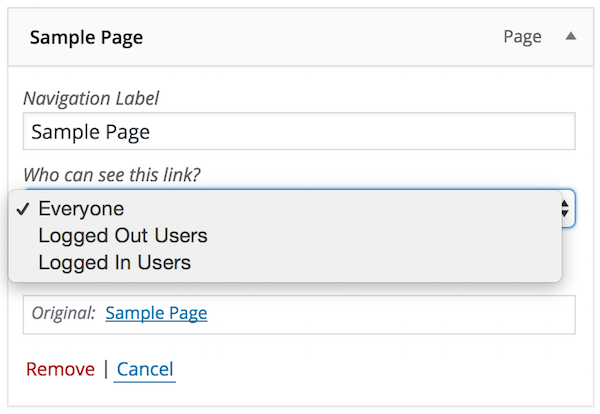
Limit menu item visibility based on logged in status, user role etc.
-
Display user information such as username, first name etc in your menu text.
-
Quickly insert login/logout links & choose where users will be taken afterwards.
About this plugin
User Menus is the perfect plugin for websites that have logged in users.
The plugin gives you more control over your nav menu by allowing you to apply visibility controls to menu items e.g., who can see each menu item (everyone, logged out users, logged in users, specific user roles).
It also enables you to display logged in user information in the navigation menu e.g., “Hello, John Doe”.
Lastly, the plugin allows you to add login, register, and logout links to your menu.
Full Feature List
User Menus allows you to do the following:
- Display menu items to everyone
- Display menu items to only logged out users
- Display menu items to only logged in users
- Display menu items to users with or without a specific user role.
- Show a logged in user’s {avatar} in a menu item with a custom size option.
- Show a logged in user’s {username} in a menu item
- Show a logged in user’s {first_name} in a menu item
- Show a logged in user’s {last_name} in a menu item
- Show a logged in user’s {display_name} in a menu item
- Show a logged in user’s nickname} in a menu item
- Show a logged in user’s {email} in a menu item
- Add a logout link to the menu (optional redirect settings)
- Add a register link to the menu (optional redirect settings)
- Add a login link to the menu (optional redirect settings)
** Includes a custom Menu Importer that will allow migrating User Menus data with the normal menu export/import.
Created by Code Atlantic
User Menus is built by the Code Atlantic team. We create high-quality WordPress plugins that help you grow your WordPress sites.
Check out some of our most popular plugins:
- Popup Maker – #1 Popup & Marketing Plugin for WordPress
- Content Control – Restrict Access to Pages and Posts
Requires WordPress 4.6 and PHP 5.6
Questions
- How do I set up this plugin?
- To setup the plugin, go to /wp-admin/ > Appearance > Menus.
- Add a menu item or choose an existing one to edit the User Menus settings.
- To see the User Menus settings, expand the menu item that you chose in the Menu structure panel.
- Select Everyone, Logged Out Users, or Logged In Users from the Who can see this link? dropdown.
- Logged In Users: The Choose which roles can see this link radio button is selected by default. If no roles are selected, all roles can see the menu item by default. Once a role is checked, then only checked roles can see the menu item.
- Logged In Users: The Choose which roles won’t see this link radio button is not selected by default. If no roles are selected, all roles still have visibility to the menu item by default. Once a role is checked, then only checked roles won’t see the menu item.
- To show a logged in user’s information in a menu item, make a menu item only visible to logged in users. Click the grey arrow button to add a user tag (username, first_name, last_name, nickname, display_name, email) to the menu item label.
- To add a login or logout link to your menu, expand the User Links under the Add menu items panel, check Login or Logout, then click Add to Menu.
- Where can I get support?
If you get stuck, you can ask for help in the User Menu Plugin Forum.
- Where can I report bugs or contribute to the project?
Bugs can be reported either in our support forum or preferably on the User Menu GitHub repository.
sandywp / also on the shelf
Try another plugin
4.8 · 20K+ installs
Add a dynamic "Login" or "Logout" menu item to any WordPress Menu and control redirects.

4.7 · 10K+ installs
Automatically logout idle user sessions, with logout redirections and concurrent limit logins all in one place.

WPForce Logout – WordPress User Login Logout Management Plugin
4.8 · 8K+ installs
Forcefully log out users from your WordPress site, manage online status, and track last login activity.
Spin up a real WordPress site in seconds.
Test plugins, build a demo, hand a client a link — then squash it and start again. No local setup, no Docker.