sandywp / plugins / top-10

WebberZone Top 10 — Popular Posts
Track post views and page views, and display popular posts and trending content on your WordPress site.
Ready in seconds.
v4.4.3 10,000+ installs WP 6.6+ PHP 7.4+
What you get inside
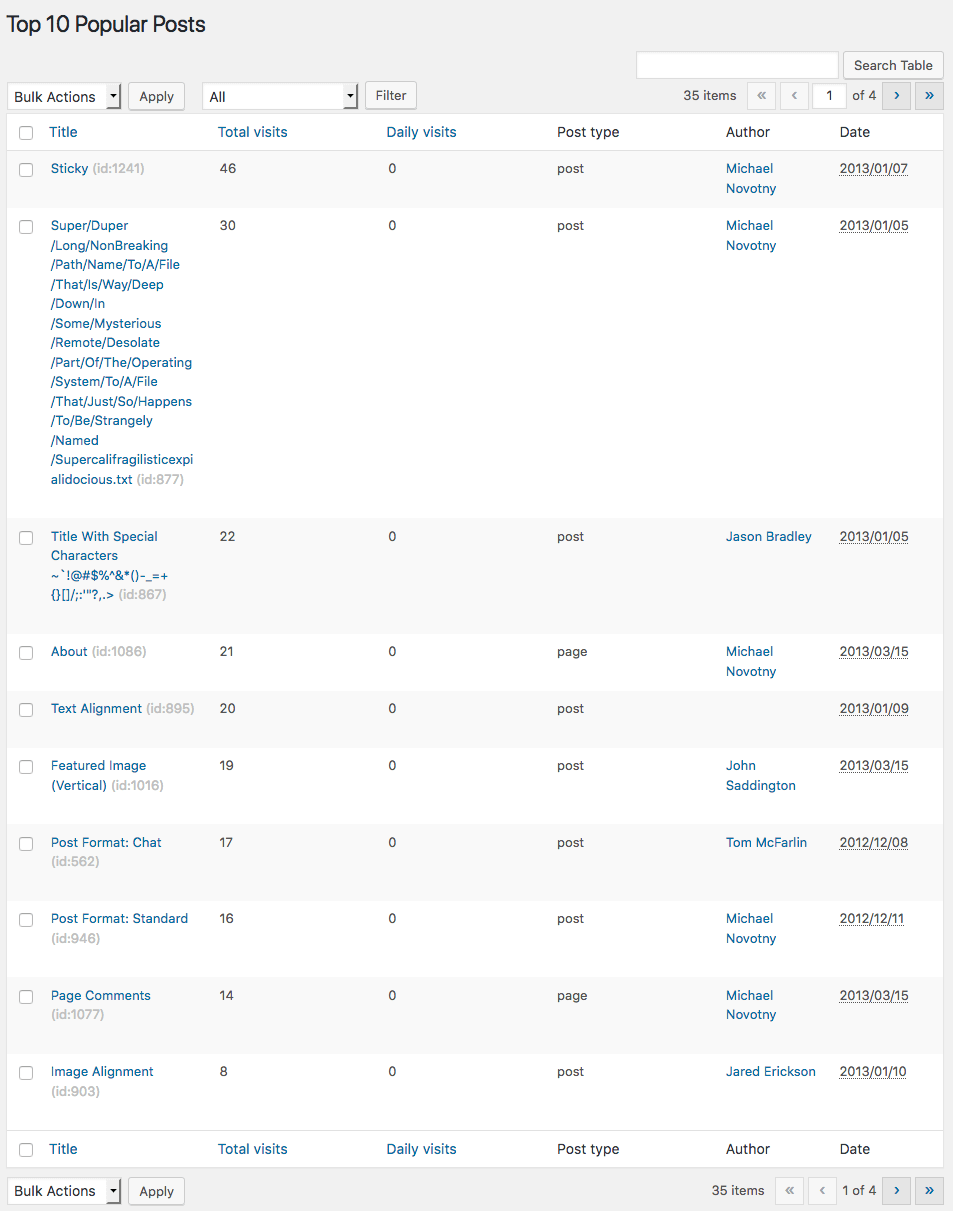
2 screens-
Top 10 – Popular posts overview in the WordPress admin
-
Top 10 – Popular posts list with thumbnails
About this plugin
WordPress lacks built-in page view tracking or a popular posts feature. Top 10 solves this by counting views across posts, pages, and custom post types, then letting you showcase your most popular content.
Top 10 provides blocks, widgets, shortcodes, and template functions for displaying popular posts and view counts across your site. All tracking data is stored locally in your WordPress database, with no external services involved.
Top 10 includes comprehensive features such as thumbnail support, flexible display options, custom post type support, and developer-friendly extensibility. A built-in caching layer reduces server load, while AJAX-based tracking avoids page cache interference and works with most popular caching plugins.
Top 10 also exposes a powerful API with WordPress actions and filters, allowing developers to customise queries, tracking behaviour, and output rendering without modifying core plugin files.
Features
- Page Counter: Tracks hourly post views on posts, pages, and custom post types. Display counts automatically using blocks, shortcodes, or template functions
- Popular Posts: Display most viewed posts by total counts or within custom time periods
- Gutenberg Support: Dedicated “Popular Posts [Top 10]” block with configurable display options
- Multisite Dashboard: Network-wide aggregated statistics across all sites in a multisite installation
- Widgets: Sidebar widgets for daily and overall popular posts with extensive customisation
- Shortcodes: Use
[tptn_list]to display popular post lists and[tptn_views]to show view counts - Thumbnails:
- WordPress post thumbnail support with custom
tptn_thumbnailimage size - Automatic extraction of the first image from post content
- Manual thumbnail URLs via Edit Post screens
- WordPress post thumbnail support with custom
- Exclusions: Exclude posts by category or post ID from popular post lists
- Styling: Output wrapped in semantic CSS classes. Add custom CSS via settings or use included styles
- Admin Interface: View daily and overall popular posts from the dashboard. Adds sortable view-count columns to post and page lists
- Export/Import: Export count tables and settings, and restore them on the same site or other installs
- Caching Compatibility: Works with WP Super Cache, W3 Total Cache, Quick Cache, and similar plugins
- Developer-Friendly: Extensive filters and actions to customise queries, tracking behaviour, and output rendering
Features in Top 10 Pro
-
Enhanced Tracking and Performance
- Fast and High-Traffic Trackers: Alternative tracking methods for improved performance on busy sites
- Query Optimisation: MySQL
MAX_EXECUTION_TIMEdirective to prevent long-running queries, configurable via settings and thetop_ten_query_max_execution_timefilter - Data Retention Override: Customizable data retention period (default 180 days via
TOP_TEN_STORE_DATA) - Lazy Loading: Render popular posts lists via JavaScript only when they are about to scroll into view, so full-page caching plugins can serve a page without baking in a live popular-posts query. Works with content, shortcodes, widgets, and the Popular Posts block; disable per instance with the
lazy_loadshortcode/block attribute
-
Advanced Blocks and Widgets
- Top 10 Query Block: Query and display popular posts directly from the block or site editor
- Enhanced Top 10 Featured Image Block: Support for multiple image sources with fallbacks
- Popular Posts Block Enhancements:
- Save and clear default block settings with a single click
- Auto-insert default and global settings attributes with an option to disable
-
Enhanced Admin Tools
- Admin Bar Integration: Admin bar menu item to view daily, total, and overall post counts, access admin pages, and clear cache
- Disable Admin Bar menu: Setting to disable the Admin Bar menu
- Dashboard Access Control: Setting to control which user roles can view the Top 10 dashboard
- Display Settings: Setting to choose which post type screens display admin columns
- Mini “Top 10 Views Overview” widget: Compact views-over-time chart on the WordPress Dashboard
- Multisite Settings Copy: Tool to copy settings between sites in a multisite network
-
Custom Display Options
- Taxonomy-Specific Displays:
display_only_on_tax_idsparameter to restrict popular post displays to specific taxonomy terms - Category Inclusion: Edit Post meta box option to include popular posts from specific categories
- RSS Feed Filtering: Filter RSS feeds by category or post type via settings or URL parameters
- Taxonomy-Specific Displays:
-
WP-CLI Integration
wp top10 counts: View, get, set, reset, export, and import post view counts from the command linewp top10 db: Manage database tables — check status, create, update, recreate, prune old rows, force aggregation, truncate, and clean up orphaned countswp top10 cache: Flush, enable, disable, and check the status of the output cachewp top10 settings: Get, set, export, and import plugin settings as JSONwp top10 cron: View, enable, disable, and manually trigger the maintenance and aggregation cron jobswp top10 popular: List popular posts with counts using the same query as the front endwp top10 status: Print a full plugin status overview- All destructive commands support
--dry-runand--force; multisite commands support--networkand--blog-id
-
Developer-Friendly Features
- Custom Post Type Sortable Columns: Admin columns on supported custom post types with sortable functionality
GDPR
Top 10 does not collect personal visitor data out of the box. Tracking data is stored locally in the wp_top_ten and wp_top_ten_daily database tables (table prefix may vary).
You are responsible for ensuring GDPR compliance on your website.
Translations
Top 10 is available for translation on WordPress.org.
See the Translator Handbook to contribute.
Contribute
Top 10 is developed openly on GitHub.
Fork the project and submit pull requests for bug fixes or improvements. Please do not use GitHub for support requests.
Other WebberZone Plugins
- Contextual Related Posts – Display related posts on your WordPress site and feeds
- Better Search – Enhance WordPress search with relevance-based results
- Knowledge Base – Create a knowledge base or FAQ section
- WebberZone Snippetz – Manage custom HTML, CSS, and JavaScript snippets
- Auto-Close – Automatically close comments, pingbacks, and trackbacks
- Popular Authors – Display popular authors widgets. Addon for Top 10.
- Followed Posts – Show related posts based on reader journeys
- WebberZone Link Warnings – Add accessible warnings for external links and target=”_blank” links
Questions
- Where can I get help and support?
Before opening a support request, please check the following resources:
These cover the most common questions and are the fastest way to get answers, as they are actively maintained.
If your question is not answered there, please create a new topic in the
WordPress.org support forum.
This is the preferred support channel for the free plugin, and the forums are monitored regularly.Support for products sold and distributed by WebberZone is available only
to users with an active, valid licence. Licensed users can request support here.- Can this plugin replace Google Analytics?
No. Top 10 tracks page views and displays popular posts. It is not designed to replace analytics platforms.
- How does tracking work?
Each visit is queued in a lightweight funnel table and aggregated into the count tables every five minutes by a cron job, so tracking never blocks page loads and works correctly behind page caches.
For a full explanation of tracker types, the funnel flow, and how to adjust the aggregation interval, see Trackers in Top 10.
- How does scheduled maintenance work?
When enabled, Top 10 runs a scheduled task that periodically removes old entries
from thewp_top_ten_dailytable.Note: WordPress executes scheduled tasks on the first eligible page load.
- How can I report security bugs?
You can report security bugs through the Patchstack Vulnerability Disclosure Program.
The Patchstack team help validate, triage and handle any security vulnerabilities.
Report a security vulnerability.
sandywp / also on the shelf
Try another plugin

4.9 · 2K+ installs
WP Most Popular is a simple plugin which tracks your most popular blog posts based on views and lets you display them in your…

5.0 · 90+ installs
Displays the most visited posts as a widget using data from Google Analytics. Designed to be used under high-traffic or low…
-
Lightweight post view counter with a widget and shortcodes. Track post views automatically, stop double-counting, and display…

Spin up a real WordPress site in seconds.
Test plugins, build a demo, hand a client a link — then squash it and start again. No local setup, no Docker.