sandywp / plugins / sucuri-scanner

Sucuri Security
Auditing, Malware Scanner and Security Hardening
The Sucuri WordPress Security plugin is a security toolset for security integrity monitoring, malware detection and security hardening.
Ready in seconds.
v2.7.4 600,000+ installs WP 3.6+
What you get inside
8 screens-
WordPress Integrity Tool - Detects added, modified, and removed files.
-
Integrity Diff Utility - Shows differences in the core WordPress files.
-
Audit Logs and Malware Scanner - Reports suspicious events and malicious code.
-
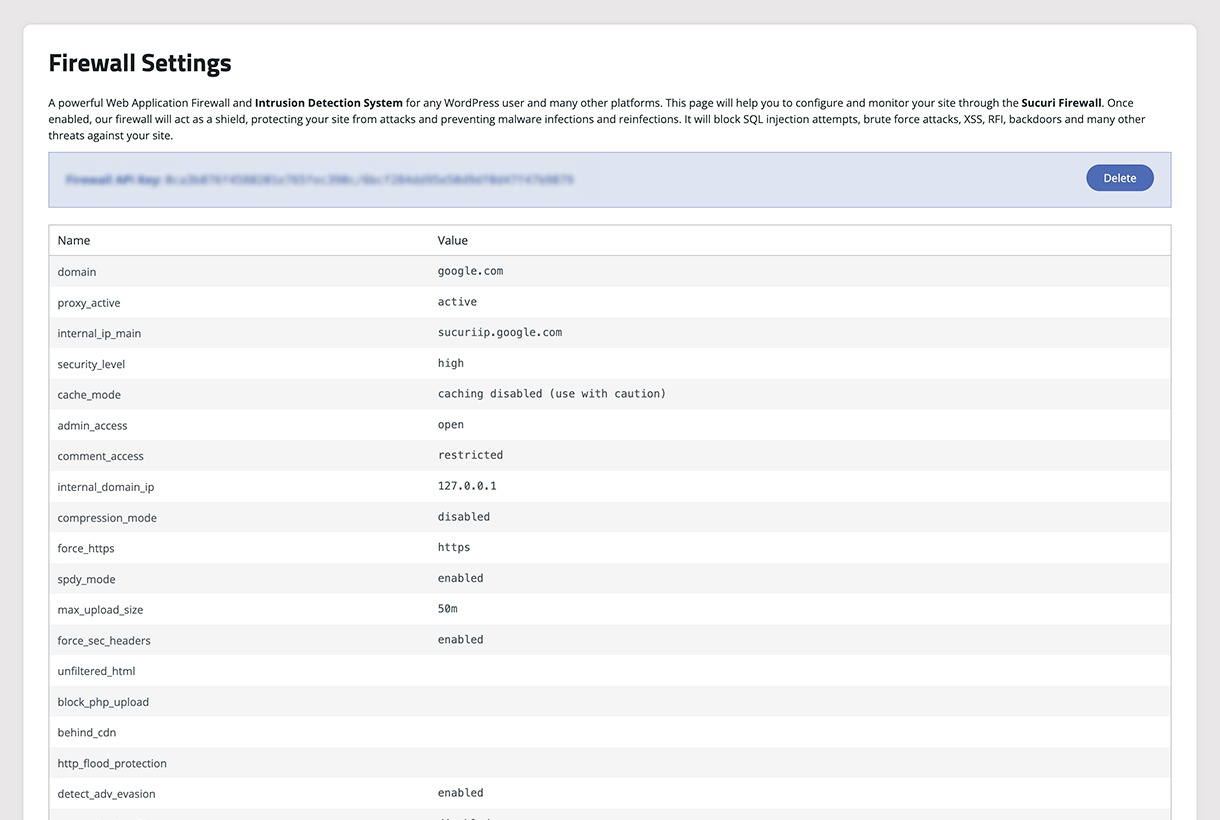
Sucuri Firewall - Settings visibility, audit logs, IP blocklisting, and cache.
-
Website Hardening - Offers multiple options to increase the security of the website.
-
Failed Logins - Shows failed login attempts, successful logins and online users.
-
Post Hack Tools - Offers multiple tools to react after the suspiciousness of a hack.
-
Settings - Offers multiple settings to configure the functionality of the plugin.
About this plugin
At Sucuri, we are dedicated to keeping your website safe and secure. With a focus on protection and monitoring, we offer solutions that help you stay ahead of potential threats for your WordPress site.
Our services include everything from malware detection to performance optimization, all designed to give you peace of mind.
We understand the importance of your online presence and are here to support you every step of the way. Join us, and let’s work together to ensure your website remains secure and resilient.
The Sucuri Security Monitoring Plugin is designed to safeguard your WordPress site with ease and reliability. Our plugin offers a range of essential security features, including:
- Security Activity Auditing: Keep track of every security-related event within your WordPress environment.
- File Integrity Monitoring: Detect unauthorized changes to your files and protect your site from potential vulnerabilities.
- Remote Malware Scanning: Regularly scan your site for malware with our remote scanner to ensure it’s clean and secure.
- Blocklist Monitoring: Receive alerts if your site is blocklisted by any major services, allowing for quick resolution.
- Security Hardening: Implement recommended security practices to fortify your site against threats.
- Post-Hack Security Actions: If the worst happens, our plugin helps you recover your site easily.
With Sucuri, you can focus on what matters most—growing your website—while we handle the security. Our feature set provides a clear view of your site’s status, making it easy to manage, monitor and take action.
Contributors & Maintenance Notice
Our dedicated team of engineers and security analysts is continually working to enhance the Sucuri Security Monitoring Plugin.
We provide regular updates, address bugs, and actively incorporate user feedback to ensure your WordPress site maintains its highest security stance. Our growth roadmap underscores our commitment to keeping you protected against emerging threats.
To support you further, we offer a variety of resources, including prompt responses for the forum, our website’s various content types, and an extensive knowledge base.
Our content is designed to help you maximize your plugin feature usage and benefits with the support you need.
If you want to be ahead of possible threats and keep up-to-date with Plugin updates, subscribe to our content here.
Introducing the Sucuri Firewall + WordPress Security Plugin
We’re excited to introduce the Sucuri Firewall + WordPress Security Plugin, designed for those who seek advanced protection for their WordPress sites.
Building upon our trusted free plugin, this premium offering provides a robust suite of features to ensure comprehensive security and peace of mind.
Key features include:
* Web Application Firewall (WAF): Protect your site from malicious traffic with our powerful firewall solution.
* Brute Force Protection: Safeguard your site against unauthorized login attempts.
* Brute Force Audit & Reporting: Gain insights into login attempts with detailed auditing and reporting.
* DDoS Mitigation: Maintain site availability even during targeted attacks.
* Core Vulnerabilities Scanning: Identify and address security weaknesses in WordPress core files.
* Plugins Vulnerability Scanning: Ensure your installed plugins are secure and up to date.
* Themes Vulnerability Scanning: Protect your site by scanning for vulnerabilities in installed themes.
* PHP Vulnerability Scanning: Detect and address potential security issues in your PHP environment.
With the Sucuri Firewall + WordPress Security Plugin, you benefit from the expertise and dedication of our team, committed to keeping your digital assets secure.
Experience the next level of protection and support, and enjoy the peace of mind that comes with knowing your site is in good hands.
Questions
- What is the security activity auditing?
One of the standout features of our WordPress plugin is the comprehensive audit logging system. At Sucuri, we recognize that every change within your application can be a potential security event. From user logins to content modifications, our audit logs are designed to capture all security-related activities on your site.
These logs provide you with crucial visibility into your website’s operations, answering key questions such as:
* Who logged in? Understanding who accesses your site is fundamental to ensuring that only authorized users are logging in. This helps in identifying any unauthorized access attempts, allowing you to respond swiftly to potential security breaches.
* What changes were made? Essential for maintaining its integrity and security. By knowing what modifications have been made, you can quickly pinpoint any suspicious activities or errors that need attention.With the release of version 1.9.6, we’ve enhanced this feature, allowing you to filter audit logs by event types and dates. This improvement offers you even greater insight into your site’s activities, enabling proactive security management.
- What is the file integrity monitoring
Security File Integrity Monitoring has been fundamental to the world of security. It’s the act of comparing a known good with the current state. If the current state differs from the known good, you know you have a problem. This is the basis of a lot of host intrusion detection systems. We have built that into this plugin.
It will create a known good the minute the plugin is installed. This will be of all the directories at the root of the install, including plugins, themes and core files.
- What is remote malware scanning?
Once this plugin is installed and activated, we automatically scan your site searching for known malware, viruses, blacklisting status, website errors, out-of-date software, and malicious code.
We access your site just like a regular visitor would as this helps us catch threats that try to stay hidden from bots or search engines. This feature is powered by our free website security scanner – SiteCheck.
- What is the blocklist monitoring?
Another very interesting feature of the website Security Malware Scanner is that it checks various blocklist engines, including the following:
- Sucuri Labs
- Google Safe Browsing
- Norton
- AVG
- Phish Tank
- ESET
- McAfee Site Advisor
- Yandex
- SpamHaus
- Bitdefender
These are some of the largest blocklisting entities, each having the ability to directly impact your brand’s online reputation. By synchronizing with their environments we’re able to tell you whether any of them are negatively flagging your website with a security related issue. If they do, then via our website security product, we’re able to help you get off of the security blocklist.
- What is effective security hardening?
Our team cleans thousands of websites every day, giving us deep insight into the most effective ways to protect WordPress sites.
We’ve used that experience to create a list of actionable recommendations available in the Hardening & Prevention section of this plugin.
To name a few (note that this will depend on your environment), these actions are:
- Enable Website Firewall Protection
- Remove WordPress Version
- Block PHP Files in Uploads, wp-content and wp-includes directories.
- Verify default admin account.
- Disable Plugin and Theme Editor.
- Automatic Secret Keys Updater.
- What are the post-hack security actions?
Even with the strongest security measures, no site is 100% safe from hacking. When a compromise occurs, the Post-Hack section of our plugin guides you through four critical steps to help you regain control of your site:
- Update Secret Keys.
- Reset User Passwords.
- Reset Installed Plugins.
- Update Plugin and Themes.
These steps are designed to help you recover faster after a security incident.
- What are the security notifications?
Security features only matter if you know when something’s wrong, that’s why we included a set of customizable security alerts inside our Settings > Alerts section. You can also customize how frequently you want to be alerted of security related events.
- What is the website firewall (premium)?
This is by far the coolest security feature Sucuri has to offer everyday website owners. It’s an enterprise grade Website Firewall designed to give you the best security protection any website can hope for. It protects your website from a variety of website attacks, including:
- Denial of Service (DOS / DDOS) Attacks.
- Exploitation of Software Vulnerabilities.
- Zero Day Disclosure Patches.
- Brute Force Attacks against your Access Control Mechanisms.
This is coupled with a number of features like:
- Performance Optimization.
- Advanced Access Control Features.
- Failover and Redundancy.
This is not included as a free option of the plugin, but is integrated so that if purchased you are able to activate. If you prefer to leverage the Sucuri Firewall product by itself, you have the option to operate the Website Firewall WordPress Security plugin in standalone mode.
The Sucuri WordPress Security plugin is built by the team that is known for their proactive approach to security. It is built using intelligence gathered from thousands upon thousands of remediation cases, millions of unique domain scans and 10’s of millions of website security attack blocks.
sandywp / also on the shelf
Try another plugin

Wordfence Security – Firewall, Malware Scan, and Login Security
4.7 · 5M+ installs
Firewall, Malware Scanner, Two Factor Auth, and Comprehensive Security Features, powered by our 24-hour team. Make security a…

Limit Login Attempts Security – Login Security, 2FA, Firewall, Brute Force…
4.8 · 1M+ installs
WordPress login security with brute force protection, Two-factor authentication (2FA/MFA), firewall, IP/country blocking, and…

Security Optimizer – The All-In-One Protection Plugin
4.5 · 1M+ installs
Secure your WordPress site from brute-force attacks, threats, malware, and bots. Free to use and easy to set up.
Spin up a real WordPress site in seconds.
Test plugins, build a demo, hand a client a link — then squash it and start again. No local setup, no Docker.