sandywp / plugins / subheading

SubHeading
Adds the ability to easily add and display a sub title/heading on any public post type.
Ready in seconds.
v1.8.1 900+ installs WP 3.2.1+
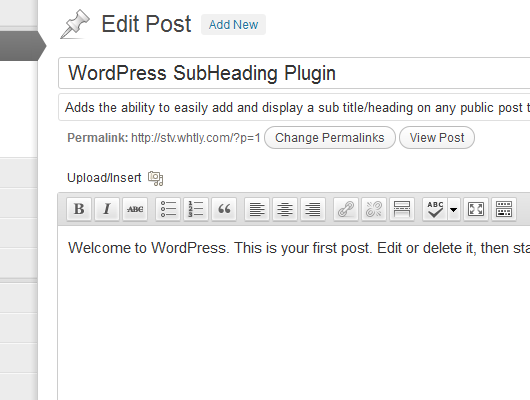
What you get inside
2 screens-
The subheading option is displayed directly below the main title.
-
Settings are managed via the Settings > Reading page.
About this plugin
This plugin uses a custom field to allow sub titles/headings to be added to any post type, including pages, posts and any public custom post type.
The custom subheading field is re-positioned so it is directly below the main title when editing.
Updates to your theme templates may be required in order for you to output the subheading values, please refer to the Installation instructions.
By default subheadings are also appended to RSS feeds and the admin edit post/page lists, these options and more can be modified via the settings page.
Following a plugin review by Alison Barrett (WordPress.com VIP) a number of improvements were introduced in version 1.7.
Languages: Also available in Brazilian Portuguese (Português do Brasil by mauriciomesquita).
Questions
- Installation Instructions
Here we go:
- Upload the
subheadingfolder to the/wp-content/plugins/directory. - Activate the plugin through the ‘Plugins’ menu in WordPress.
- Place
<?php if (function_exists('the_subheading')) { the_subheading('<p>', '</p>'); } ?>in your template files where you want it to appear, or enable theAutomatically display subheadings before post contentoption on the settings page. - Add the subheading content using the standard WordPress edit page.
The settings for this plugin are found by navigating to the
Settingsmenu and selectingReading, with the options displayed towards the bottom of the page.If you are not within
the_loop, you can useget_the_subheading($postID);to fetch the value for a particular page or post.- Upload the
- How do I enable subheadings on posts and custom post types?
By default subheadings are only enabled for pages, you can enable them for posts or any public custom post type via the
Settings > Readingpage.Just check the box that says
Enable on Posts.or the required post type.- What custom field name does it use?
The field name used is
_subheading, the underscore prefix prevents it from being displayed in the list of custom fields.- How can I append the subheading to my RSS feed?
Check the RSS option on the settings page
Plugins > SubHeading > Append to RSS feeds.- What if I want to include shortcodes in my subheading?
Check the apply shortcode filters option on the settings page
Plugins > SubHeading > Apply shortcode filters.This will apply any existing shortcode filters to the subheading value you have set.
- How can I prevent the subheading input moving to the top of the edit page?
Some plugins will hide the element containing the post title, which is this element that the subheading input is appended to.
You can prevent the repositioning of the input via the options page.
- What are the `Before` and `After` inputs used for?
If you are using the option to automatically wrap the subheading content, you can include custom content before and after the subheading is displayed.
For example, setting Before to
<h3>and after to</h3>will wrap the subheading in a h3 tag.- How can I stop subheadings appearing in places I don’t want them to?
Using the “Automatically display subheadings before post content.” setting will prepend any subheading value before outputting any post content.
The output can be customised slightly using the “Before” and “After” fields, however if you prefer more customisation and control it is probably best to disable this setting and edit the output within your theme templates.
To display subheadings, place
<?php if (function_exists('the_subheading')) { the_subheading('<p>', '</p>'); } ?>in your template files where you want the subheading to appear.
sandywp / also on the shelf
Try another plugin

4.8 · 1M+ installs
Loginizer is a WordPress security plugin which helps you fight against bruteforce attacks.

4.4 · 900K+ installs
Redux is a simple, truly extensible, and fully responsive options framework for WordPress themes and plugins. It ships with an…

4.6 · 300K+ installs
Lets you edit the WordPress admin menu. You can re-order, hide or rename menus, add custom menus and more.
Spin up a real WordPress site in seconds.
Test plugins, build a demo, hand a client a link — then squash it and start again. No local setup, no Docker.