sandywp / plugins / statify

Statify
Visitor statistics for WordPress with focus on data protection, transparency and clarity. Perfect as a widget in your WordPress Dashboard.
Ready in seconds.
v2.0.2 100,000+ installs WP 5.1+ PHP 7.4+
What you get inside
6 screens-
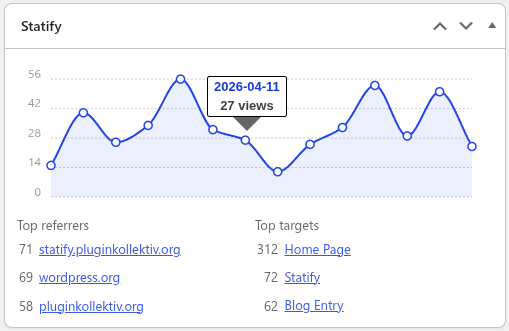
Statify dashboard widget
-
Statify dashboard widget settings
-
Statify settings page
-
Statify tracking configuration
-
Monthly views per year
-
Top referrers for last week
About this plugin
Statify provides a straightforward and compact access to the number of site views. It is privacy-friendly as it uses neither cookies nor a third party.
An interactive chart is followed by lists of the most common reference sources and target pages. The period of statistics and length of lists can be set directly in the dashboard widget.
Data Privacy
In direct comparison to statistics services such as Google Analytics, WordPress.com Stats and Matomo (Piwik) Statify doesn’t process and store personal data as e.g. IP addresses – Statify counts site views, not visitors.
Absolute privacy compliance coupled with transparent procedures: A locally in WordPress created database table consists of only four fields (ID, date, source, target) and can be viewed at any time, cleaned up and cleared by the administrator.
Due to this tracking approach, Statify is 100% compliant with GDPR and serves as an lightweight alternative to other tracking services.
Display of the widget
The plugin configuration can be changed directly in the Statify Widget on the dashboard by clicking the Configure link.
The amount of links shown in the Statify Widget can be set as well as the option to only count views from today. Of course, older entries are not deleted when changing this setting.
The statistics for the dashboard widget are cached for four minutes.
Period of data saving
Statify stores the data only for a limited period (default: two weeks), longer intervals can be selected as option in the widget. Data which is older than the selected period is deleted by a daily cron job.
An increase in the database volume can be expected because all statistic values are collected and managed in the local WordPress database (especially if you increase the period of data saving).
JavaScript tracking for caching compatibility
For compatibility with caching plugins like Cachify Statify offers an optional switchable tracking via JavaScript. This function allows reliable count of cached blog pages.
For this to work correctly, the active theme has to call wp_footer(), typically in a file named footer.php.
Skip tracking for spam referrers
The comment blacklist can be enabled to skip tracking for views with a referrer URL listed in comment blacklist, i. e. which considered as spam.
Support
If you’ve problems or think you’ve found a bug (e.g. you’re experiencing unexpected behavior), please post at the support forums.
Contribute
- Active development of this plugin is handled on GitHub.
- Pull requests for documented bugs are highly appreciated.
- If you want to help us translate this plugin you can do so on WordPress Translate.
Questions
- Which areas are excluded from counting?
Statify does not count the following views:
- feeds
- trackbacks
- searches
- previews
- views by logged in users (unless tracking is activated via the settings page)
- error pages
- favicon (as of WP 5.4)
- sitemap (as of WP 5.5)
This behavior can be modified with the
statify__skip_trackinghook.- Can further visitor data be recorded?
Some plugin users want to capture additional visitor data, e.g. name of the device and resolution.
Statify counts exclusively page views and no visitors, the desired data acquisition is not a question.- How to change who can see the Dashboard widget?
Per default only administrators can see the widget. This can be changed with the
statify__user_can_see_statshook.Example:
add_filter(
    'statify__user_can_see_stats',
    '__return_true'
);
has to be added to the theme’s
functions.phpand adapted to your needs. This example would allow all users to see the widget.Editing the configuration is still limited to users with
edit_dashboardcapability.- How to skip tracking for defined users or pages
The conditions for tracking views can be customized according to page type and user capabilities by using the hook
statify__skip_tracking.Example:
add_filter(
    'statify__skip_tracking',
    function() {
        if ( condition ) {
            return true;
        }

        return false;
    }
);
has to be added to the theme’s
functions.php. The condition has modified such that the method returns true if and only if the view should be ignored.- How to extend this plugin?
- Statify – Extended Evaluation for a more detailed evaluation and export function
- Statify Widget to display most popular content
- Statify Blacklist to define a customized blacklist for referrer spam
- How can I report security bugs?
You can report security bugs through the Patchstack Vulnerability Disclosure Program. The Patchstack team help validate, triage and handle any security vulnerabilities. Report a security vulnerability.
sandywp / also on the shelf
Try another plugin

Site Kit by Google – Analytics, Search Console, AdSense, Speed
4.2 · 5M+ installs
Site Kit is a one-stop solution for WordPress users to use everything Google has to offer to make them successful on the web.
-
The best free Google Analytics plugin for WordPress. See how visitors find and use your website so you can grow your business…

WP Statistics – Simple, privacy-friendly Google Analytics alternative
4.1 · 600K+ installs
Get website traffic insights with GDPR/CCPA compliant, privacy-friendly analytics. Includes visitor data, stunning graphs, and no…

Spin up a real WordPress site in seconds.
Test plugins, build a demo, hand a client a link — then squash it and start again. No local setup, no Docker.