sandywp / plugins / sold-out-badge-for-woocommerce

Sold Out Badge for WooCommerce
Display a "Sold Out!" badge on out-of-stock products. Show the text and colors you want. Perfect for artists, artisans, real estate professionals...
Ready in seconds.
v4.4.0 8,000+ installs WP 5.2+ PHP 7.2+
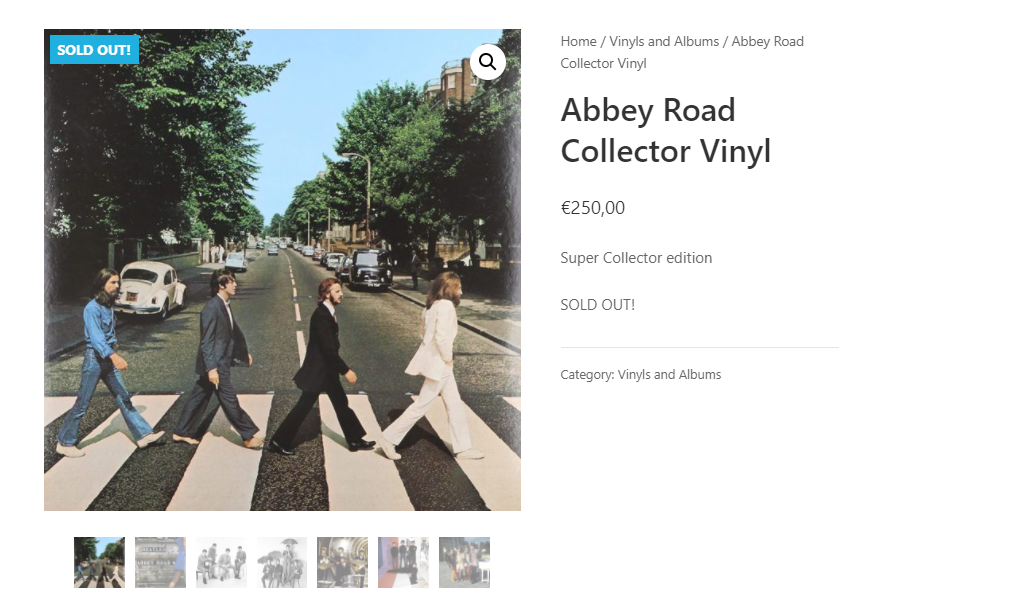
What you get inside
3 screens-
Single product page
-
Store and categories pages
-
Admin settings
About this plugin
Display a “Sold Out!” badge on out-of-stock products.
When a WooCommerce product becomes out of stock, this plugin will show a badge on thumbnail with the text you will have defined.
This plugin was initially created to help people and companies selling unique products or services, like artists, artisans, real estate professionals, etc. It is often beneficial for them to keep showing sold out (out of stock) products on their websites, while displaying a message indicating that the product can’t be sold anymore.
However, this plugin can be used by anyone wanting to display any text in a badge when a product is out of stock.
It is also possible to display a badge on backorder products.
Usage & Documentation
You can customize options in Settings > Sold Out Badge for WooCommerce
What can I customize in this plugin ?
- Badge text (you can replace “Sold Out” with any text you want, like “Out of stock” or “Coming Soon“)
- Badge background color
- Badge text color
- Badge font size
- Badge width
- Badge height
- …
- An option to hide “Sale” badge if you get an overlap (checked by default)
Resources
Questions
- Is this plugin completely free?
Yes.
- Can I use this plugin for commercial purposes?
Sure, go ahead! It is completely open source.
- Can I change the badge text?
Yes. Go to Settings > Sold Out Badge for WooCommerce, you’ll find the setting you want.
- What if this plugin isn’t compatible with my theme or doesn’t work?
You could uninstall this plugin and try to get the badge manually. There are two ways you could do it:
1. Pure CSS
If you’re lucky enough, you’ll have a specific CSS class for out-of-stock products.
You could add a SOLD OUT badge like this:.product.outofstock:before { content: 'SOLD OUT'; color: #ffffff; background: #FE2121; font-size: 16px; padding: 4px; font-weight: bold; width: auto; height: auto; border-radius: 0; z-index: 9999; text-align: center; position: absolute; top: 6px; right: auto; bottom: auto; left: 6px; }2. PHP + CSS
Otherwise, you could use WP hooks to add a badge. Put this code in your child theme’s
functions.php:add_action( 'woocommerce_before_shop_loop_item_title', 'my_custom_soldout_badge_display', 10 ); add_action( 'woocommerce_before_single_product_summary', 'my_custom_soldout_badge_display', 30 ); function my_custom_soldout_badge_display() { global $post, $product; if ( ! $product->is_in_stock() ) { echo '<span class="wcsob_soldout">SOLD OUT</span>'; } }Use the following CSS code to style the badge:
.wcsob_soldout {
     content: 'SOLD OUT';
     color: #ffffff;
     background: #FE2121;
     font-size: 16px;
     padding: 4px;
     font-weight: bold;
     width: auto;
     height: auto;
     border-radius: 0;
     z-index: 9999;
     text-align: center;
     position: absolute;
     top: 6px;
     right: auto;
     bottom: auto;
     left: 6px;
}
sandywp / also on the shelf
Try another plugin

YITH WooCommerce Badge Management
2.9 · 10K+ installs
YITH WooCommerce Badge Management allows you to create and manage custom badges for products.

Trusted Shops Easy Integration for WooCommerce
5.0 · 6K+ installs
Show that your customers love you with reviews in your online store and boost your business with the free Trusted Shops Plugin…

Product Badge, Label, Countdown Timer for WooCommerce – Sale Booster
4.8 · 5K+ installs
WooCommerce Product Badge and Label, Sale Badge, Sold Out Badge, Countdown Timer, Notification Bar (PRO), Quick View,…
Spin up a real WordPress site in seconds.
Test plugins, build a demo, hand a client a link — then squash it and start again. No local setup, no Docker.