sandywp / plugins / smtp-mailer

SMTP Mailer
Configure a SMTP server to send email from your WordPress site. Configure the wp_mail() function to use SMTP instead of the PHP mail() function.
Ready in seconds.
v1.1.27 70,000+ installs WP 7.0+
What you get inside
2 screens-
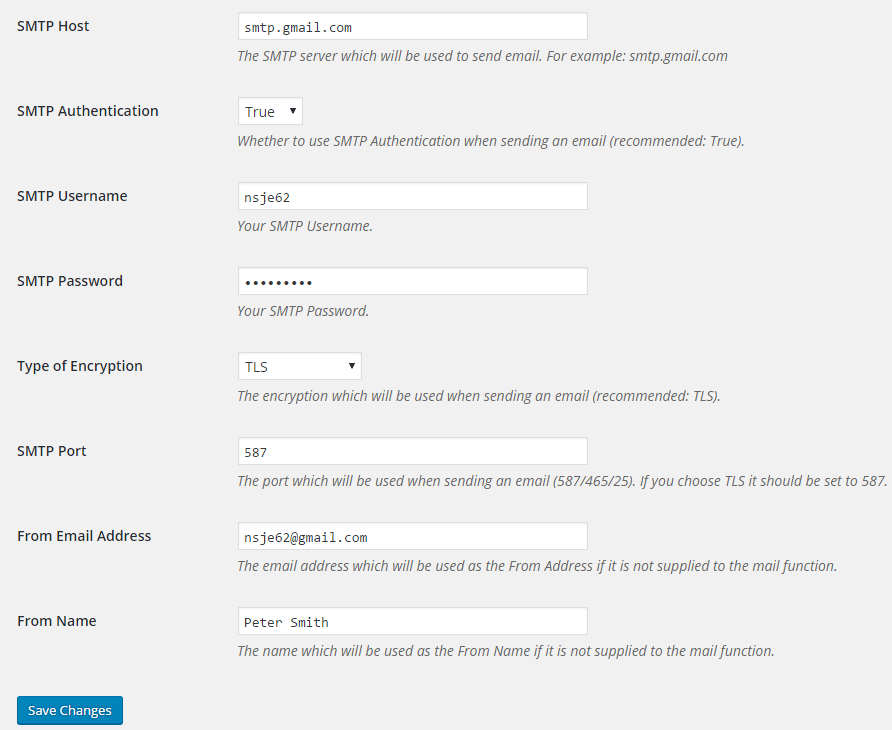
SMTP Mailer Settings
-
SMTP Mailer Test Email Tab
About this plugin
SMTP Mailer plugin allows you to configure a mail server which handles all outgoing email from your website. It takes control of the wp_mail function and use SMTP instead.
SMTP Mailer Add-ons
SMTP Mailer Settings
- SMTP Host: Your outgoing mail server (e.g. smtp.gmail.com).
- SMTP Authentication: Whether to use SMTP authentication when sending an email (True/False). If you choose to authenticate you will also need to provide your username and password.
- SMTP Username: The username to connect to your SMTP server.
- SMTP Password: The password to connect to your SMTP server.
- Type of Encryption: The encryption to be used when sending an email (TLS/SSL/No Encryption. TLS is recommended).
- SMTP Port: The port to be used when sending an email (587/465/25). If you choose TLS the port should be set to 587. For SSL use port 465 instead.
- From Email Address: The email address to be used as the From Email when sending a test email.
- From Name: The name to be used as the From Name when sending a test email.
- Force From Name: The From name in the settings is set for all outgoing email messages.
- Force From Email: The From email in the settings is set for all outgoing email messages.
- Force From Address: The From address in the settings is set for all outgoing email messages.
- Disable SSL Certificate Verification: As of PHP 5.6 a warning/error is shown if the SSL certificate on the server is not properly configured. This option lets you disable that behaviour.
SMTP Mailer Test Email
Once you have configured the settings you can send a test email to check the functionality of the plugin.
- To: Email address of the recipient.
- Subject: Subject of the email.
- Message: Email body.
Known Compatibility
SMTP Mailer should work with any plugin that uses the WordPress Mail function. However, It has been tested with the following form and contact form plugins:
- Contact Form 7
- Jetpack Contact Form
- Visual Form Builder
- Fast Secure Contact Form
- Formidable Forms
- Contact Form by BestWebSoft
For detailed setup instructions please visit the SMTP Mailer plugin page.
sandywp / also on the shelf
Try another plugin

WP Mail SMTP by WPForms – The Most Popular SMTP and Email Log Plugin
4.8 · 4M+ installs
Make email delivery easy for WordPress. Connect with SMTP, Gmail, Outlook, SendGrid, Mailgun, SES, Zoho, + more. Rated #1…

MC4WP: Mailchimp for WordPress
4.8 · 1M+ installs
The #1 Mailchimp plugin for WordPress. Allows you to add a multitude of newsletter sign-up methods to your site.

Easy WP SMTP – WordPress SMTP and Email Logs: Gmail SMTP, Office 365, Outlook,…
4.6 · 500K+ installs
Make SMTP email sending and delivery easy. Configure Gmail SMTP, Outlook, Brevo, SendGrid, Mailgun, SendLayer or connect to any…
Spin up a real WordPress site in seconds.
Test plugins, build a demo, hand a client a link — then squash it and start again. No local setup, no Docker.