sandywp / plugins / slim-seo

Slim SEO
AI SEO Plugin, Lightweight, Fast & Automated
An AI SEO plugin for WordPress that's lightweight and fast. Automatically generates meta tags, sitemaps, schemas and more with no bloat.
Ready in seconds.
v4.10.0 70,000+ installs WP 6.6+ PHP 7.4+
What you get inside
6 screensAbout this plugin
An AI SEO Plugin That’s Lightweight, Fast & Automated
Currently there are many SEO plugins for WordPress in the market. But these plugins often have too many options and are very complicated for ordinary users. Access to their configuration section, you will easily get lost in a maze of explanations and options that you sometimes don’t understand. Besides, there are ads!
So how can an ordinary user use an SEO plugin?
SEO should be an integrated part of WordPress, where users don’t need or need very little effort to configure for SEO. The main reason is that not everyone understands the terms of SEO and how to configure them optimally.
So, we made Slim SEO.
Slim SEO is a full-featured SEO plugin, that’s done right! It provides a complete SEO solution for WordPress where the configuration has been done automatically. Users do not need to care about their complex and semantic options.
So what does Slim SEO do?
Slim SEO Features
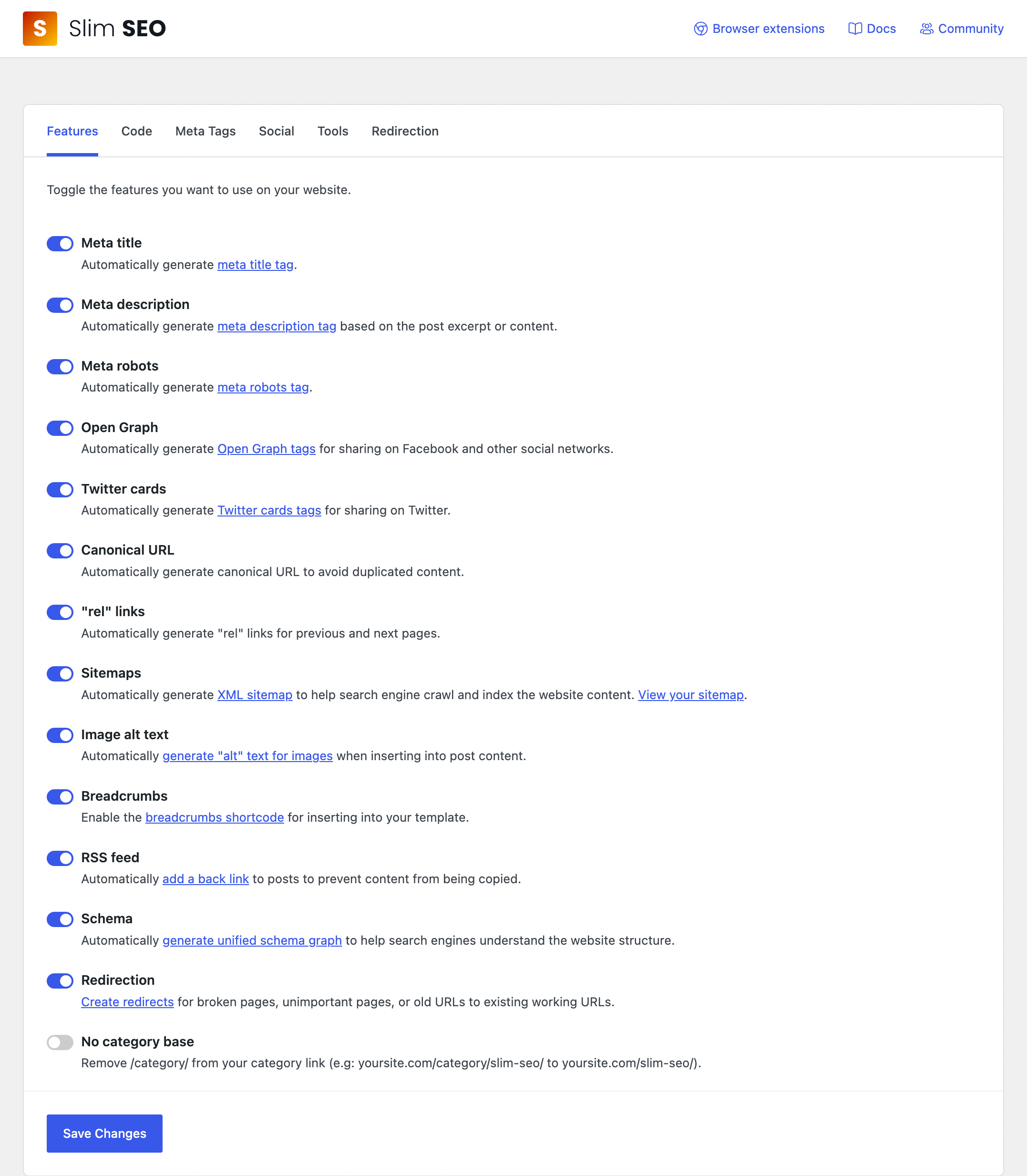
Slim SEO helps you do the following jobs automatically:
1. AI-Powered Meta Tags
Slim SEO integrates AI to help you write SEO-friendly meta titles and descriptions faster and better. No more staring at a blank field or guessing what to write.
- Generate with AI: a magic wand button in the meta title and description fields on the post and term edit screens. Click it and the plugin writes SEO-optimized titles and descriptions for you, based on your content and in the same language.
- Bulk generation: generate or rewrite meta titles and descriptions for hundreds of posts and terms in one go, right from the Tools tab. Choose which post types and taxonomies to process, and decide whether to keep existing values.
- Your preferred AI provider: works with OpenAI (GPT), Google (Gemini), Anthropic (Claude) and OpenRouter. Bring your own API key and pick any model you like.
Read more about AI integration.
2. Meta Tags
The following meta tags are auto-generated and optimized for the best SEO scores.
- Meta title tag: display your title in a SEO-friendly way.
- Meta description tag: auto generate from posts/pages excerpt or content.
- Meta robots tag: decide which pages are indexed and which ones not.
- Facebook Open Graph Tags: share your posts on Facebook beautifully.
- Twitter Card Tags: share your posts on Twitter beautifully.
- LinkedIn meta tags
3. XML Sitemap
Slim SEO automatically generates XML sitemap (at domain.com/sitemap.xml) to submit to search engines. With XML sitemaps, your website are indexed fast and completely.
Besides the normal XML sitemap, Slim SEO also includes sitemaps for images and Google news.
4. Breadcrumbs
The plugin allows you to output a breadcrumb trail on your website easily. It automatically fetches the information from the current post and output a hierarchy for you. You can also style the breadcrumbs to match your theme style.
5. Schema (Structured Data)
Schema is a way that describes structured data for search engines. Based on the data provided, search engines can show the content in the search results page in a more appealing way.
Slim SEO automatically adds the some structured data to the website via JSON-LD which makes your website more SEO-friendly. Not only schemas are created by the plugin, there are also meaningful connections between them. For example, an article (single post) is the main entity of the current webpage. Slim SEO does that all without any configuration.
6. Redirection
- Setting up redirection rules easily
- Auto redirect non-www to www and vice versa
- 404 link monitoring
7. And many more
- Inserting Google Analytics, Facebook pixel or any code to the header or footer of the site
- Auto prevent scraping content from RSS feed
- Integrations with many plugins, including page builders
- Import and export data or migrate data from popular SEO plugins
- Auto redirect if post slug changed
Slim SEO Pro
Upgrade to Slim SEO Pro to have access to advanced SEO features without complexity:
- Visual schema builder
- 30+ pre-built schema types
- Custom schema with JSON-LD
- Contextual link suggestions
- Real-time link health monitoring
- Broken link repair
- Link updater
- View search performance with Google Search Console integration
- Improve your content with writing assistant
Who should use Slim SEO?
Everyone can use Slim SEO!
However, Slim SEO is perfectly suitable for users who prefer simplicity or do not like the complicated options that other SEO plugins provide. It’s also a good choice for users with little SEO knowledge and just want to use SEO plugins to automate their jobs.
You might also like
If you like this plugin, you might also like our other WordPress products:
- Meta Box – A powerful WordPress plugin for creating custom post types and custom fields.
- Falcon – A lightweight companion for making WordPress faster, cleaner, and more secure.
- GretaThemes – Free and premium WordPress themes that clean, simple and just work.
- Auto Listings – A car sale and dealership plugin for WordPress.
Questions
- How meta title tag is generated?
WordPress already has this featured! All we need to do is add theme support for
title-tag. By default, the title tag will have the following format:For homepage: Site title – Site description
For single page or post: Page/Post title – Site title
For other pages: Page title – Site titleThis format is pretty good!
- How meta description tag is generated?
The meta description tag is automatically generated from the post excerpt or post content (in case you didn’t enter post excerpt). For categories, post tags or custom taxonomies, their description will be used as meta description.
- How Open Graph meta tags is generated?
Open Graph inherits the meta title and meta description. For image tag, it gets from the featured image.
For single posts, the plugin also provides detailed information for article section (the first post category) and article tags (post tags). It also provides additional information such as published time and modified time.
Other tags such as
url,site_name,type,localeare quite obvious.- How Twitter card meta tags is generated?
Twitter inherits some tags from Open Graph such as title, description and image. So we only need to set the card type to large image, so the posts appear beautifully on Twitter.
- How do I set meta tags for my homepage?
If your homepage is a static page, then it’s treated like a normal page. The meta description is generated from page content, and the featured image will be used for Open Graph tags.
If your homepage shows latest posts, then it’s already done automatically by the plugin.
- Can I change the meta tags manually?
Yes, you can. When you edit a post or a page, there’s a “Search Engine Optimization” meta box below the editor, which allows you to edit meta tags if needed.
- Where is my XML sitemap?
The sitemap URL is located at
domain.com/sitemap.xml.- How to remove plugin’s data when uninstalling
Add the following constant in your
wp-config.phpfile:define( 'SLIM_SEO_DELETE_DATA', true );
sandywp / also on the shelf
Try another plugin

WPCode – Insert Headers and Footers + Custom Code Snippets – WordPress Code…
4.9 · 3M+ installs
Easily add code snippets in WordPress. Insert header & footer scripts, add PHP code snippets with conditional logic, insert…

4.9 · 600K+ installs
Easily add tracking code snippets, conversion pixels, or other scripts required by third party services for analytics, marketing,…

5.0 · 300K+ installs
Include inline javascript, stylesheets, CSS code or anything you want in Header and Footer areas of your WordPress with ease.
Spin up a real WordPress site in seconds.
Test plugins, build a demo, hand a client a link — then squash it and start again. No local setup, no Docker.