sandywp / plugins / simple-css

Simple CSS
Add CSS to your website through an admin editor, the Customizer or a metabox for page/post specific CSS.
Ready in seconds.
v1.1.1 80,000+ installs WP 4.0+
What you get inside
4 screens-
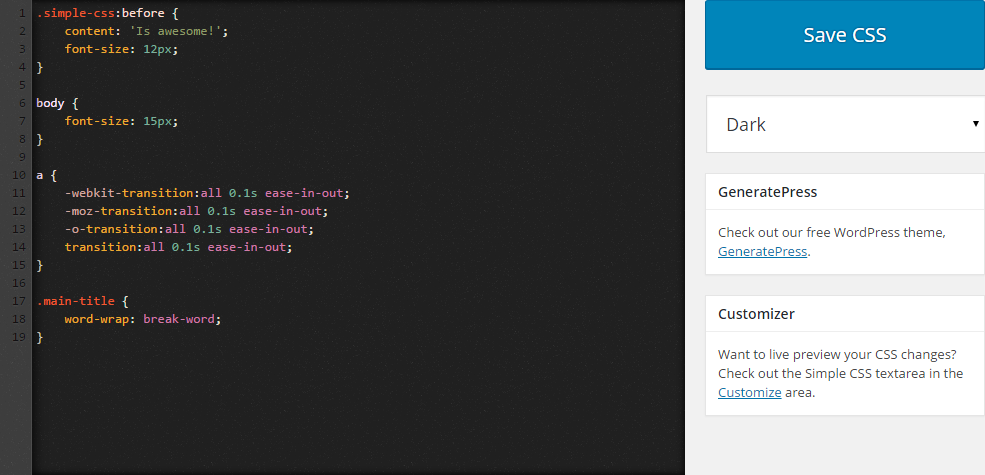
The dark theme of the CSS editor.
-
The light theme of the CSS editor.
-
The CSS editor in the Customizer.
-
The CSS editor metabox.
About this plugin
Need to add some custom CSS to your site? Simple CSS gives you an awesome admin editor and a live preview editor in the Customizer so you can easily add your CSS.
Want your CSS to only apply on a specific page or post? Simple CSS adds a metabox which allows you to do just that.
Check out GeneratePress, our awesome WordPress theme! (https://wordpress.org/themes/generatepress)
Features include:
- Full featured admin CSS editor
- Dark and light editor themes
- CSS editor in the Customizer so you can live preview your changes
- Metabox for page/post specific CSS
Questions
- How do I add CSS using your plugin?
- Make sure Simple CSS is activated.
- Navigate to “Appearance > Simple CSS” and add your CSS to the editor.
- How do I add CSS using the Customizer?
- Make sure Simple CSS is activated.
- Navigation to “Appearance > Customize” and open the “Simple CSS” section.
- How do I change the editor color?
- In “Appearance > Simple CSS”, change the “Dark” option below the “Save CSS” button to “Light”.
- How do I add CSS that applies only to one page?
- Navigate to your page or post in the Dashboard and look for the “Simple CSS” metabox.
sandywp / also on the shelf
Try another plugin

WPCode – Insert Headers and Footers + Custom Code Snippets – WordPress Code…
4.9 · 3M+ installs
Easily add code snippets in WordPress. Insert header & footer scripts, add PHP code snippets with conditional logic, insert…

4.7 · 1M+ installs
An easy, clean, and simple way to enhance your site with code snippets.

4.7 · 100K+ installs
Add Custom CSS to your WordPress site without any hassles.
Spin up a real WordPress site in seconds.
Test plugins, build a demo, hand a client a link — then squash it and start again. No local setup, no Docker.