sandywp / plugins / shortcoder

Shortcoder
Create Shortcodes for Anything
Create custom "Shortcodes" easily for HTML, JavaScript, CSS code snippets and use the shortcodes within posts, pages & widgets
Ready in seconds.
v6.5.4 100,000+ installs WP 4.9.0+ PHP 5.3+
What you get inside
7 screens-
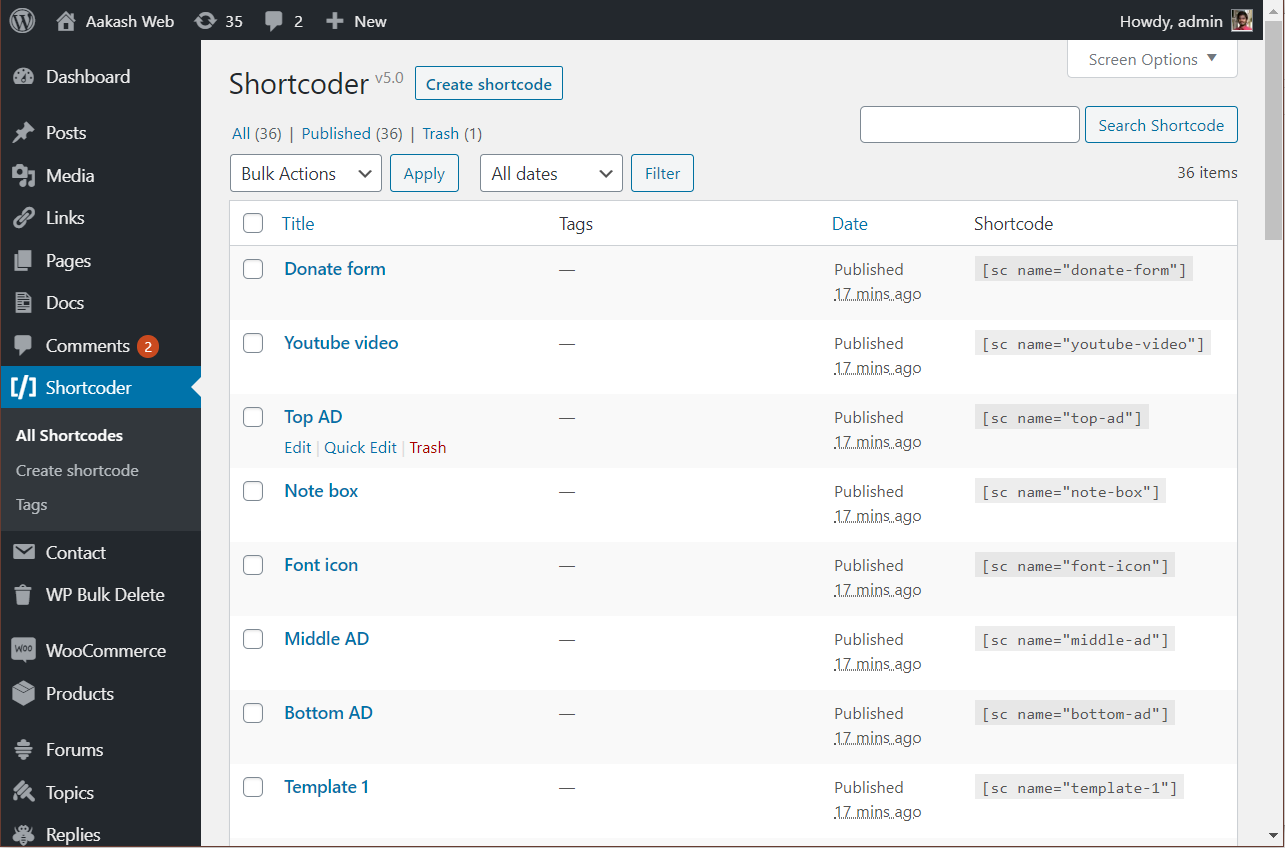
Shortcoder admin page.
-
Editing a shortcode.
-
"Insert shortcode" popup to select and insert shortcodes.
-
A shortcode inserted into post.
-
Shortcoder block for Gutenberg editor.
-
Shortcoder executed in the post.
-
Insert shortcode inline from block editor toolbar.
About this plugin
Shortcoder plugin allows to create a custom shortcodes for HTML, JavaScript, CSS and other code snippets. Now the shortcodes can be used in posts/pages and the snippet will be replaced in place.
✍ Create shortcodes easily
- Give a name for the shortcode
- Paste the HTML/JavaScript/CSS as shortcode content
- Save !
- Now insert the shortcode
[sc name="my_shortcode"]in your post/page. - Voila ! You got the HTML/Javascript/CSS in your post.
✨ Features
- Create custom shortcodes easily and use them in any place where shortcode is supported.
- Have any HTML, Javascript, CSS as Shortcode content.
- Insert: Custom parameters in shortcode
- Insert: WordPress parameters in shortcode
- Multiple editors: Code, Visual and text modes.
- Globally disable the shortcode when not needed.
- Disable shortcode on desktop, mobile devices.
- A button in post editor to pick the shortcodes to insert.
- Execute blocks HTML in shortcode content.
- Insert shortcodes in Gutenberg/block editor.
🎲 An example usage
- Create a shortcode named “adsenseAd” in the Shortcoder admin page.
- Paste the adsense code in the box given and save it.
- Use
[sc name="adsenseAd"]in your posts and pages. - Tada !!! the ad code is replaced and it appears in the post.
- Now you can edit the ad code at one place and the code is updated in all the locations where the shortcode is used.
Similarly shortcodes can be created for frequently used snippets.
You can also add custom parameters (like %%id%%) inside the snippets, and change it’s value like [sc name="youtube" id="GrlRADfvjII"] when using them.
🧱 Using in block editor
Though shortcodes can be used in any place manually, Shortcoder provides below options to select and insert the shortcodes created easily when working with the block editor.
- Shortcoder block
- Toolbar button to select and insert shortcodes inline (under “more”)
💎 Upgrade to PRO
Shortcoder also provides a PRO version which has additional features to further enhance the experience. Below features are offered in the PRO version.
- Custom editor – Edit Shortcode content using block editor or page builder plugins like Elementor and WPBakery.
- (New) Translation with WPML – Translate Shortcode content with WPML.
- Revisions – Revisions support for Shortcode content.
- Locate shortcode – Search posts and pages where a shortcode is used.
- Extra code – Include extra code to the footer when a shortcode is used in a page.
Get started with Shortcoder – PRO
Links
Questions
- What are the allowed characters for shortcode name?
Allowed characters are alphabets, numbers, hyphens and underscores.
- My shortcode is not working in my page builder!
Please check with your page builder plugin to confirm if the block/place/area where the shortcode is being used can execute shortcodes. If yes, then shortcode should work fine just like regular WordPress shortcodes.
- My shortcode is not working!
Please check the following if you notice that the shortcode content is not printed or when the output is not as expected.
- Please verify if the shortcode content is printed. If shortcode content is not seen printed, check the shortcode settings to see if any option is enabled to restrict where and when shortcode is printed. Also confirm if the shortcode name is correct and there is no duplicate
nameattribute for the shortcode. - If shortcode is printed but the output is not as expected, please try the shortcode content in an isolated environment and confirm if the shortcode content is working correctly as expected. Sometimes it might be external factors like theme, other plugin might conflict with the shortcode content being used.
- There is a known limitation in shortcodes API when there is a combination of unclosed and closed shortcodes. Please refer this document for more information.
- Please verify if the shortcode content is printed. If shortcode content is not seen printed, check the shortcode settings to see if any option is enabled to restrict where and when shortcode is printed. Also confirm if the shortcode name is correct and there is no duplicate
- Can I insert PHP code in shortcode content?
No, right now the plugin supports only HTML, Javascript and CSS as shortcode content.
- Can I use block editor or page builders like Elementor, WPBakery to create shortcode?
Yes, this feature is available in the PRO version. You can upgrade to the PRO version to design using custom editor and create shortcode for that.
sandywp / also on the shelf
Try another plugin

WPCode – Insert Headers and Footers + Custom Code Snippets – WordPress Code…
4.9 · 3M+ installs
Easily add code snippets in WordPress. Insert header & footer scripts, add PHP code snippets with conditional logic, insert…

4.7 · 1M+ installs
An easy, clean, and simple way to enhance your site with code snippets.

5.0 · 200K+ installs
Easy add site-wide, category and article specific custom code before the closing </head> and </body>, or after…
Spin up a real WordPress site in seconds.
Test plugins, build a demo, hand a client a link — then squash it and start again. No local setup, no Docker.