sandywp / plugins / shortcode-in-menus

Shortcode in Menus
Allows you to add shortcodes in WordPress Navigation Menus.
Ready in seconds.
v3.5.1 50,000+ installs WP 3.6+ PHP 5.6+
What you get inside
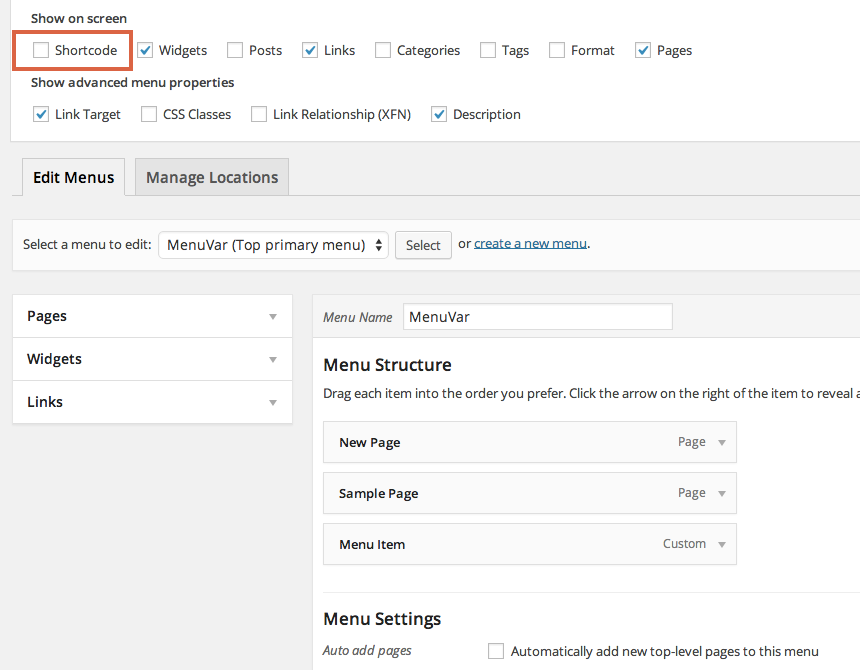
8 screens-
Check the screen options, if you don't see the Shortcode box.
-
Check the Shortcode option to see the new Shortcode box.
-
Add your shortcode/HTML to the text area (not a link, in the screenshot). Optionally, add a title.
-
The menu item is saved.
-
The html is displayed.
-
Old Method: In the Links box, add your shortcode in the URL field.
-
Old Method: If you want to use a shortcode that outputs not just the URL, but complete HTML sections, write FULL HTML OUTPUT in the Link Text option for that…
-
Old Method: The menu item is saved.
About this plugin
Allows you to add shortcodes in WordPress Navigation Menus so that you can generate links dynamically. Also allows you to add full fledged HTML sections to navigation menus.
Usage
See the screenshots.
Also, see a great tutorial by Aurovrata Venet
Special Thanks To
- Aurovrata Venet for this great tutorial.
- Lee Willis for finding out and helping in resolving this bug.
- Dennis Hunink for reporting this bug.
- @hbwarper for providing a patch to Dennis’ issue.
Questions
- How to enter shortcode
You can add enter shortcodes in the “Custom Link” menu item, or you can use “Shortcode” menu shortcodes in menus.
Screencast for using WordPress’ default “Custom Links” menu item:
Screencast for using “Shortcode” menu item:
- How to view/edit “Shortcode” menu item
You will need to enable displaying of “Description” in order to view/edit “Shortcode” menu item.
Here’s a screencast for the same:
sandywp / also on the shelf
Try another plugin

4.8 · 8K+ installs
Allows you to add Widgets in WordPress Navigation Menus

Add Featured Image Custom Link
4.1 · 1K+ installs
Try it out on your free dummy site: Click here => https://tastewp.com/new?pre-installed-plugin-slug=custom-url-to-featured-imag…
5.0 · 10+ installs
Easily add customizable download buttons with timers to your WordPress posts.
Spin up a real WordPress site in seconds.
Test plugins, build a demo, hand a client a link — then squash it and start again. No local setup, no Docker.