sandywp / plugins / sendpulse-email-marketing-newsletter

SendPulse Email Marketing Newsletter
Add a customizable email subscription form to your site, send newsletters, and automate email campaigns with autoresponders using SendPulse.
Ready in seconds.
v2.2.6 1,000+ installs WP 5.7+ PHP 8.0+
What you get inside
4 screens-
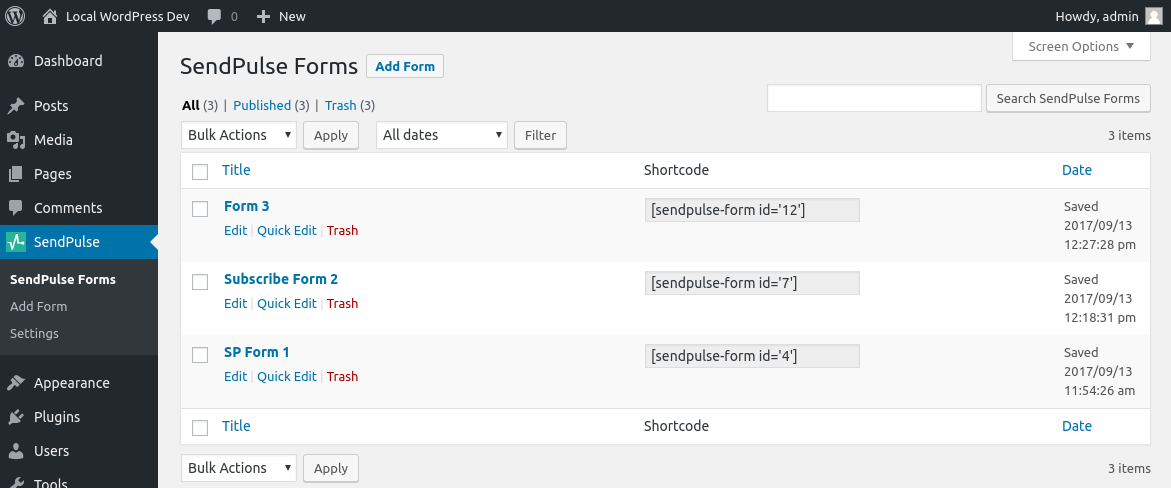
SendPulse Forms table view.
-
Form editor.
-
API setting.
-
Import Wordpress user.
About this plugin
SendPulse plugin for WordPress
Add an email subscription form to your site. Each new subscriber will be automatically added to your mailing list. Create and send email campaigns with SendPulse, a multi-channel marketing automation platform.
FEATURES
- Install the plugin in 1 click and set up within minutes;
- Add multiple email subscription forms;
- Customize your subscription forms to fit your brand identity;
- Import contacts from WordPress to your mailing list.
SENDPULSE’S KEY FEATURES
- Rich automation possibilities that allow you to create email, SMS, web push, and chatbot campaigns on one platform;
- Drag and drop email editor;
- Ready-made email templates;
- Email personalization and list segmentation;
- Detailed analytics and reports;
WHAT IS SENDPULSE?
SendPulse is a multi-channel marketing automation platform for multifaceted business promotion and customer retention.
SendPulse allows you to send email, SMS, and web push campaigns, stay in touch with clients using Telegram, Facebook Messenger, WhatsApp, and Instagram chatbots, and create landing pages in just 15 minutes.
You can easily track all of your marketing activities and gather customer data with SendPulse’s free CRM.
Create a SendPulse account, and send up to 15,000 emails every month for free.
You can install SendPulse Free WebPush plugin if you need a plugin for web push notifications.
Contacts
- Customer support – https://sendpulse.com/support
- Twitter – https://twitter.com/SendPulseCom
- Facebook – https://facebook.com/sendpulse
Usage
- Create a subscription form using SendPulse’s builder.
- Add a new SendPulse form using WordPress.
- Paste your subscription form code in the editor.
- To display your subscription form, use a shortcode (for example
[sendpulse-form id="..."]where “…” is form id) in editor or place<?php echo do_shortcode('[sendpulse-form id="..."]')?>in your themes file.
Requirement
- PHP version >= 8.0+ (Recommended >= 8.0+)
Questions
- How place shortcode in themes file?
Shortcode can be used anywhere in the theme templates via do_shortcode function.
For example,<?php echo do_shortcode('[sendpulse-form id="..."]')?>.- Why is the SendPulse subscription form not appearing on my website?
If the subscription form does not appear on your website, the issue is often caused by frontend optimization plugins.
Many performance plugins (such as WP Rocket, Autoptimize, LiteSpeed Cache, Fast Velocity Minify, etc.) modify how JavaScript is loaded by enabling features like:
– JavaScript minification
– JavaScript combination (bundling)
– Deferred or delayed script execution
– JavaScript optimization and aggregationThese optimizations can change the loading order or execution timing of third-party scripts and may prevent SendPulse subscription forms from loading correctly.
How to fix:
1. Temporarily disable JavaScript optimization options and check whether the subscription form starts working.
2. If it does, re-enable options one by one to identify the conflicting setting.
3. Clear all caches after changing optimization settings.For WP Rocket users:
– Disable the “Minify JavaScript files” option
– Disable the “Combine JavaScript files” option
– Disable the “Delay JavaScript Execution” option (if enabled)
– Clear the cache after making changesIn some cases, excluding SendPulse resources from optimization may also help.
Recommended exclusions:
– static-login.sendpulse.com
– web.webformscr.com
– /apps/fc3/build/loader.jsThese resources are required for loading and rendering SendPulse subscription forms.
Note:
JavaScript combination is often unnecessary on modern HTTP/2 and HTTP/3 websites and may cause compatibility issues with third-party services such as embedded forms, chat widgets, analytics tools, and marketing integrations.
sandywp / also on the shelf
Try another plugin

weMail – Email Marketing, Newsletters Builder & Email Automations for…
4.1 · 10K+ installs
Email marketing, newsletters & email automation for WordPress. Manage WooCommerce emails & build email newsletter…

Simple Membership MailChimp Integration
3.0 · 900+ installs
An addon for the simple membership plugin to signup members to your MailChimp list

Arigato Autoresponder and Newsletter
4.7 · 500+ installs
This plugin allows scheduling of automated autoresponder messages / drip marketing messages, instant newsletters, and managing a…
Spin up a real WordPress site in seconds.
Test plugins, build a demo, hand a client a link — then squash it and start again. No local setup, no Docker.