sandywp / plugins / schema

Schema
Get the next generation of Schema Structured Data to enhance your WordPress site presentation in Google search results.
Ready in seconds.
v1.7.9.6 30,000+ installs WP 4.0+ PHP 5.4+
What you get inside
8 screens-
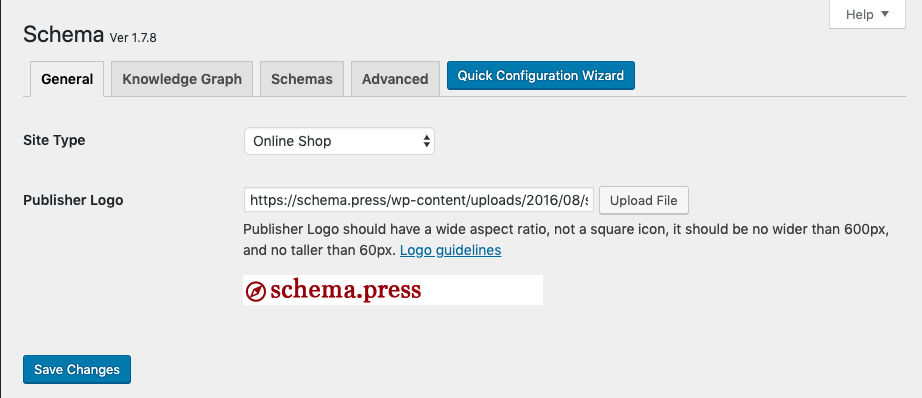
Schema Plugin General Settings page.
-
Schema Plugin Knowledge Graph Settings page.
-
Schema Plugin Schemas Settings page.
-
Schema Plugin Advanced Settings page.
-
Create new schema type screen.
-
Create post meta fields with Post Meta Box generator feature.
-
Google Structured Data Testing Tool.
-
Schema Plugin Easy Configuration Wizard.
About this plugin
Like Schema plugin? Consider leaving a 5 star review.
Super fast, light-weight plugin for adding schema.org structured data markup in recommended JSON-LD format automatically to WordPress sites.
Enhanced Presentation in Search Results By including structured data appropriate to your content, your site can enhance its search results and presentation.
Check out the Plugin Homepage for more info and documentation.
What is Schema markup?
Schema markup is code (semantic vocabulary) that you put on your website to help the search engines return more informative results for users. So, Schema is not just for SEO reasons, it’s also for the benefit of the searcher.
Schema.org Structured Data Demo & Examples
-
View our Live Structured Data Demo examples site.
-
View WordPress Grade site.
Schema Key Features
- Easy to use, set it and forget it, with minimal settings.
- [Premium] Support for different schema.org types.
- Enable Schema types at once per post type or post category.
- [Premium] Enable Schema types anywhere you want on your site content.
- [Premium] Customize source data of schema.org properties.
- Valid markup, test it in Google Structured Data Testing Tool.
- Output JSON-LD format, the most recommended by Google.
- Reuse data saved in post meta, which is created by other plugins.
- Extensible, means you can extend its functionality via other plugins, extensions or within your Theme’s functions.php file.
Note: some features are Premium. Which means you need Schema Premium to have those features. Get Schema Premium here!
Free vs Premium
See: a Free vs Premium comparison.
Free Plugin Extensions
- Schema Review: Extend Schema functionality by adding review and rating Structured Data functionality for Editors and Authors.
- Schema Default Image: Add ability to set a default WordPress Featured image for schema.org markup.
Premium Plugin Extensions
- Schema for WooCommerce: Integration for WooCommerce.
- Schema FAQ Block: Add FAQ Block. ( FAQPage Demo ).
- Schema How-To Block: Add How-To Block.
- Schema Rating: Allow site visitors to submit rating ( Demo ).
- Schema Reviews: Allow site visitors to submit reviews ( Demo ).
Supported Google/Schema Markups
-
Style Your Search Results:
Supported Schema.org Types
-
Creative Work
- Article enabled on Pages
- BlogPosting enabled on Posts
- NewsArticle
- Report
- ScholarlyArticle
- TechArticle
-
Blog to markup Blog posts list page.
- WPHeader to markup Web Page Header.
- WPFooter to markup Web Page Footer.
- BreadcrumbList to markup Breadcrumbs.
- CollectionPage to markup Categories Archives.
- CollectionPage to markup Tags Archives.
- ItemList to markup Post Type Archives.
- AboutPage to markup the About page.
- ContactPage to markup the Contact page.
- Person enabled on Author pages
- VideoObject enable automatically on all videos embedded with oEmbed. Supports VideoPress, YouTube, TED, Vimeo, Dailymotion, and Vine.
- AudioObject enable automatically on all audio embedded with oEmbed. Supports SoundCloud, and Mixcloud.
Premium Supported Schema.org Types
Schema Premium has additional support for schema.org types, including:
- Article
- Blog Posting
- Event
- FAQPage
- HowTo
- Course
- SpecialAnnouncement
- Job Posting
- Local Business
- Person
- Product
- Recipe
- Review
- Service
- Software Application
- WebPage
Schema.org Markup Examples
View our Live Structured Data Demo examples.
Supported Plugins
Schema plugin integrates and/or play nicely with (not necessarily a full integration):
- Yoast SEO
- AMP plugin (Automattic’s Accelerated Mobile Pages)
- Accelerated Mobile Pages – AMP for WP
- WPRichSnippets
- The SEO Framework
- WPBakery Page Builder
- ThirstyAffiliates
- [Premium] WooCommerce: Schema for WooCommerce extension.
- Easy Digital Downloads (EDD)
Supported Themes
The plugin should work fine with any well coded WordPress theme, however these themes were tested and works properly with the plugin.
- Genesis 2.x
- Thesis 2.x
- Divi
Premium support
schema.press team does not always provide active support for the Schema plugin on the WordPress.org forums, as we prioritize our email support. One-on-one email support is available to people who bought Schema Premium only.
Note that the premium Schema Plugin also has several extra features too, including the option to enable more schema.org types, set content location target for markup, and map schema.org properties, so it is well worth your investment!
Developers?
Feel free to fork the project on GitHub and submit your contributions via pull request.
Questions
- Do you offer a Premium plugin?
Yes, we do have a Schema Premium plugin that is packed with features and supports more schema.org types.
- The plugin isn’t working or have a bug?
Post detailed information about the issue in the support forum and we will work to fix it.
- Is there any Documentation for this plugin?
Indeed, detailed information about the plugin can be found on the documentation section on our website.
- Are you going to support new schema.org types in the future?
Nope! The Schema plugin is meant to add markup to a basic WordPress installation, including those types (mostly Article, BlogPosting) which needs to be supported on a fresh install.
Other schema.org types shall be added via Plugin Extensions, or a custom code.
- Is there a way to add a new schema.org type?
Luckily… Yes! Schema plugin has a filter which can be used to add support for new schema.org types.
- Knowledge Graph is not showing?
The plugin meant to validate markup in Google Structured Data Testing Tool, we don’t have control over the actual display of Knowledge Graph.
- I see an error in Google Structure Data Testing Tool
This could be for one -or more- of the following reasons:
- Image error: This is a missing WordPress Featured image, try to upload a Featured image.
- Logo error: This is a missing Publisher logo, it can be set in the plugin settings page, Schema > Settings > General > Publisher Logo.
P.S. You may encounter errors for sites hosted locally, for accessibility reasons.
- Compatible with Yoast SEO?
Yes, Schema plugin will detect Yoast SEO plugin and override its output on the front page of your site, this means all Knowledge Graph and Site Search output will be generated by Schema. However, the plugin settings gives you control over which plugin should output Knowledge Graph markup, Search Results, and Breadcrumbs.
sandywp / also on the shelf
Try another plugin

4.1 · 7K+ installs
Get Schema.org structured data for all pages, posts, categories and profile pages on activation. Use Schema App to customize any…

FAQ Schema For Pages And Posts
4.3 · 7K+ installs
FAQ Schema For Pages And Posts by Krystian Szastok Founder of RobotZebra - a London based SEO agency, allows you to turn…

Local Business Schema (JSON-LD) Lite
5.0 · 3K+ installs
Add clean LocalBusiness JSON-LD structured data to WordPress without coding.
Spin up a real WordPress site in seconds.
Test plugins, build a demo, hand a client a link — then squash it and start again. No local setup, no Docker.