sandywp / plugins / refmora

Refmora – Affiliate Management for WooCommerce
WooCommerce referral tracking, product commissions and manual affiliate withdrawals. No license required.
Ready in seconds.
v1.1.2 10+ installs WP 6.5+ PHP 7.4+
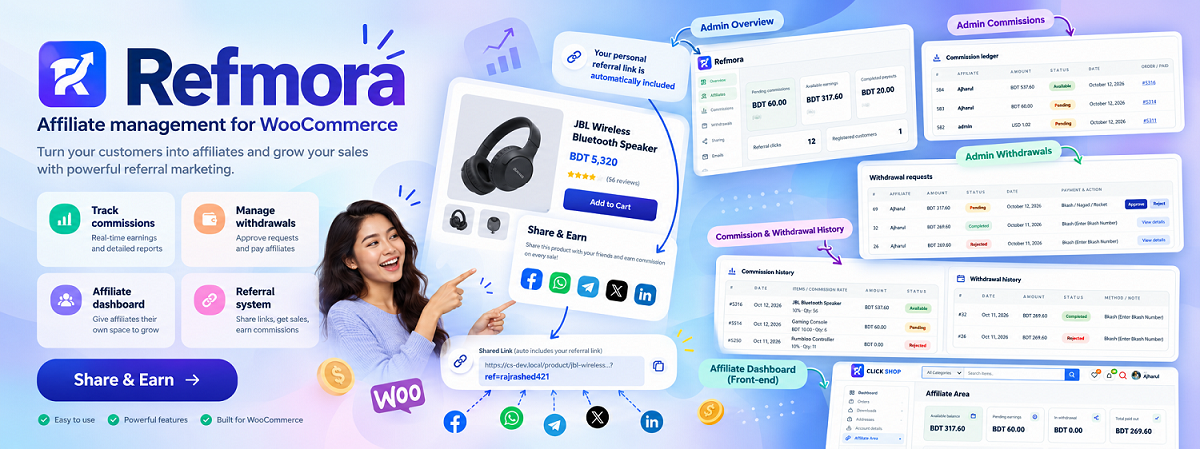
What you get inside
7 screens-
Refmora overview — affiliate management, referral sharing, commissions, and withdrawals for WooCommerce.
-
Affiliate dashboard — referral links, earnings, balances, click statistics, and withdrawal requests.
-
Admin dashboard — free program overview and referral statistics, alongside the earnings and referrals chart available with the separate Pro add-on.
-
History and reporting — commission records, withdrawal history, and payment statuses.
-
Withdrawal management — review requests, approve or reject withdrawals, and view payment details.
-
Commissions and earnings — follow commissions, order references, adjustments, and earning statuses.
-
Payout methods — custom manual methods in the free plugin. Automatic PayPal Payouts and Stripe Connect payments require the separate Pro add-on.
About this plugin
Refmora helps you run an affiliate program from your WooCommerce store. Customers can join through their existing accounts, share referral links, follow their earnings, and request a withdrawal. You can manage affiliates, review commissions, and handle payouts from one place.
The free plugin uses your store’s base currency. All features included in the free package work without payment, a license key, or activation. They do not expire.
Free features
🤝 Affiliate accounts and dashboard
- Add an Affiliate Area to WooCommerce My Account.
- Review applications before approving affiliates, if needed.
- Set Terms & Conditions for your program.
- Let affiliates view their earnings, available balance, commissions, and withdrawal history.
- Show referral clicks and registered customers while masking referred-customer contact details.
- Choose a custom Affiliate Area URL slug.
🔗 Referral links and sharing
- Give affiliates their own referral links and Share & Earn icons.
- Generate affiliate links for pages and products on the same store.
- Offer top-selling product links for affiliates to share.
- View Top Refer Links with referral URLs, clicks per link, affiliate names, and copy buttons.
- Set your referral URL parameter, cookie duration, first- or last-referral attribution, and repeat-purchase policy.
- Use signed referral cookies and self-referral checks.
💰 Commissions and earnings
- Choose percentage-based or fixed-per-unit commissions.
- Set product-specific rates and exclusions. Parent product rules also cover variations.
- Choose which WooCommerce order statuses show pending commissions, including custom statuses. Completed orders follow your commission availability rule.
- Optionally confirm or reject pending commissions manually from the Commissions list before earnings become available.
- Make commissions available when an order is Completed, or set a waiting period of 1–365 days.
- Adjust earnings when an order is refunded.
- Reserve withdrawal amounts to help prevent the same balance from being used twice.
💳 Manual withdrawals and payouts
- Add custom manual payout methods and payment instructions.
- Set a minimum withdrawal amount.
- Review and approve withdrawal requests before payment.
- Record settlement after paying the affiliate outside the plugin.
Manual payout methods are included in the free plugin. Automatic payments through PayPal Payouts or Stripe Connect require the separate Refmora Pro add-on.
📊 Overview and activity reports
- View pending commissions, available earnings, awaiting payouts, completed payouts, referral clicks, and registered customers.
- Choose Daily, Weekly, Monthly, This Year, Last Year, or Lifetime date ranges in the free Overview.
- Compare clicks and completed referred orders using a donut chart, totals, and the conversion percentage.
- Let approved affiliates view their own lifetime activity above the withdrawal card.
- Search admin records and filter by status.
- Browse paginated lists: generally ten records per admin page and five per affiliate data table.
The Overview also shows recent activity. The earnings and referrals history chart is a Pro add-on feature.
⚙️ Settings and WooCommerce support
- Edit plain-text email notifications.
- Adjust the appearance and add custom CSS scoped to the plugin.
- Back up, restore, or reset settings using JSON files.
- Clear Refmora affiliate enrollments and program history with administrator access and typed confirmation. WooCommerce customers and orders, plugin settings, product rules, and license remain unchanged.
- Use WooCommerce order CRUD, High-Performance Order Storage (HPOS), and attribution hooks for classic checkout and Checkout Blocks.
Optional Refmora Pro add-on
Refmora Pro is a separately distributed add-on. It is not included in this WordPress.org download and requires the free plugin and an active Pro license.
Pro adds:
- PayPal Payouts API payments in Sandbox and Live environments.
- Stripe Connect onboarding and API payments in Test and Live environments.
- Payment sending after withdrawal approval, provider status checks, and payment reconciliation.
- Exchange-rate conversion through FOX/WOOCS, CURCY, or manually configured currency pairs.
- CSV exports for affiliates, commissions, withdrawals, referred customers, and daily referral clicks, with optional date ranges.
- Same-site Database Backup & Restore for Refmora settings, profiles, links, click history, commissions, withdrawals and Trash. This signed JSON recovery feature is implemented in the separate Pro add-on.
- An earnings and referrals history chart combining earnings, total clicks, and completed referred orders, using the Overview date filter.
Automatic payments still require administrator approval and an explicit Send payment action. Provider eligibility, supported countries and currencies, available funds, and fees apply.
Free and Pro use the same affiliate accounts, settings, and financial history. General settings, JSON settings backups, and every other free feature remain available without a license. Premium implementation code, including the earnings chart code and styles, lives only in the separate add-on.
After directory publication, free plugin updates use the normal WordPress.org update system. Licensed Pro add-on updates use the separate WP Methods service and do not replace the free plugin.
Documentation and support
The Refmora documentation covers setup, referral tracking, commissions, manual payouts, caching, privacy, and troubleshooting. Pro-only chapters are marked as add-on features.
If Refmora is useful to your store, you can also ☕ support its development.
Privacy and External Services
What the free plugin connects to
The free plugin does not contact WP Methods for license verification or updates, send telemetry, or load external assets. Standard WordPress.org updates are handled by WordPress.
Notifications use WordPress wp_mail and your site’s configured email service. Refmora does not bundle a separate SMTP service.
Social sharing links open Facebook, WhatsApp, Telegram, X, or LinkedIn only when a visitor clicks them. The chosen platform then processes that visit under its own terms. No social SDKs are included.
Every Refmora admin sidebar includes Other Products and Support & Connect directly below the sidebar note, with optional links to WP Methods products, WordPress.org, YouTube and Buy Me a Coffee. These links open external pages only when clicked. Product thumbnails are bundled locally; the resource cards do not request remote assets or collect analytics.
The separately installed Pro add-on documents its own WP Methods, Stripe, and PayPal communications and credentials.
Referral cookies and stored data
- refm_referral: a signed cookie used to attribute orders to an affiliate.
- refm_link_clicks: a signed cookie that suppresses repeated referral visits for 30 minutes, across up to 12 recent affiliate and URL-hash pairs.
Referral clicks are stored as daily aggregate counts. The shared link directory stores each canonical public destination URL and its SHA-256 hash once. Daily counters contain the affiliate ID, link ID, local click date, and count. Lifetime summaries contain the affiliate ID, link ID, and total count.
Visitor IP addresses, browser fingerprints, arbitrary request parameters, and search terms are not stored in referral analytics. New customer accounts registered with a valid referral cookie can be associated with an affiliate.
You can connect your cookie consent manager through the refm_tracking_allowed filter. Configure consent behavior to match your store’s privacy policy.
Access, export, and retention
Affiliates see referred customers’ first names and masked email and phone details. Managers can access affiliate and financial information to process withdrawals.
WordPress personal data export and erasure hooks are supported. Affiliate daily counters and lifetime summaries are included in these tools. Shared public URL metadata contains no affiliate identifiers.
Financial records are retained for store reconciliation. Deactivating the plugin does not delete records. Review Settings → Privacy and set an appropriate retention policy for your store.
Developer Notes
Referral analytics storage
Referral tracking uses a unified URL-based system:
- refm_links stores canonical public URLs, referenced by numeric link_id values.
- refm_link_daily stores daily counts for date-filtered metrics, charts, and daily CSV exports.
- refm_link_totals stores one indexed lifetime total per affiliate and link.
Each valid click updates the daily and lifetime counters atomically. Top Refer Links reads the indexed lifetime summary rather than summing daily history. Ranking indexes support global and affiliate-specific click totals.
Product IDs, product titles, and product-specific counters are not part of referral analytics.
Referral storage upgrade
The one-time upgrade to this storage system starts referral counters fresh. Older affiliate-wide, product-specific, and repeated-URL counters are not imported. The obsolete refm_clicks, refm_link_clicks, and refm_url_clicks database tables are removed.
Financial records and customer attribution are preserved. Once the upgrade is complete, current daily and lifetime counters are retained through ordinary requests, deactivation, and reactivation.
Database and financial records
Tables use the site’s database prefix:
- refm_commissions
- refm_payouts
- refm_customers
- refm_links
- refm_link_daily
- refm_link_totals
Database transactions and named locks serialize balance changes. Financial data is deliberately preserved on deactivation. Back up the site before making structural changes or removing records.
Extension hooks
Available hooks include:
- refm_effective_settings
- refm_exchange_rate
- refm_clean_exchange_rates
- refm_exchange_settings
- refm_export_data_request
- refm_export_data_panel
- refm_database_backup_panel (separate Pro add-on panel, immediately after Export Data)
- refm_admin_overview_chart — receives the validated range and currency.
- refm_affiliate_activity_chart — receives the signed-in affiliate ID. Add-ons must enforce record ownership and access permissions.
Premium code belongs in the separate add-on plugin, not in a hidden directory inside the free package.
Questions
- Do I need a license to use the free plugin?
No. Affiliate enrollment, referral tracking, commissions, settings, sharing tools, manual payout methods, and settings backup, restore, and reset all work without a license key or activation.
- How do manual payouts work?
- An affiliate requests their entire available balance.
- Refmora reserves that amount while the request is open. Each affiliate can have one open request at a time.
- A manager reviews and approves the request.
- The manager sends payment outside the plugin using the selected manual method.
- The manager selects Mark paid to record the settlement.
The free plugin does not transfer money automatically. Naming a manual method PayPal does not connect it to PayPal’s API.
- What does the Pro add-on include?
Pro adds PayPal Payouts and Stripe Connect API payments, currency conversion, CSV exports, same-site Database Backup & Restore, and the earnings and referrals history chart.
These features are implemented in a separate plugin. The free download contains contextual information about the add-on, rather than premium code locked behind a license.
- Are automatic payments sent without a review?
No. With Pro, live payments still require administrator approval and an explicit Send payment action. Sandbox and Test payments do not settle real commission balances. Do not switch provider credentials while a payment is processing.
- Which currency does Refmora use?
The free plugin uses the base currency set under WooCommerce → Settings → General. It does not convert exchange rates. Orders in a different currency require the optional Pro add-on.
Previously saved currency and exchange-rate snapshots remain attached to historical financial records.
- When do commissions become available?
By default, commissions become available when an order is marked Completed. You can instead set a waiting period of 1–365 days.
Commissions use product totals after discounts, excluding tax and shipping. Refunds adjust earnings. If a refunded commission has already been paid, the adjustment can reduce future balances.
- Which order statuses create pending commissions?
Under Settings > Commission rules > Commission tracking order statuses, select the statuses that should count as pending earnings. For example, select Processing and leave Pending payment and On hold unchecked to wait until an order is being processed. Registered custom order statuses are also supported.
Completed is always included and uses your commission availability and waiting-period settings. Leave only Completed selected to avoid showing pending earnings before completion. A waiting period can still make a completed commission pending until the hold expires.
Orders in unselected statuses keep their referral attribution but do not create commission records. If a tracked order moves to an unselected status, its commission is rejected and removed from pending earnings. Cancelled, Failed and Refunded always reject commissions. Returning to a selected status recalculates the existing commission without creating a duplicate. Payout reservations and already-paid adjustments follow the existing reconciliation rules.
Existing installations and older settings backups keep all eligible registered statuses selected by default. Saving this setting does not recalculate historical orders; it applies when an order status changes or its commission is otherwise synchronized.
- Can I confirm commissions manually?
Yes. Set Commission availability to Confirm from Commission List. The Commissions tab then shows an Action column with Confirm and Reject buttons for pending, unpaid commissions in eligible order statuses. Confirm makes the commission available for withdrawal, even before order completion. Reject sets its amount to zero and keeps the rejection through later order updates and settings changes.
Completed orders remain pending in this mode until a manager decides. Existing scheduled releases cannot bypass manual review. Commissions already released, reserved or paid are not sent back for review. Waiting-period fields are hidden in this mode. Other availability modes keep their normal behavior and do not show Confirm/Reject. Administrators can still use the Action column for Delete and Restore.
Refunds, cancellations, excluded tracking statuses and once-per-customer restrictions still apply. Manually confirmed earnings can therefore be reduced by later order changes. A manual confirmation releases earnings; it does not pay the affiliate or change the WooCommerce order status.
Only users with the manage_woocommerce capability can review commissions. Each action requires a POST request and a commission-specific nonce. The current order, commission version and eligibility are rechecked under the existing financial locks. The decision, reviewer user ID and UTC review time are saved in the commission ledger.
sandywp / also on the shelf
Try another plugin

4.2 · 30K+ installs
Amazonや楽天市場から商品を検索してアフィリエイトリンクを管理できるプラグインです。

4.1 · 10K+ installs
Display unlimited number of ads inside your WordPress widget.

Affiliate Program Suite — SliceWP Affiliates
4.9 · 10K+ installs
SliceWP is the powerful WordPress affiliate plugin that makes running your own affiliate program effortless. Track affiliate…
Spin up a real WordPress site in seconds.
Test plugins, build a demo, hand a client a link — then squash it and start again. No local setup, no Docker.