sandywp / plugins / re-add-underline-justify

Re-add text underline and justify
This tiny plugin re-adds the Editor text underline & text justify buttons in the WYSIWYG removed in WordPress 4.7.0
Ready in seconds.
v0.4.2 50,000+ installs WP 4.7+ PHP 5.5.12+
What you get inside
5 screens-
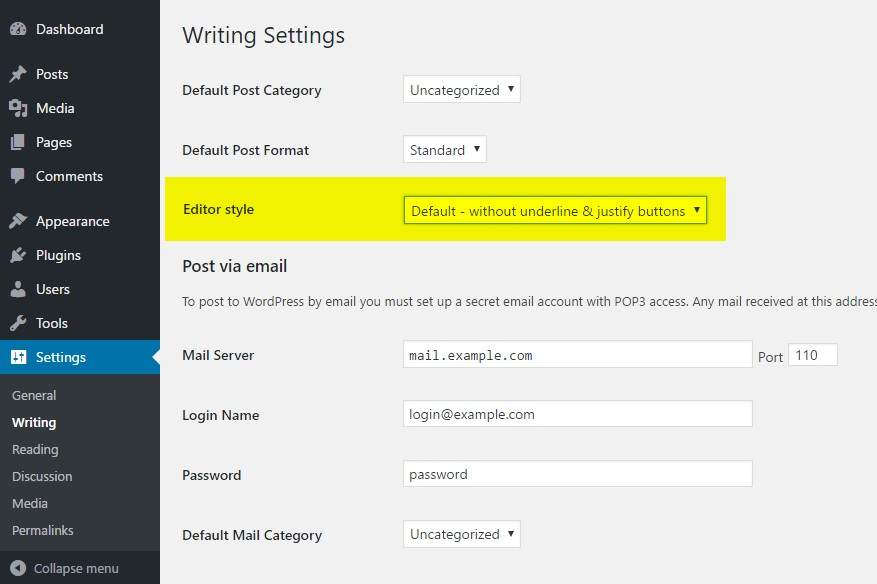
Change the Editor style from the Writing option page
-
Gutenberg with justify button
-
Default - without underline & justify buttons
-
Re-add underline & justify buttons
-
Re-add justify only
About this plugin
Works well with the Classic Editor plugin, Advanced Custom Fields (Free & Pro) and is also compatible with the Gutenberg’s “Classic” bloc.
In WordPress 4.7, the core developper team decided to make various changes in the editor (TinyMce WYSIWYG), including removing the underline and justify buttons and rearranging some of the toolbar buttons.
If you don’t want to change the way you edit your content and/or don’t want to confuse your customers with a new contribution interface, this very lightweight plugin will set the editor style back to its previous state (like in WordPress 4.6 and above versions).
You may change the Editor style from the Writing option page.
3 options are available for the Editor style:
- Without underline & justify buttons
- Default – Re-add underline & justify buttons
- Re-add justify only
Please note, the previous option “Re-add underline & justify + rearrange” has been deprecated in 0.2 (sept. 2018) as it causes conflicts with the new Gutenberg editor. This option automatically switches to “Re-add underline & justify buttons” from now on.
Please ask for help or report bugs if anything goes wrong. It is the best way to make the community benefit!
Questions
- Where can I change the Editor style?
Just go to Settings -> Writing and select the option you want under “Editor style”.
sandywp / also on the shelf
Try another plugin

Elementor Website Builder – more than just a page builder
4.5 · 10M+ installs
The Elementor Website Builder has it all: drag and drop page builder, Atomic Editor, pixel perfect design, global and reusable…

4.9 · 8M+ installs
Enables the previous "classic" editor and the old-style Edit Post screen with TinyMCE, Meta Boxes, etc. Supports all plugins that…

4.9 · 2M+ installs
Enables the previous "classic" widgets settings screens in Appearance - Widgets and the Customizer. Disables the block editor…
Spin up a real WordPress site in seconds.
Test plugins, build a demo, hand a client a link — then squash it and start again. No local setup, no Docker.