sandywp / plugins / polldaddy
Crowdsignal Dashboard
Polls, Surveys & more
Manage your Crowdsignal polls, surveys, quizzes, and ratings directly from the WordPress dashboard.
Ready in seconds.
v3.1.8 200,000+ installs WP 5.5+ PHP 5.6+
What you get inside
2 screens-
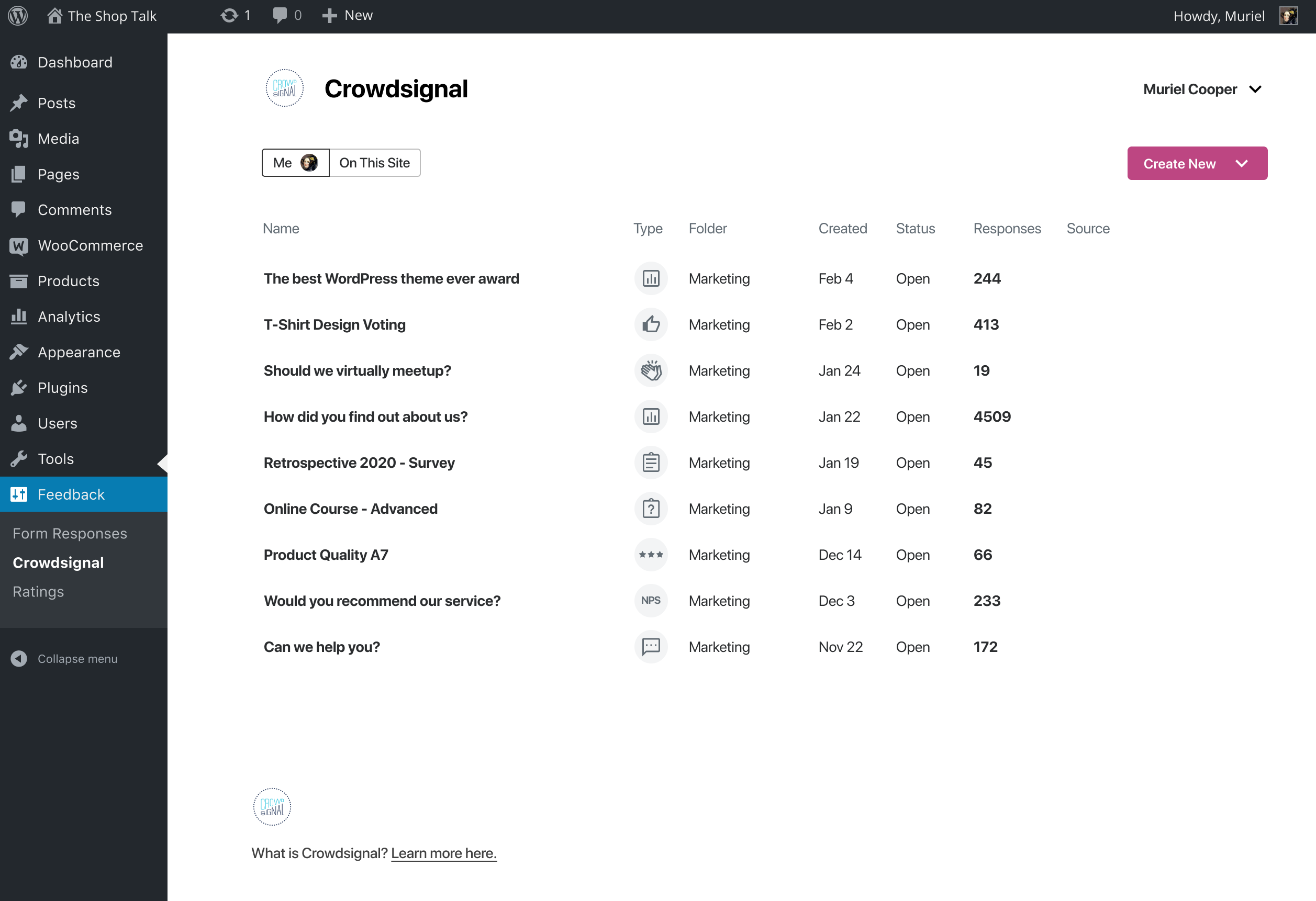
The Crowdsignal Dashboard
-
Analyse and export your results
About this plugin
The Crowdsignal Dashboard plugin allows you to create and manage polls, surveys, quizzes, and ratings from within your WordPress admin. See all your projects in one place, be they surveys, quizzes and polls made on Crowdsignal.com or any of our poll and survey blocks using our Crowdsignal Forms plugin. With just one click view all results for your responses as they come in to analyze responses in real time and export your results everywhere!
The Block Editor
Are you using the new block editor for WordPress? Our other plugin, Crowdsignal Forms provides a number of blocks for your post editor that allow you to gather actionable feedback from your audience:
* Poll: Create polls and get your audience’s opinion.
* Survey Embed: Create surveys in minutes with 14 question types and embed them into your page.
* Feedback Button: A floating and always visible button that allows your audience to share feedback anytime.
* Measure NPS: Calculate your Net Promoter Score! Collect feedback and track customer satisfaction over time.
* Voting: Allow your audience to rate your work or express their opinion.
* Applause: Let your audience cheer with a big round of applause.
Learn more about the Crowdsignal Forms plugin here, and on crowdsignal.com.
Want to help translate the plugin or keep an existing translation up-to-date? Head on over to the translation site.
Some strings are not translated when polls and surveys are embedded. You will have to translate them using a language pack on Crowdsignal.com.
Development of the plugin takes place in this GitHub repository. Contributions are welcome!
The Classic Editor
If you are a long time user of this plugin and you still use the classic post editor, the best way to create polls is through your Crowdsignal account where you have a number of different ways to share polls (and surveys). However, up to version 2.2.6, this plugin had an “Add Poll” button above the post editor that opened a very basic poll editor. That “Add Poll” button has since been removed but if you would still like to use it, open up the wp-admin dashboard on your WordPress site. Add “admin.php?page=polls&action=create-poll” to the end of the URL, after “wp-admin/” so it looks like https://example.com/wp-admin/admin.php?page=polls&action=create-poll and you will see the old poll editor. Bookmark that URL if you still want to use that poll editor. We do not recommend using version 2.2.6 of the plugin as you will miss out on many bug fixes and new features added since then.
Questions
- Where do I find my Crowdsignal Dashboard?
You can find your dashboard under the Feedback top level menu. You will find Crowdsignal and Ratings menu items there. The Crowdsignal menu item leads to the dashboard. If you have ratings enabled you will see a Ratings menu item that links to a summary of your ratings.
- Where do I find my Crowdsignal Settings?
You will find the settings area for this plugin under the Settings top level menu, and look for the Crowdsignal menu item.
- I have multiple authors on my blog? What happens?
Each author that wants to create polls will need his or her own Crowdsignal.com account.
- But, as an Administrator, can I edit my Authors’ polls
Yes. You’ll be able to edit the polls they create from your blog. (You won’t be able to edit any of their non-blog, personal polls they create through Crowdsignal.com.)
- Neat! Um… can my Authors edit MY blog polls?
Nope. The permissions are the same as for posts. So Editors and Administrators can edit anyone’s polls for that blog. Authors can only edit their own.
- Where are my ratings?
Check that footer.php in your theme calls the wp_footer action. The rating javascript is loaded on this action.
More info here
- My ratings are gone after I reinstalled the plugin. How do I get them back?
Login to your Crowdsignal.com account and view the ratings in your dashboard. You should see ratings named “blog name – ” comments/posts/pages. You need the rating ID of each of those which is visible when you edit them. It’s the number in the URL of your browser that looks like https://app.crowdsignal.com/ratings/1234567/edit/. After you connect the plugin to your Crowdsignal account go to Settings->Ratings and make sure the ratings are displayed on your posts/pages/comments as desired. You’ll see a link at the bottom of the page saying, “Advanced Settings” that will toggle new configuration settings. One of those settings is “rating ID” which you should replace with the number you got from your Crowdsignal account. Now save the changes and the ratings on your site will be updated.
- I cannot access my ratings settings, I am getting a “Sorry! There was an error creating your rating widget. Please contact Crowdsignal support to fix this.” message.
You need to select the synchronize ratings account in the WordPress options page at Settings->Polls & Ratings to make sure the ratings API key is valid.
sandywp / also on the shelf
Try another plugin

Poll Maker by AYS – Versus Polls, Anonymous Polls, Image Polls
4.4 · 7K+ installs
Poll Maker is a FREE WordPress poll plugin that will let you create customizable and professional online polls and voting for…

3.3 · 60+ installs
This is an easy to setup polling/ voting plugin for users. Create Polls from admin panel and display in widgets.

3.5 · 60+ installs
Wedgies are polls that you can embed in your WordPress site and templates.
Spin up a real WordPress site in seconds.
Test plugins, build a demo, hand a client a link — then squash it and start again. No local setup, no Docker.