sandywp / plugins / pixelyoursite

PixelYourSite
Your smart PIXEL (TAG) & API Manager
Add Meta Pixel with Conversion API, Google Analytics (GA4) + Consent Mode, Google Tag Manager, OpenAI Pixel & API, and Head & Footer scripts.
Ready in seconds.
v11.4.0 500,000+ installs WP 4.4+ PHP 5.4+
What you get inside
8 screens-
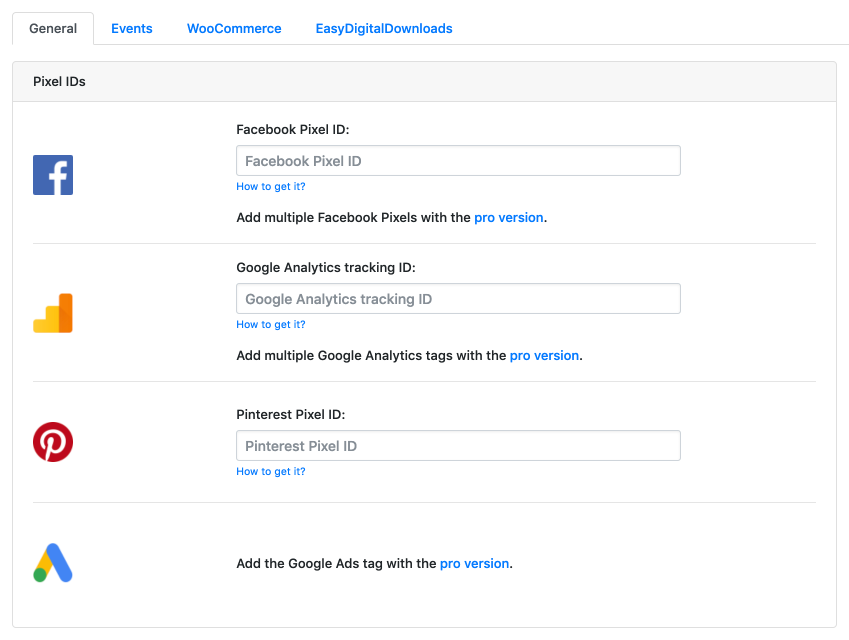
Add your Facebook pixel ID, Google Analytics ID, or Pinterest ID.
-
You don't have to copy/paste all the Facebook pixel code, but just the pixel ID. You can find it in your Ads Manager, under the Pixels link.
-
You just need your Google Analytics Tracking ID, not the full code.
-
You simply need your Pinterest Tag ID.
-
You can exclude user roles from tracking (like Admin), so they won't affect your stats.
-
You can allow other user roles to use the plugin.
-
The Global Events are fired automatically, tracking important actions and data.
-
The GeneralEvent is fired on every page, tracking important data about your content.
About this plugin
Trusted by 500,000+ websites, PixelYourSite is a complete tracking solution for the Meta Pixel, Google Analytics 4, Google Tag Manager, and now OpenAI and ChatGPT traffic too.
Set up Meta Pixel with full Conversion API support, Google Analytics 4, and Google Tag Manager on your WordPress site, no coding required. Need to add a custom script somewhere? Our Head & Footer option handles that too. Pinterest, Bing, and Reddit tracking are available as dedicated paid add-ons: Pinterest Tag, Bing Tag, Reddit Pixel.
NEW: OpenAI Pixel & API. Install the OpenAI Pixel, enable the API, configure conversions, and start tracking ChatGPT referred traffic in minutes. Watch the setup video.
NEW: Talk to your tracking setup. Connect Claude, or any other MCP compatible AI assistant, and it can audit your pixels, check your Meta EMQ score, and fix configuration issues for you. No need to dig through settings screens yourself. Watch how to connect Claude, or watch a fast WooCommerce audit.
Free training:
Our YouTube channel covers the plugin, Meta API, Google Analytics, Google Ads, TikTok, and more. Start with this one on how to check and fix your Meta catalog match rate, crucial for WooCommerce ads:
What you can do with the free version:
- Install the Meta Pixel with Conversion API support, so your ad data survives ad blockers and iOS tracking limits.
- Install Google Analytics 4 (GA4).
- Install Google Tag Manager and push events into the data layer with zero coding.
- Configure Google Consent Mode: see the full guide.
- Set up Google Tag Manager server side tagging for our native GA4 script: see the full guide.
- Install the OpenAI Pixel & API.
- Add any other script with our Head & Footer option.
- Connect Claude or another MCP compatible AI assistant to audit and manage your tracking setup.
Built for WooCommerce:
- All e-commerce specific events fire automatically, no manual event mapping needed.
- Every parameter required for dynamic ads (Meta or Google) is included out of the box.
- Choose how products are identified: default IDs, SKU, or Facebook for WooCommerce’s own product ID logic, so your catalog and your tracking always match.
- Customer data is used to improve your Meta EMQ score on API events.
Built for Easy Digital Downloads:
- All e-commerce specific events fire automatically.
- Every parameter needed for dynamic ads (Meta or Google) is included out of the box, same as WooCommerce.
- Customer data is used to improve your Meta EMQ score on API events.
Automated events, tracked without any setup:
- Searches (with the search term captured as a parameter).
- Form submissions.
- User signups and logins.
- Downloads (file name and type captured as parameters).
- Comments.
- Page scroll depth.
- Time on page.
Need something more specific? Configure any standard or custom event for Meta, GA4, or GTM yourself.
Head & Footer scripts, placed exactly where you need them:
- Site wide, or on specific pages only.
- On the WooCommerce order received page.
- Desktop only, mobile only, or both.
Consent & GDPR, handled properly:
- Works with the most popular consent management plugins out of the box.
- Consent filters let other consent plugins control our scripts and cookies directly.
- Fires GA4 tags with Google Consent Mode granted.
- A dedicated filter enables Meta Limited Data Use.
- Fully integrated with ConsentMagic.
Google Tag Manager, without the manual setup:
Most tracking plugins make you build GTM triggers and variables by hand. PixelYourSite pushes every event straight into the GTM data layer, and our GTM Container Import file pre-configures triggers, variables, and Google Analytics 4 tags for you: see how it works.
When you need more than the free version covers:
PixelYourSite Professional and our other plugins (WooCommerce Feed Plugin, ConsentMagic) add:
- Google Ads and TikTok tags.
- Pinterest and Bing tags, via paid add-ons.
- More automated events and more parameters, including landing page, traffic source, and UTM tracking.
- More triggers for custom events: link clicks, CSS selectors, page view counts, mouse over, video views, email link clicks, post type, and direct integration with popular form plugins and Elementor forms.
- Deeper EMQ improvements, including pulling user data from forms and URLs.
- More complete WooCommerce and EDD purchase tracking.
- Support for multiple tags per platform, with conditional rules for where each one fires.
- Native WooCommerce and EDD reporting.
A quick, honest note: this free plugin stays free and fully supported because people upgrade to Pro. Every update, every fix, and every new feature here, including OpenAI Pixel & API, gets built and maintained using Pro revenue. If the free version is useful to you, buying Pro is what keeps it that way.
Further reading: Guides for getting more out of your tracking setup, on the free version and on Pro:
- Improve your Meta EMQ Score
- Track WordPress Forms
- Automated Events, explained
- Set up GTM server side tagging
- Handle Google Consent Mode V2
- Build custom tracking events by chatting with Claude or ChatGPT
- Audit your WooCommerce tracking with Claude or ChatGPT
- Track phone calls from Google Ads as conversions
A few more videos worth watching:
- Yes, it’s fine if Meta sees the same event more than once
- How much profit is your WooCommerce store really making from Meta ads
Documentation: Full documentation for PixelYourSite and all our plugins
Questions
- FACEBOOK PIXEL: Do I need to copy/paste the full Facebook Pixel code somewhere?
No, you just have to enter your pixel ID in the dedicated field. The plugin will do the rest for you.
- FACEBOOK PIXEL: Where can I find the Facebook Pixel ID?
You can find it here:
https://www.facebook.com/ads/manager/pixel/facebook_pixel- FACEBOOK PIXEL: Can I use the plugin for Custom Audiences or Custom Conversions?
Absolutely yes! Actually, the plugin will super-optimize your site for Custom Audiences and Custom Conversions.
You will be able to create the classical ones based on URLs, but also Custom Combinations, like people who visited posts from category XYZ, or tagged with tag ABC in the last 30 days.
Use the PRO version, and you’ll be able to do crazy things, like targeting people that came from Google and visited products under category “blue widget”, or clients who bought products of at least $100, using the discount coupon “promo”.
- FACEBOOK PIXEL: I used the old Facebook Pixel, will my audiences still work?
Yes, they will, you won’t lose anything.
- FACEBOOK PIXEL: Does it work with WooCommerce?
Yes, it does. The plugin adds all the necessary events, like ViewContent, AddToCart, InitiateCheckout, and Purchase. This way you can easily track conversions and conversion value.
- FACEBOOK PIXEL: Do I have to manually add the events for WooCommerce?
No, you don’t, the plugin will take care of everything for you.
- FACEBOOK PIXEL: Does it work with Easy Digital Downloads?
Yes, it works in the same way it does with WooCommerce.
- FACEBOOK PIXEL: Does it work with Dynamic Product Ads (promote a product catalog)
Yes, all the WooCommerce and EDD pixel events are Dynamic Ads ready.
sandywp / also on the shelf
Try another plugin

Analytify – Google Analytics Dashboard For WordPress (GA4 analytics tracking)
4.7 · 20K+ installs
Analytify is the must-have Plugin for Google Analytics 4 Integration, Tracking, & Reporting in WordPress. Enhanced eCommerce,…

Analytify – Dashboard Widget for Google Analytics
5.0 · 10K+ installs
Google Analytics Dashboard widget is a Free Add-on for Google Analytics by Analytify plugin to show Google Analytics widget at…
-
Pixel Tag Manager for WooCommerce is a powerful plugin to monitor eCommerce events with seamless integration. Track Google…

Spin up a real WordPress site in seconds.
Test plugins, build a demo, hand a client a link — then squash it and start again. No local setup, no Docker.