sandywp / plugins / peters-login-redirect

LoginWP (Formerly Peter's Login Redirect)
Redirect users to different locations after they log in, log out and register based on different conditions.
Ready in seconds.
v3.0.9.0 90,000+ installs WP 5.6+ PHP 7.4+
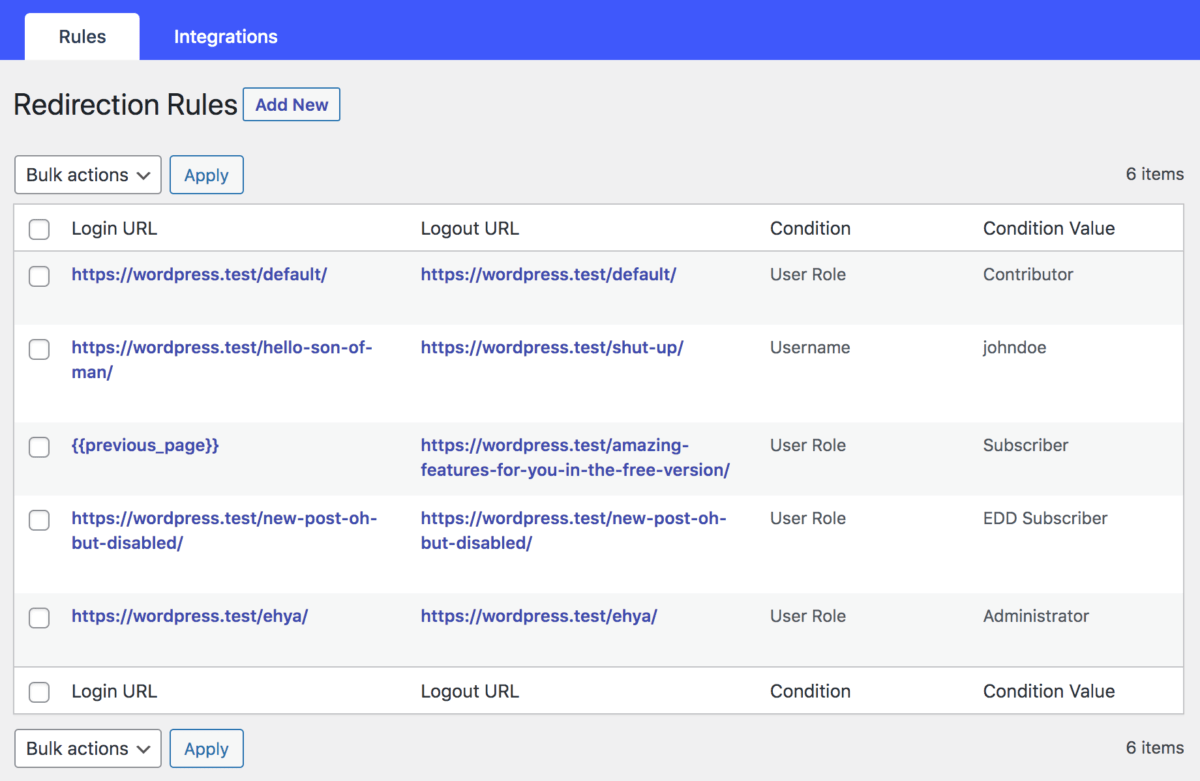
What you get inside
4 screens-
Redirection rules overview.
-
Adding a redirection rule.
-
Other settings.
-
Redirect Placeholders.
About this plugin
LoginWP (formerly Peter’s Login Redirect) lets you define a set of redirect rules for specific users, users with specific roles, users with specific capabilities, and a blanket rule for all other users. Also, set a redirect URL for post-registration.
You can use the following placeholders in your URLs so that the system will build a dynamic URL upon each login: {{username}}, {{user_slug}}, {{website_url}}.
Upgrade to LoginWP PRO to redirect users to the current page they are logging in from or back to the previous (or referrer) page after login using {{current_page}} and {{previous_page}} placeholders. Learn more
You can add your own code logic before and between any of the plugin’s normal redirect checks if needed. See our documentation. Some examples include: redirecting the user based on their IP address and redirecting users to a special page on the first login.
Website | Documentation | Support
Pro Integrations
This is the lite version that works with the default WordPress login page and limited other user registration and login form plugins. Upgrade to Pro to avail the support for the following features and plugins.
- Redirect After First Login
- WooCommerce
- Gravity Forms
- WPForms
- LearnDash
- Uncanny Toolkit
- LifterLMS
- Tutor LMS
- ProfilePress
- MemberPress
- MemberMouse
- LearnPress
- Easy Digital Downloads
- Restrict Content Pro
- Ultimate Member
- WP User Manager
- WP User Frontend
- Paid Memberships Pro
- WishList Member
- Theme My Login
- User Registration (WPEverest)
- Elementor Login Form
- BuddyBoss Theme Login/Registration Form
- Divi Theme Login/Registration Form
Spin up a real WordPress site in seconds.
Test plugins, build a demo, hand a client a link — then squash it and start again. No local setup, no Docker.