sandywp / plugins / orbisius-child-theme-creator

Child Theme Creator by Orbisius
Create Child Themes quickly and easily from any theme that you have currently installed on your site/blog.
Ready in seconds.
v1.5.6 10,000+ installs WP 3.4+ PHP 5.6+
What you get inside
4 screens-
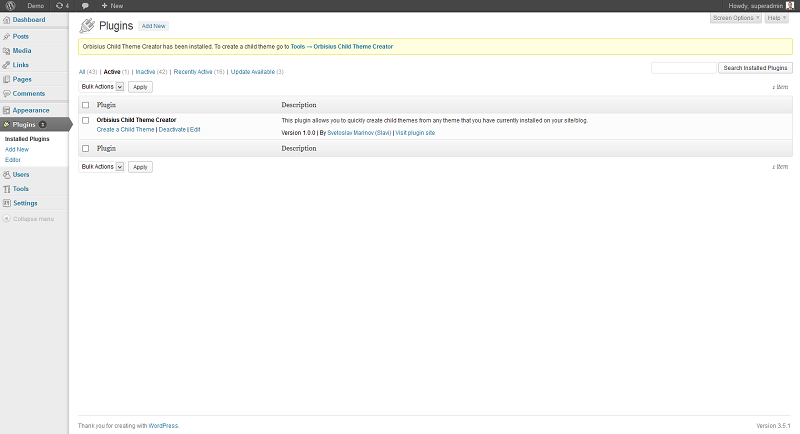
Plugin page after installation
-
Orbisius Child Theme Creator in Appearance > Orbisius Child Theme Creator - before creating a child theme
-
Orbisius Child Theme Creator in Appearance > Orbisius Child Theme Creator - after creating a child theme
-
Orbisius Theme Editor in Action from Admin > Appearance > Orbisius Theme Editor
About this plugin
This plugin allows you to quickly create child themes from any theme that you have currently installed on your site/blog.
It also creates rtl.css if exists in the parent theme.
Did you find this plugin helpful? Please consider writing a review
** Live Demo**
Child Theme Creator Features
- Since v1.4 store your snippets, license keys in Orbisius cloud library. Access them with a click of a button.
- Create a theme with a click of a button
- Uses the recommended approach for loading css (since v.1.3.4)
- Never forget what files to copy and what to skip when creating child themes.
- Copies parent theme’s options (since v.1.3)
- Easy to use interface
- When moving through the themes the currently looked one will have a nice background & border
- Create unlimited child themes from a parent theme. The plugin will add Child 01, Child 02 etc.
- Edit theme files with our two theme editors.
- Automatically creates rtl.css if it exists in the parent theme
- The plugin uses minified css/js to make sure it loads quicker.
- Copy files from one theme to another (Since v1.5.2)
This plugin allows you to quickly edit theme files from Appearance > Orbisius Theme Editor (entry added by the same plugin)
It features two editors and you can pick snippets from one theme and paste into another.
Theme Editor Features
- Edit two theme files at the same time
- Ajax -> No page refresh
- Easy to use interface
- Supports WordPress Multisite
- Create a New File (+ checks if the file exists)
- Delete file
- Respects the DISALLOW_FILE_EDIT constant, which if set to true will disable the Theme editor
- Since (v1.1.3) PHP syntax check
- Since (v1.1.3) Send selected theme and parent theme (if any) to yourself or a colleague.
- Since (v1.1.3) Implemented theme files to be listed recursively (i.e. all files from the selected theme)
- Since (v1.1.9) Both editors have the same buttons (in older versions only the left editor had all of the buttons).
- Since (v1.2.2) Can create a blank functions.php file (Thanks Tobias Kaupat for the suggestion)
- Since (v1.3.5)* Users can create new files in non-existing folders e.g. headers/header-two.php
Important Reasons to Create Child Themes
- Keep your changes when the parent theme is updated.
- Reduce duplicated code i.e. you need to copy and customize only the files that need to be customized
- Child Themes are often very small in size and can easily be shared and used for another project.
- Lots of cool and professional people do it
- … and a lot more
Pro Addon is Now Available
We’ve just released the
Pro Addon which improves on the current functionality.
Important
We have noticed that some child themes created by this plugin do not work as expected.
This is not a bug in this plugin but could be caused by theme authors using custom theme frameworks and/or do not using WordPress’ recommended functions for themes that support child themes.
Please check with the created of the theme first to see if their theme supports child themes.
We have launched a FREE service that allows you to setup a test/sandbox WordPress site in seconds. No technical knowledge is required.
Join today and test themes and plugins before you actually put them on your live site. For more info go to:
https://qsandbox.com
Usage : To create a child theme go to
Go to Admin > Appearance > Orbisius Child Theme Creator then click on the theme you like and the child theme will be created for you.
Usage : To edit themes files go to
Go to Admin > Appearance > Orbisius Theme Editor then click on the theme you like and the child theme will be created for you.
Demo
Premium
Do you want to be able to preview themes from within the 2 editors?
Get this Orbisius Theme Switcher plugin
Support
Support is handled on our site: https://orbisius.com/
Please do NOT use the WordPress forums or other places to seek support.
Author
Do you need an amazing plugin created especially for your needs? Contact me.
Svetoslav Marinov (Slavi) | Custom Web and Mobile Programming by Orbisius.com
Hire Us
Do you need any WordPress work done? e.g. WordPress tweaks, new plugin development or existing plugin improvements.
Do you need a trusted WordPress Developer to hire?
Questions
- How to change Child thme screenshot?
currently, only via ftp.
- How to use this plugin?
Just install the plugin and activate it. Then go to Admin > Appearance > Orbisius Child Theme Creator.
Then click on a theme and the plugin will create a child theme for you.- After my child theme is created can I remove the plugin safely?
Yes, you can, however, the plugin comes with a double editor which is pretty awesome.
It allows you to copy and paste from one theme to another without changing screens.- How to disable Orbisius Theme Editor Plugin?
Just put this line right after the first <?php tag in the wp-config.php. This will also remove the WordPress’ Theme/Plugin editors as well.
define(‘DISALLOW_FILE_EDIT’, true);
- How to edit a logo or colours?
The theme should have an option to do that.
Please, check the customizer or within the admin area for a menu that matches the theme’s name.
Our plugin doesn’t know how each theme works so it’s better to direct those kind of questions to the theme designer.- The child theme is created but doesn’t have some styles or doesn’t show the admin panel of the parent theme
OK. Please contact the theme author if his/her theme is child theme friendly.
Also which files does the theme need in order to work well.- My Site is Broken
!@$@!$. Ok. Calm down. When you created the theme did you click on copy functions.php from advanced options?
Ok. You’ll need to use FTP client and go to in the wordpress folder and then wp-content/themes/AAAAA-child-01/ and delete functions.php
AAAAA is of course the directory of your parent theme.- I want to be able to copy functions.php
Please use Orbisius Theme Editor (part of this plugin)
sandywp / also on the shelf
Try another plugin

4.7 · 300K+ installs
When using the Customizer is not enough - Create a child theme from your installed themes and customize styles, templates,…

4.7 · 20K+ installs
WP Child Theme Generator is an easy solution to all your WordPress child theme creating problems!

4.9 · 10K+ installs
Creates a child theme from any installed parent theme with just one click.
Spin up a real WordPress site in seconds.
Test plugins, build a demo, hand a client a link — then squash it and start again. No local setup, no Docker.