sandywp / plugins / options-importer

WP Options Importer
Export and import WordPress Options.
Ready in seconds.
v7 6,000+ installs WP 3.8+
What you get inside
4 screens-
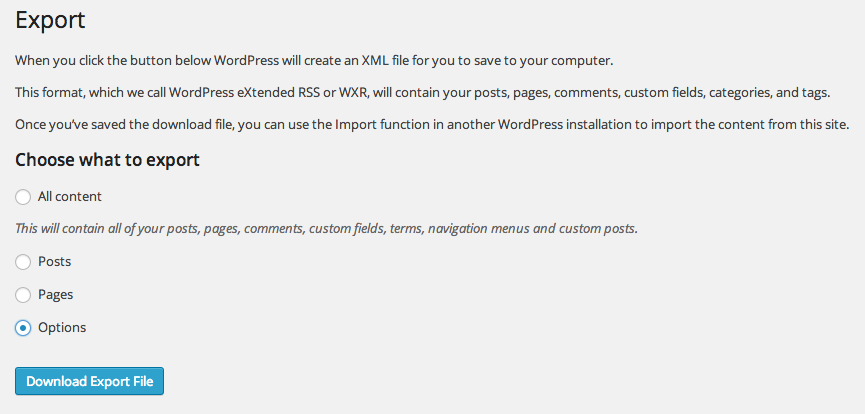
"Options" is seamlessly integrated as a choice when exporting.
-
"Options" is seamlessly included in the list of importers.
-
Once you upload the JSON file, you're presented with a choice of which options you want to import and if you want to override existing options.
-
If you choose to import "Specific Options", you're provided with a list of everything in the JSON file. Check the box next to those you want included, or…
About this plugin
WordPress can presently export all of its content via WXR, and then import that
through the WordPress Importer plugin. That process includes all posts, terms,
menus, comments, and users, but it doesn’t touch options. In addition to
general settings, options can include widget configurations, plugin settings,
theme settings, and lots more. This can be very time-consuming to migrate
manually. WP Options Importer aims to fill that void and save us all a lot of
time.
WP Options Importer allows you to export all options to a JSON file, and then
you can selectively import them into another WordPress installation. The import
process is very transparent, and it even shows you what data you’ll be
importing. Lastly, it gives you the option to override existing settings or to
skip options that already exist.
Questions
- When I import the default options, [some plugin]’s settings don’t transfer. What gives?
The default options are core options, or those which a plugin has indicated
are safe to import. You can choose “Specific Options” when importing to
manually select those which you need to import.- I’m the author of [some plugin]. Can you add my settings to the default list?
No, but you can! We provide a filter,
options_import_allowlistfor you to add
your options to the default list. Here’s an example one might add to their
plugin:function my_awesome_plugin_options( $options ) { $options[] = 'my_awesome_plugin'; return $options; } add_filter( 'options_import_allowlist', 'my_awesome_plugin_options' );Similarly, if you don’t want someone to ever import an option, you can add it
to the denylist using theoptions_import_denylistfilter. As above, it
would look something like this:function my_awesome_plugin_denylist_options( $options ) { $options[] = 'my_awesome_plugin_edit_lock'; return $options; } add_filter( 'options_import_denylist', 'my_awesome_plugin_denylist_options' );- I operate a multisite network and some options should *never* be able to be exported or imported by the site owner. Can I prevent that?
You have two options for both exports and imports.
Imports
First, you can use the
options_import_denylistfilter
and add any options to that array (which is empty by default). If your users
have access to theme or plugin code, this isn’t 100% safe, because they could
override your denylist using the same filter. In those cases, there’s an
emergency ripcord where you can disable options from ever being imported. To
use this, define the constantWP_OPTION_IMPORT_DENYLIST_REGEX(you’ll
probably want to do this in an mu-plugin) and set it to a regular expression.
Anything matching this expression will be skipped. For example:define( 'WP_OPTION_IMPORT_DENYLIST_REGEX', '/^(home|siteurl)$/' );Exports
Exactly the same as with imports. The filter is
options_export_denylist,
and the constant isWP_OPTION_EXPORT_DENYLIST_REGEX.
sandywp / also on the shelf
Try another plugin

4.8 · 100K+ installs
Easily export or import your WordPress customizer settings!

Advanced Order Export For WooCommerce
5.0 · 100K+ installs
Export WooCommerce orders to Excel, CSV, XML, JSON, PDF and HTML. Best free order export plugin for WooCommerce.

WP All Export – Drag & Drop Export to Any Custom CSV, XML & Excel
4.5 · 100K+ installs
Easily export data from any post type, custom field, or taxonomy to a CSV, XML, or Excel file of any custom format. Supports…
Spin up a real WordPress site in seconds.
Test plugins, build a demo, hand a client a link — then squash it and start again. No local setup, no Docker.