sandywp / plugins / mw-wp-form

MW WP Form
MW WP Form is shortcode base contact form plugin. This plugin have many features. For example you can use many validation rules, inquiry data saving, …
Ready in seconds.
v5.1.6 200,000+ installs WP 6.0+ PHP 8.0+
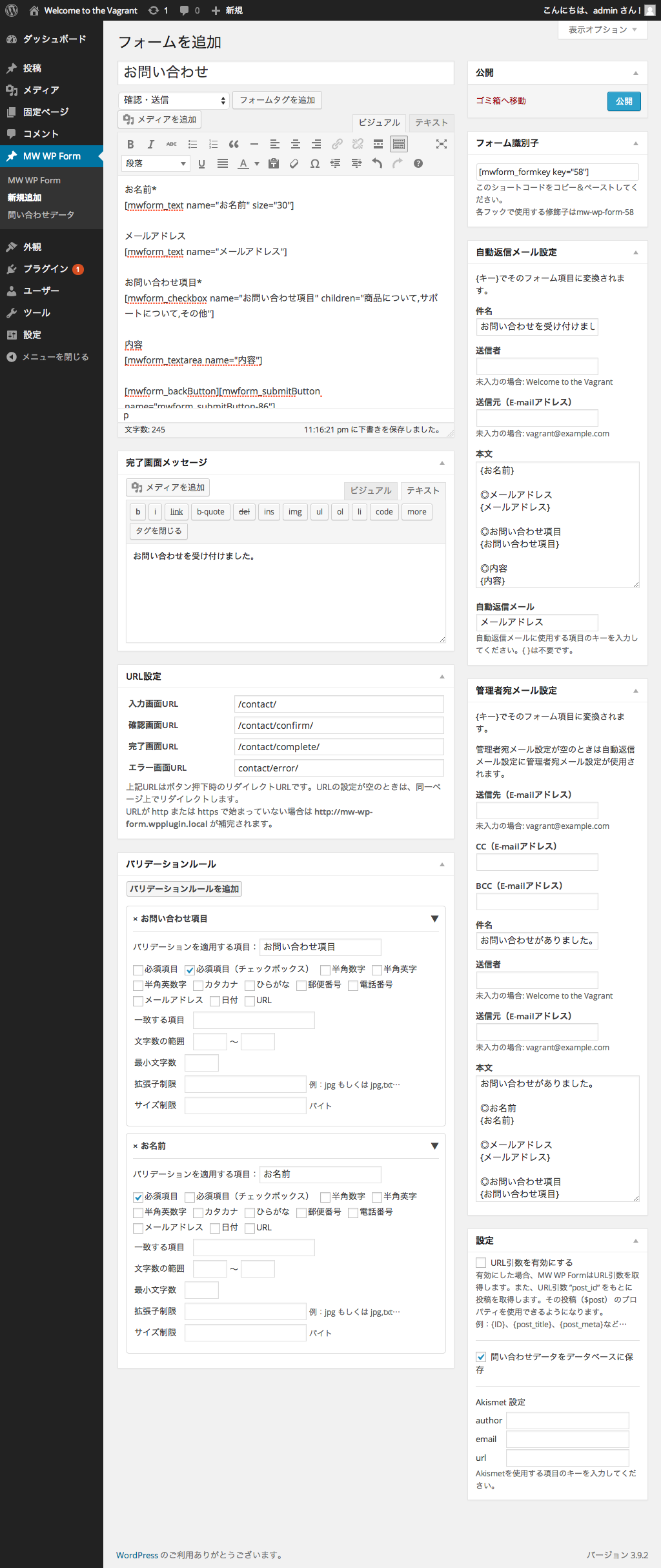
What you get inside
5 screens-
Form creation page.
-
Form item create box. You can easily insert the form.
-
Supports saving inquiry data to database.
-
List page of inquiry data that has been saved.
-
Supports chart display of saved inquiry data.
About this plugin
This plugin currently has only the minimum required maintenance releases.
Main maintainer has been handed over from @inc2734 to @websoudan.
MW WP Form can create mail form with a confirmation screen using shortcode.
- Form created using shortcodes
- Using confirmation page is possible.
- The page changes by the same URL or individual URL are possible.
- Many validation rules
- Saving inquiry data is possible.
- Displaying Chart using saved inquiry data is possible.
Official
https://mw-wp-form.web-soudan.co.jp
GitHub
https://github.com/web-soudan/mw-wp-form
The following third-party resources
Google Charts
Source: https://developers.google.com/chart/
Contributors
- Takashi Kitajima ( inc2734 )
- Ryujiro Yamamoto ( ryu263 )
- Tsujimoto Tomoyuki ( tomothumb )
- [Naoyuki Ohata] ( nanniku )
- Kazuto Takeshita ( moto hachi )
- Atsushi Ando ( NExt-Season )
- Kazuki Tomiyasu ( KUCKLU )
- Kei Nomura ( mypacecreator )
- mh35
- Takashi Nojima
- herikutu
- tsucharoku
- Tetsuaki Hamano ( t-hamano )
- Susumu Seino ( Susumu Seino )
- Yosuke Onoue ( likr )
- Yudai Konishi ( Yudai Konishi )
- takekoshi ( takekoshi )
sandywp / also on the shelf
Try another plugin

4.1 · 100+ installs
Protect your wordpress site with spam registration. DM Confirm Email requires new users to confirm their email addresses.

5.0 · 100+ installs
Access hidden WooCommerce options such as: Disable Confirm Logout, Hide Password Strength Meter, Hide Categories from Shop Pages…
5.0 · 100+ installs
An extra confirmation dialog for the Publish button to help prevent accidental publishing.
Spin up a real WordPress site in seconds.
Test plugins, build a demo, hand a client a link — then squash it and start again. No local setup, no Docker.