sandywp / plugins / mimetypes-link-icons

MimeTypes Link Icons
Adds icons automatically to any uploads and/or file links inserted into your blog posts.
Ready in seconds.
v3.3.2 8,000+ installs WP 3.6+
What you get inside
5 screens-
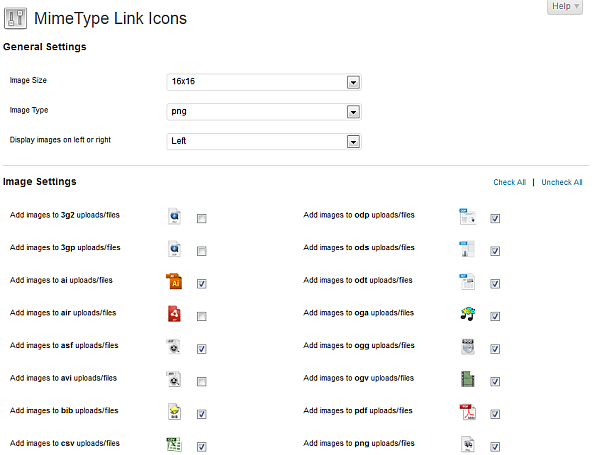
Screenshot of the administration screen
-
Screenshot of the administration screen - advanced settings
-
Screenshot of plugin in action.
-
MimeTypes Link Icons adds icons automatically to your inline attachments.
-
Now you can get MimeTypes Link Icons to add the file size of your attachment, too.
About this plugin
MimeTypes Link Icons is a plugin that looks for links to files and uploads in your blogs posts and adds a nice icon next to it. Optionally add the file’s file size next to the link.
Important note on v3.0 and up: This version partially breaks backwards compatibility: the plugin now requires PHP5.1+ and WP 3.5+. Please have a look at the changelog for more information about the changes.
The icons are configurable. You can choose to display a PNG with transparent background or GIF with white matte, display the icon to the left or the right of the link and choose the icon size.
Each icon is available in the following sizes:
- 16x16px
- 24x24px
- 48x48px
- 64x64px
- 128x128px
Supported File Extensions
- .3g2
- .3gp
- .ai
- .air
- .asf
- .avi
- .bib
- .capx
- .cls
- .csv
- .deb
- .djvu
- .dmg
- .doc
- .docx
- .dwf
- .dwg
- .eps
- .epub
- .exe
- .f
- .f77
- .f90
- .flac
- .flv
- .gif
- .gz
- .ico
- .indd
- .iso
- .jpg
- .jpeg
- .key
- .log
- .m4a
- .m4v
- .midi
- .mkv
- .mov
- .mp3
- .mp4
- .mpeg
- .mpg
- .msi
- .msix
- .odp
- .ods
- .odt
- .oga
- .ogg
- .ogv
- .pages
- .png
- .pps
- .ppsx
- .ppt
- .pptm
- .pptx
- .psd
- .pub
- .py
- .qt
- .ra
- .ram
- .rar
- .rm
- .rpm
- .rtf
- .rv
- .skp
- .spx
- .sql
- .sty
- .tar
- .tex
- .tgz
- .tiff
- .ttf
- .txt
- .vob
- .wav
- .wmv
- .xls
- .xlsx
- .xml
- .xpi
- .zip
Localization
- Dutch – jrf
Please help make this plugin available in more languages by translating it. The translation files are included in the download. See the FAQ for more info.
Requirements
Since version 3.0, the plugin now requires PHP5.2+ and WP 3.5+.
The PHP filter extension needs to be enabled as well.
Need more ?
If you need support for this plugin or even want a completely different plugin programmed: hire Toby or Juliette!
Error Reporting
The plugin is causing errors/not working the way it should!
First thing to check is whether you are using the latest version, if not, please upgrade and check again.
If you are getting a blank screen when saving the settings, please check that the PHP filter extension is enabled – it is enabled by default in a normal PHP installation, though some disreputable webhosting companies seem to disable it. If that’s the case, contact your webhost to get them to turn it on.
You can check your server php configuration using the code snippet below:
<php
phpinfo();
If the error persists, please report any errors you are getting in the WP forum or on GitHub. Error reporting is much appreciated as it will improve the plugin for everyone!
We’ll need at least the following information:
- the complete error message if there is any
- a description of the problem
- the version number of the plugin you are using
- preferably a link to a page where we can see the error
- depending on the error: the WP version you are using and the PHP version WP is running on
Sometimes we may need information on the settings you are using. If you have WP_DEBUG set to true, you will see a list of the plugin settings at the bottom of the MimeType Link Icons settings page.
On rare occasions, like with problems with the filesize functions, we may need even more information. We will then ask you to turn on a plugin-specific debugging option.
To do so, please add the following to your (child-)theme’s functions.php file:
$GLOBALS['mimetypes_link_icons']->debug = true;
You may want to wrap this snippet in an if( WP_DEBUG === true ) {} and you can remove it once you’ve send us the output.
Alternatively, you can (temporarily) change the variable in the plugin file, search for the following code snippet and change false to true:
/**
 * @var bool    Debug setting to enable extra debugging for the plugin
 */
var $debug = false;
Questions
- Does `MimeTypes Link Icons` only convert links to uploaded documents ?
No. It searches your post for any links containing the file extensions you have activated. This will be triggered by any link within the normal content area.
- I don’t want MimeTypes Link Icons to convert a particular link….
No worries 😉 Just enable the classnames setting on the settings page and add one or more classnames.
The way this works is as follows:
The plugin will look for the classname in your document and will remove the Mimetypes link icons (and file sizes) from all links wrapped within that class.Examples:
- If you want to disable the plugin for a particular link, you may add the class “no_mtli” to the link itself and add “no_mtli” to the list of excluded classes.
- If you want to disable the plugin for a particular post – for instance post 123 -, you could add the “post-123” class to the list of excluded classes.
- If you want to disable the plugin for all attachment pages, you could add the “type-attachment” class to the list of excluded classes. Just for the image attachment pages ? add the “image-attachment” class.
Please note: Classnames may differ depending on your theme, so look at the html source of the relevant pages to determine which classname(s) to exclude.
- I want to format the file size differently…
You can 😉
First of all, you can change the rounding precision for the file size on the settings screen.
Secondly, there’s an output filter available for your use which will receive the formatted file size string which will look something along the lines of
(123.4 kB).To use the filter add a snippet like the following to your (child-)theme’s functions.php file:
function my_function( $formatted_file_size ) {
    // do your thing
    return $formatted_file_size;
}
add_filter( 'mtli_filesize', 'my_function' );
Please note: be aware that the file size string will be added to the page via CSS, so the output of your function should be usable in a CSS string!
- Is there a way to clear the file size cache ?
Yup! Just uncheck the ‘cache file sizes’ checkbox, save your settings and then check the checkbox again. The file size cache has now been cleared.
- I want to have the mimetype icons for a content area which is outside of the loop (a sidebar for instance). Can I?
Yes you can.
If you generate the output yourself in a template file, change:
echo $my_content;
to
echo mimetypes_to_icons( $my_content );or even better, if the content you want to change supplies you with an output filter – add the following to your (child-)theme’s functions.php file:
add_filter( ‘name_of_output_filter’, ‘mimetypes_to_icons’, 15 );
for instance:
add_filter( ‘widget_text’, ‘mimetypes_to_icons’, 15 );Please note: the icons generated for that specific content area, will be generated in non-async mode. All other settings will be respected.
- I want to change the classes used by this plugin
You can 😉
There’s an output filter available for the attachment link classes.
Mind: the$classnames_stringvariables holds all the classes – not just the MTLI classes – which the attachment link, i.e. the<a>tag, has.To use the filter add a snippet like the following to your (child-)theme’s functions.php file:
function my_classnameFunction( $classnames_string ) { // do your thing return $classnames_string; } add_filter( 'mtli_classnames', 'my_classnameFunction' );- I want to be able to upload more file types to my WordPress blog!
This is outside of the scope of this plugin, but you should probably read this explanation (includes code sample) on how to add more file types to the WordPress allowed list in an upgrade-friendly manner.
However, if you do add extra file types to your blog and these file types would not (yet) be included in this plugin, you can add the mimetype extensions to the list this plugin uses, by using the filter hook we provided for this purpose.
To use the filter add a snippet like the following to your (child-)theme’s functions.php file:
function change_mimetypes( $current_mimetypes ) { // do your thing to the array // // ie $current_mimetypes[] = 'mp6'; // // or $current_mimetypes = array('mp4','pdf','zzz'); - don't forget to add your own css to your stylesheet in the format .mtli_[extension_without_dots] {background-image:url('/path/to/your/icon')} return $current_mimetypes; } add_filter( 'mtli_active_mimetypes', 'change_mimetypes' );- I’m a plugin/theme developer and the MimeTypes Link Icons plugin is conflicting with my plugin…
You can temporarily suspend this plugin by using the pause_mtli() and unpause_mtli() functions.
Add the following code to your plugin where you want to suspend the plugin:
if( function_exists( 'pause_mtli' ) ) {
    pause_mtli();
}

// Your code

if( function_exists( 'unpause_mtli' ) ) {
    unpause_mtli();
}
Please do advise your users about your use of these functions as we’re not looking to get complaints from users about this plugin not working 😉
Spin up a real WordPress site in seconds.
Test plugins, build a demo, hand a client a link — then squash it and start again. No local setup, no Docker.