sandywp / plugins / meta-tag-manager

Meta Tag Manager
Easily add and manage custom meta tags to various parts of your site or on individual posts, such as Yahoo and Google verification tags.
Ready in seconds.
v3.3 70,000+ installs WP 3.6+
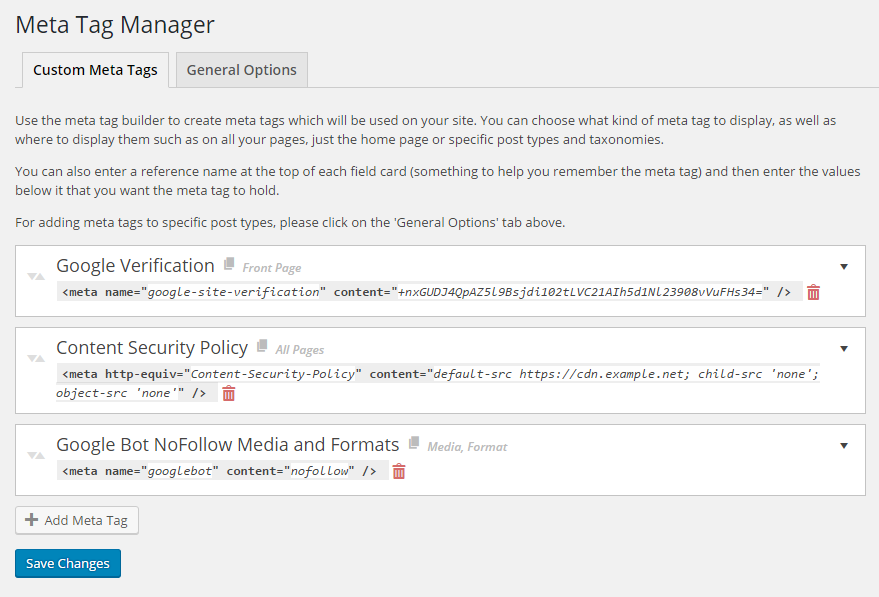
What you get inside
7 screens-
Once the plugin is activated you can add/edit/delete tags from the menu in Settings > Meta Tag Manager
-
You can also choose what post types to manage specific meta tags
-
If enabled you can add meta tags to a specific post in it's own meta box
About this plugin
Meta Tags Manager is a powerful yet simple, lightweight plugin which allows you to add custom meta tags to your site. Features include:
- Supports meta tags including the name, property, http-equiv, charset and itemprop attributes.
- Choose from predefined types, such as ‘name=”keyword”‘ or create your own by typing it in.
- Add meta tags to specific posts, choose what Custom Post Types to support from our settings page.
- Add global meta tags that will display on specific CPTs, Taxonomies, your front page or your whole site.
- Automatically add Open Graph details to your home page.
- Automatically add Schema and Structured Data to your home page.
- Add Google Sitelinks and Sitelinks Search markup.
- Easily add verification codes for services like Facebook, Google Webmaster Tools, Bing Webmaster Tools, Yandex and more (or… create your own custom meta tags!).
Use cases include:
- Adding Google and Yahoo site verification tags
- Adding additional open graph, twitter card or other social media meta info not supported by other SEO/Meta plugins
Go Pro for many newly added features, including:
- Dynamic placeholders to include data about the page being displayed, such as page title, comment count, thumbnail URLs and more!
- Additional contexts to add global meta tags, as well as exclusion rules for finer-grained controls.
- Shortcode support within meta descriptions, allowing for more dynamic data insertion with plugins such as ACF
- Unique tag detaction of Meta Tag Manager tags with hierarchical precedence, avoid creating duplicate meta tags.
- Taxonomy support – create meta tags for individual taxonomy term pages such as a single tag or category.
- More to come! Go Pro now and get an early-bird discount of up to 50%!
Questions
- OK, I’ve installed the plugin, how and where do I start adding meta tags?
You can manage your meta tags in two areas of your WordPress dashboard.
- Within Settings > Meta Tag Manager.
The general settings page is where you can add tags that appear on various areas of your site, such as your front page, archive pages, category/taxonomy pages, etc. Each tag you create can be assigned to a specific are of the site.
- On specific post type pages.
When editing a post, page, or other CPT (such as an event, product, etc.) you can add meta tags that will only be displayed on that item’s page. The Meta Tag Manager will be available as an individual meta box.
- I don’t see the Meta Tag Manager meta box when editing a page on my site
This may be because your editing a CPT and it’s not selected within our settings page for Meta Tag Management. See next question for more information.
- How do I enable/disable Meta Tag Manager for specific Custom Post Types (CPTs)?
By default (since 2.1) all custom post types are enabled, previous versions only had posts/pages enabled. If you install a plugin that introduces a new CPT, that also needs to be added, as it is not added automatically.
You can add or remove this via Settings > Meta Tag Manager > General Options (tab). You’ll see an input box containing a list of already enabled CPTs and you can click the input box to show and select other available CPTs to include, or click the X next to the CPT you wish to remove.
- I’m stuck, or have a suggestion.
Please visit our support forums if you have any questions.
sandywp / also on the shelf
Try another plugin

4.5 · 2M+ installs
ACF helps customize WordPress with powerful, professional and intuitive fields. Proudly powering over 2 million sites, WordPress…

2.1 · 400K+ installs
Reach more customers and drive sales on Facebook, Instagram and WhatsApp with the official Meta for WooCommerce plugin.

2.7 · 400K+ installs
Grow your business with Meta for WordPress!
Spin up a real WordPress site in seconds.
Test plugins, build a demo, hand a client a link — then squash it and start again. No local setup, no Docker.